
What goes in a training program's details?
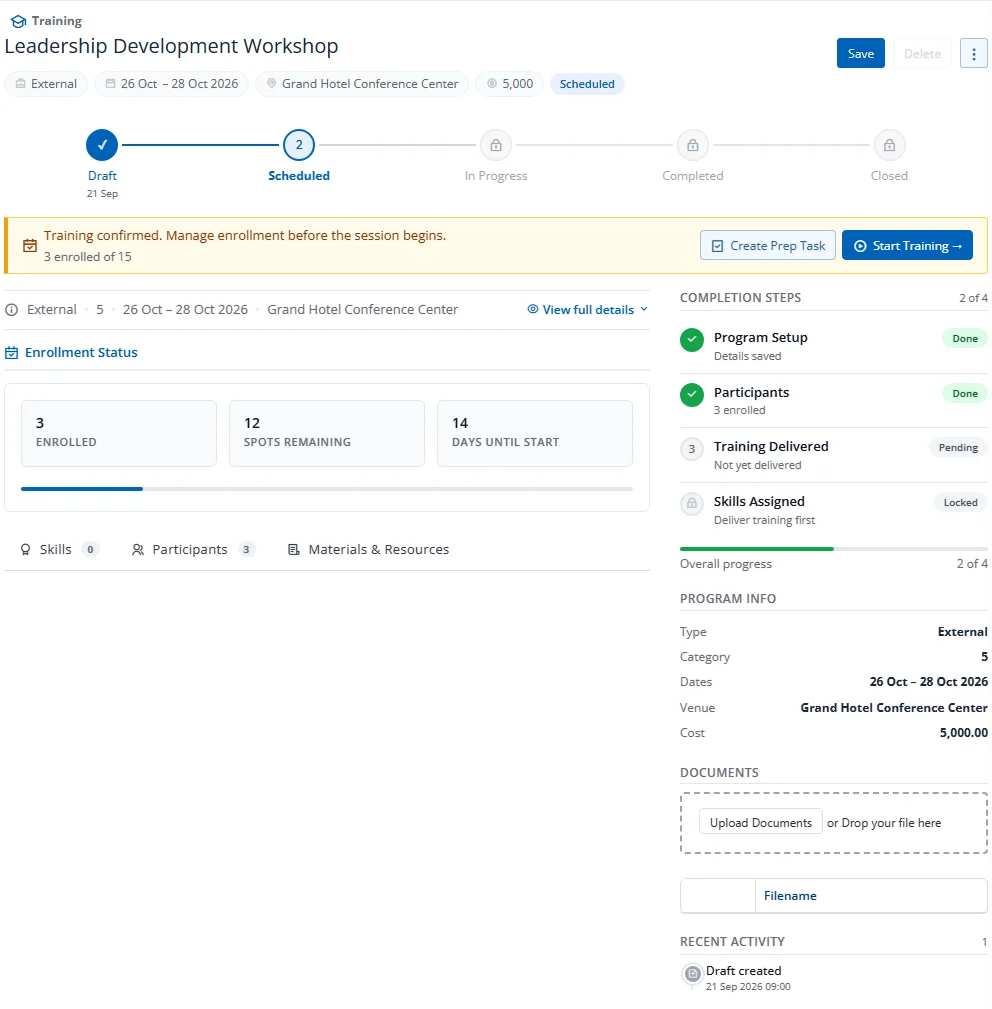
The v2 edit form replaces the previous tab pattern with a single workspace organised as:
- Header bar — page title (
Training › <program>) + action bar (Save, Delete, kebab) - Identity strip — chips for Type, dates, venue, capacity, mandatory flag
- 5-step stepper — Draft → Scheduled → In Progress → Completed → Closed (Cancelled is shown only when applicable)
- CTA strip — amber banner with the next required action (e.g., Schedule Training, Mark Completed, Close & Assign Skills)
- Stage card — current-stage form fields
- Sub-tabs — Skills · Participants · Materials & Resources (and Assessments / Feedback once Completed)
Status Badge
A color-coded badge at the top of the workspace shows the current status: Draft (gray), Scheduled (blue), In Progress (amber), Completed (green), Closed (teal), or Cancelled (red).
Reminder Configuration
Two fields control automated email reminders:
- Reminder Start Days Before — How many days before start date to begin sending reminders
- Reminder Frequency Days — How often to send reminders (e.g., every 3 days)