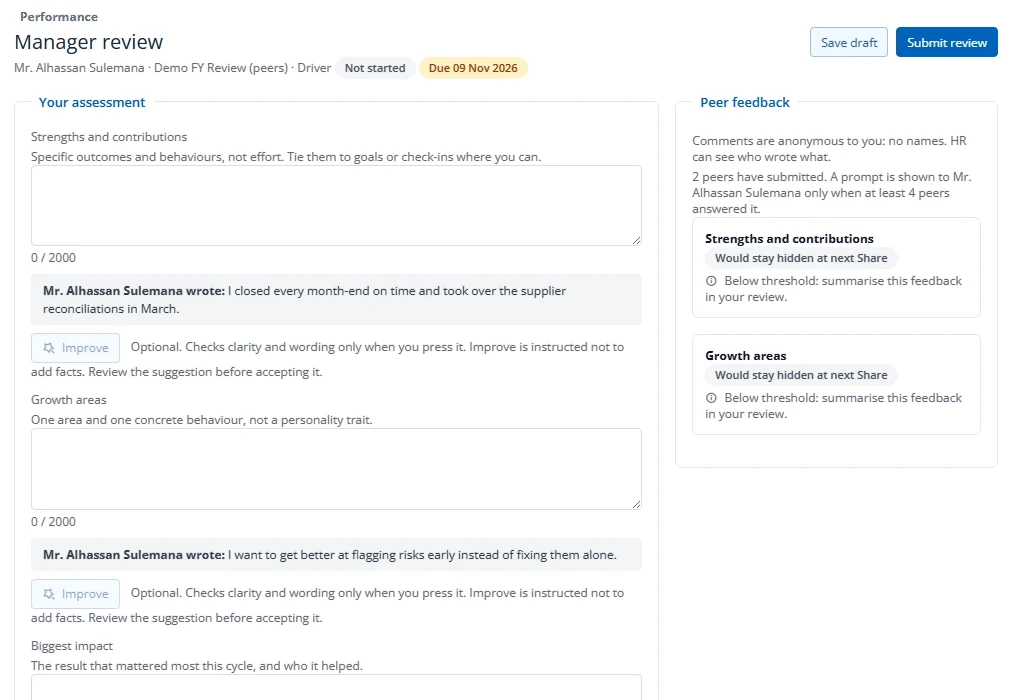
How do I write a manager review?
- On your home, press Write review next to the person.
- Answer each question. The employee's own answer is shown under each question for reference, and any peer comments are summarised on the right.
- Rate each goal, then check the Score and rating: the computed score comes from the goal ratings and the cycle's weights. You can choose a different final rating with a reason.
- Write a Final comment; the employee sees it once you share.
- Press Save draft to continue later, or Submit review when everything required is filled in.
Submit stays disabled until every goal and every rated question has a rating. If the self section carries weight, the self review must also be submitted first. The button's tooltip lists what is missing, for example "2 of 5 goals not rated".
Your draft is private. HR sees your text only after you submit. After the due date the form becomes read-only unless HR extends it or reopens your review.
Improve (only if your company has switched it on) suggests clearer wording for your own text. Nothing changes until you press Use suggestion and save.