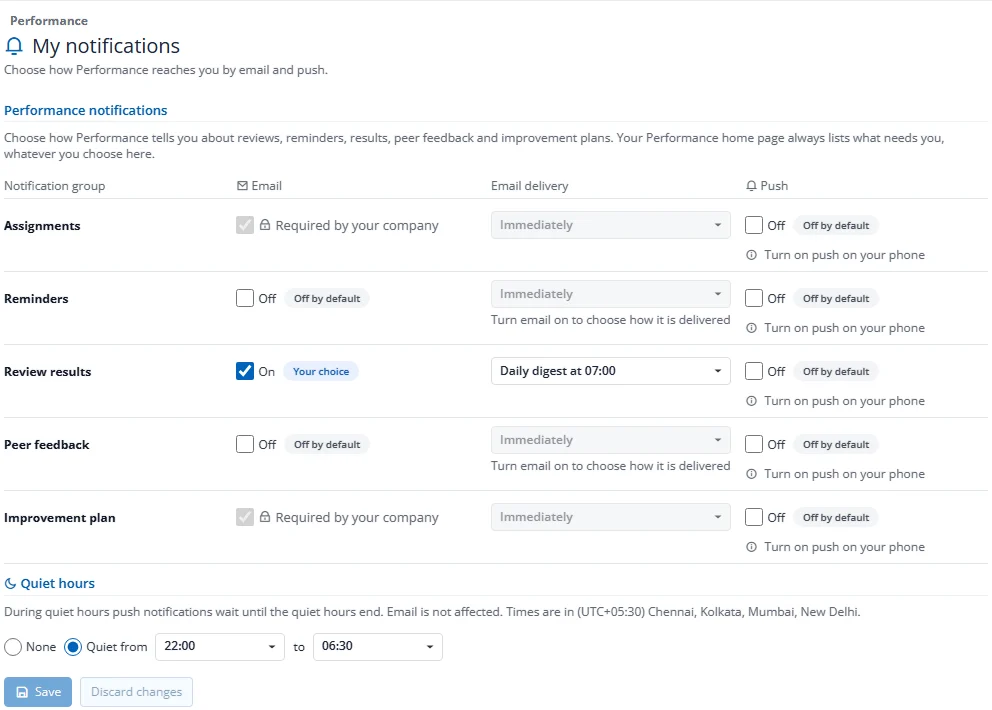
How do I change my performance notification settings?
- On your Performance home, press Notification settings.
- For each group, switch Email and Push on or off, and choose how e-mail arrives: Immediately, Daily digest (07:00) or Weekly digest (Monday 07:00).
- Optionally set Quiet hours: push alerts that arrive in that window wait until it ends.
- Press Save.
Settings marked Required by your company cannot be switched off. Company default means you follow what HR set; Your choice means you changed it. A phone alert always reads "You have something waiting in Factura" and never says who or what. Your home always lists everything waiting for you, whatever you choose here.
Email for Assignments and for Improvement plans is always on and cannot be turned off, because those groups include required emails such as cycle launch and plan start. This also covers other emails in those groups, such as peer assignments and calibration invitations.
Digest and quiet-hours times follow the Factura server's clock, shown on the page as "Times are in …". They do not adjust to each person's own time zone.