
Payslips, PAYE, SSNIT and the bank file — from a single run you sign off.
Factura HRMS keeps employee records, leave, attendance and payroll in one place, one file per employee. GRA PAYE, SSNIT and Tier 2 & 3 are computed per employee, per run, and the payslips, bank file and statutory schedules all come from that run.
The people who run Ghanaian payrolls on Factura every month are the ones specifying it. The friction they hit is what gets built next.


What it looks like on the screen
Screens from a demo company. Every figure is computed by the engine; nothing here is a drawing.
A pay run you can check before you commit it
Process one employee, a group or the whole company. Review the register, fix what is flagged, then close the run and the payslips, bank file and statutory schedules follow from it.
- Prepare joiners, leavers, unpaid days, overtime and loan movements — most of it already on the employee record
- Review the register, with anything unusual flagged and the reason beside it
- Close the run: it locks per employee against recalculation, with every input change on the audit trail
- Process: send payslips by email and to self-service, and produce the bank transfer file
- Statutory files from the same run — nothing re-keyed into separate returns
- Single, group and mid-month runs
- Formula-based allowances & deductions
- Loans and expense claims on the payslip
- Payroll cost and variance analytics
- Coded journal export for your accounts
The schedules come from the run that paid them
GRA PAYE bands and reliefs, SSNIT Tier 1, and Tier 2 & 3 schemes are computed per employee, per run. The return-ready schedules and the bank transfer file are produced from the same closed run, and the checks that would block a return are surfaced before you get there.
- GRA PAYE bands and reliefs
- SSNIT Tier 1 · Tier 2 & 3 schemes, per-employee opt-ins
- Bank transfer files — thirteen layouts across nine Ghanaian banks
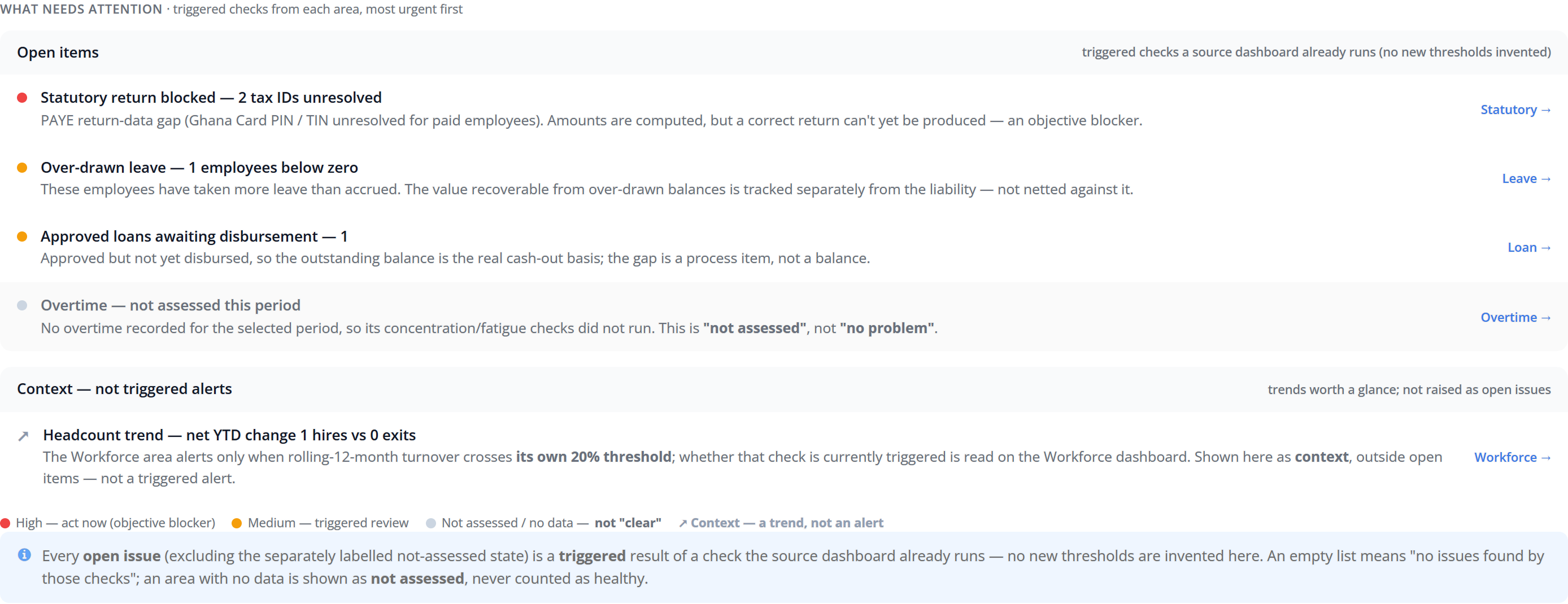
- Return blockers — missing TINs, unresolved IDs — flagged before you file
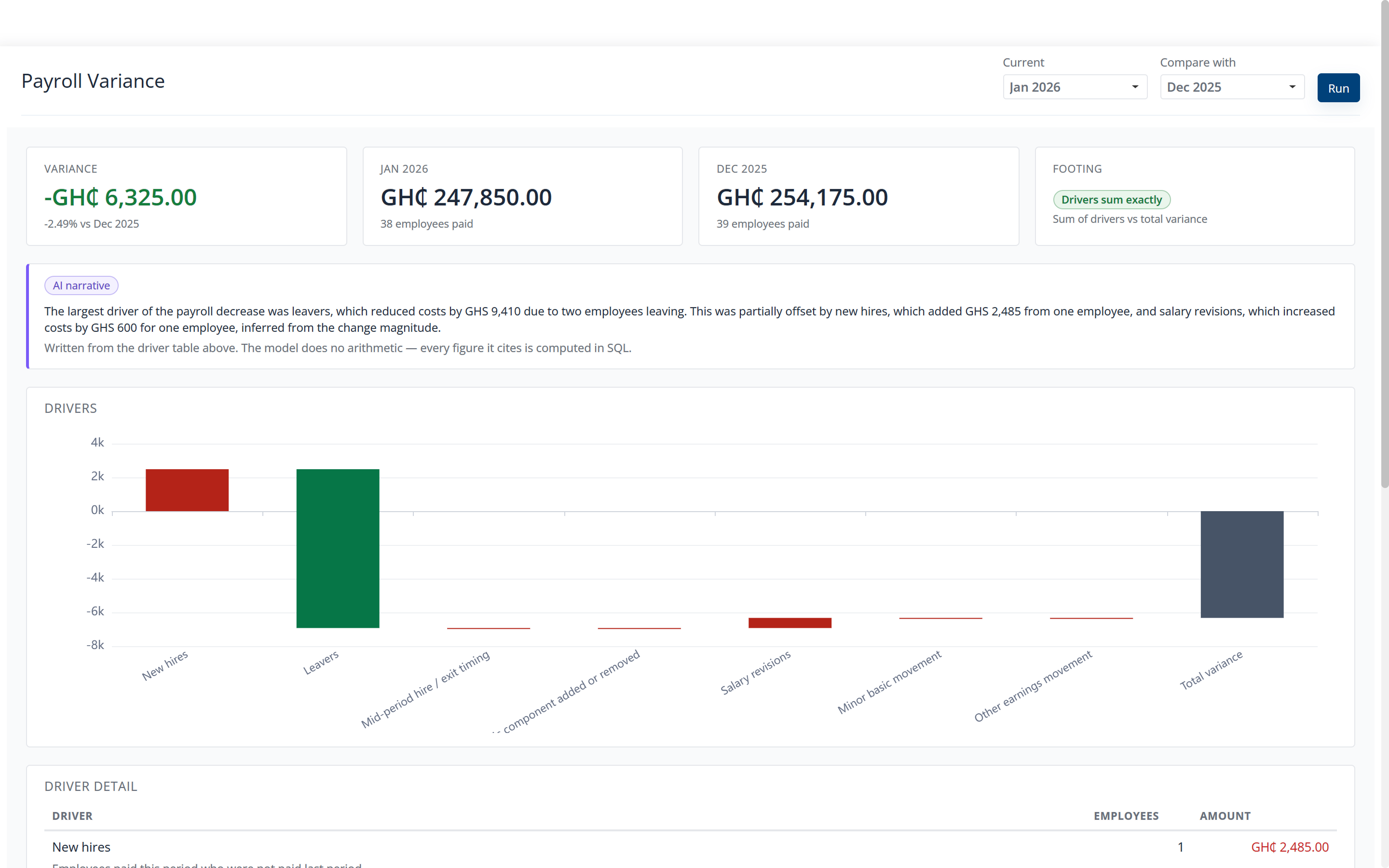
It explains the numbers and never decides.
Built into Factura HRMS, the assistant reads what the engine produced and puts it in plain language. It does not produce the numbers itself. Six places it works today:
- Variance narrative: what moved between two periods, and why
- Anomaly detection on the pay run, before you close
- Formula Copilot: generate, explain or debug a pay-component formula
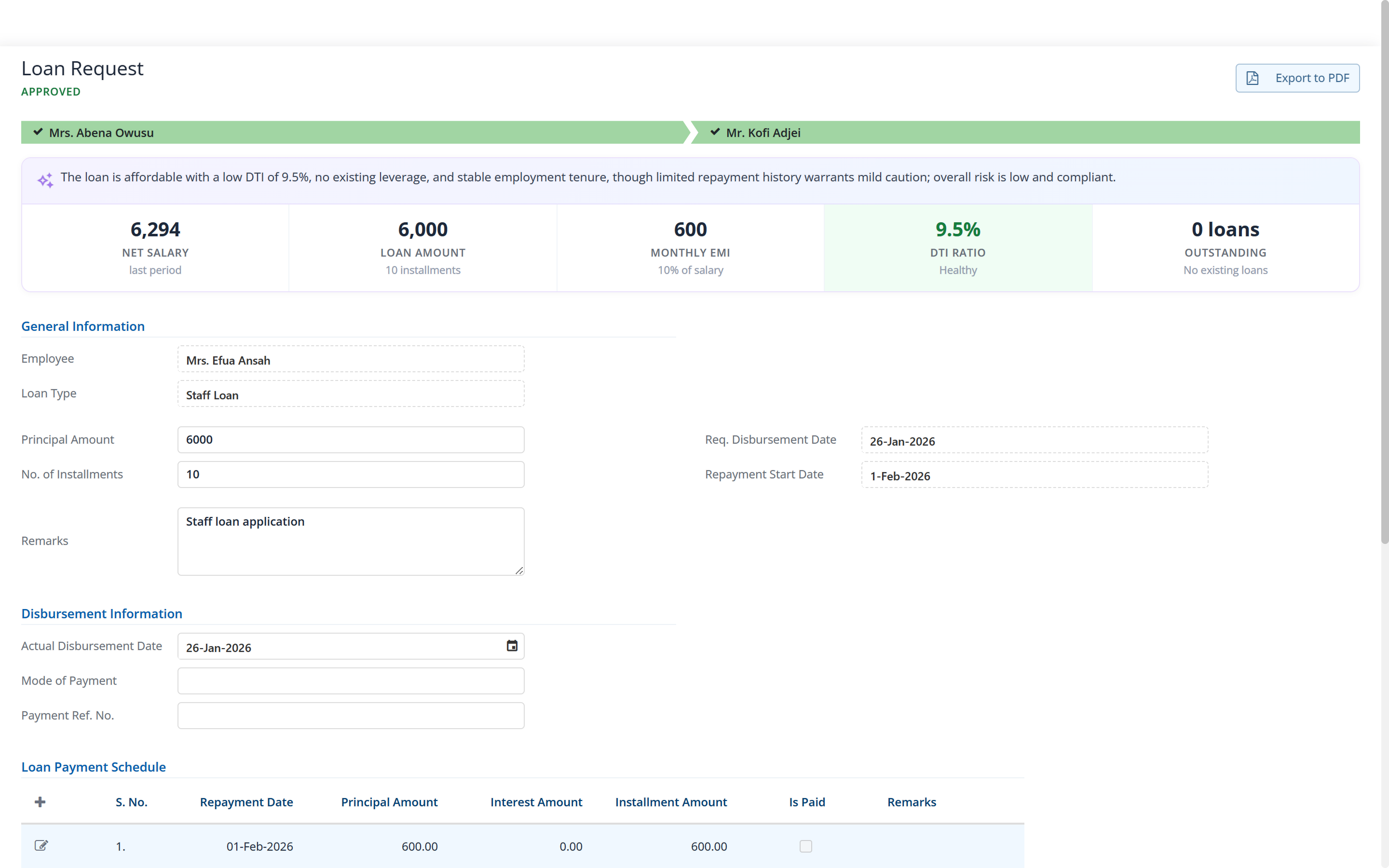
- Approval context: balances, affordability and anomalies beside a leave, loan or expense request
- Payslip explainer: staff see why their take-home changed
- Exceptions explained, not just flagged
Approvals with the context in front of the approver
Leave, loan and expense requests move through approval chains you configure, one level or several, per company. Each request arrives with the facts an approver needs: the balance, the affordability, the things that look unusual — and whatever the requester attached.
- Multi-level approval chains, per company
- Leave, loan and expense requests
- Each request shows the balance, whether a loan is affordable, and anything unusual
- Attachments carried to the approver
- Approved items reach the pay run without re-keying
One record per person, and a portal to read it
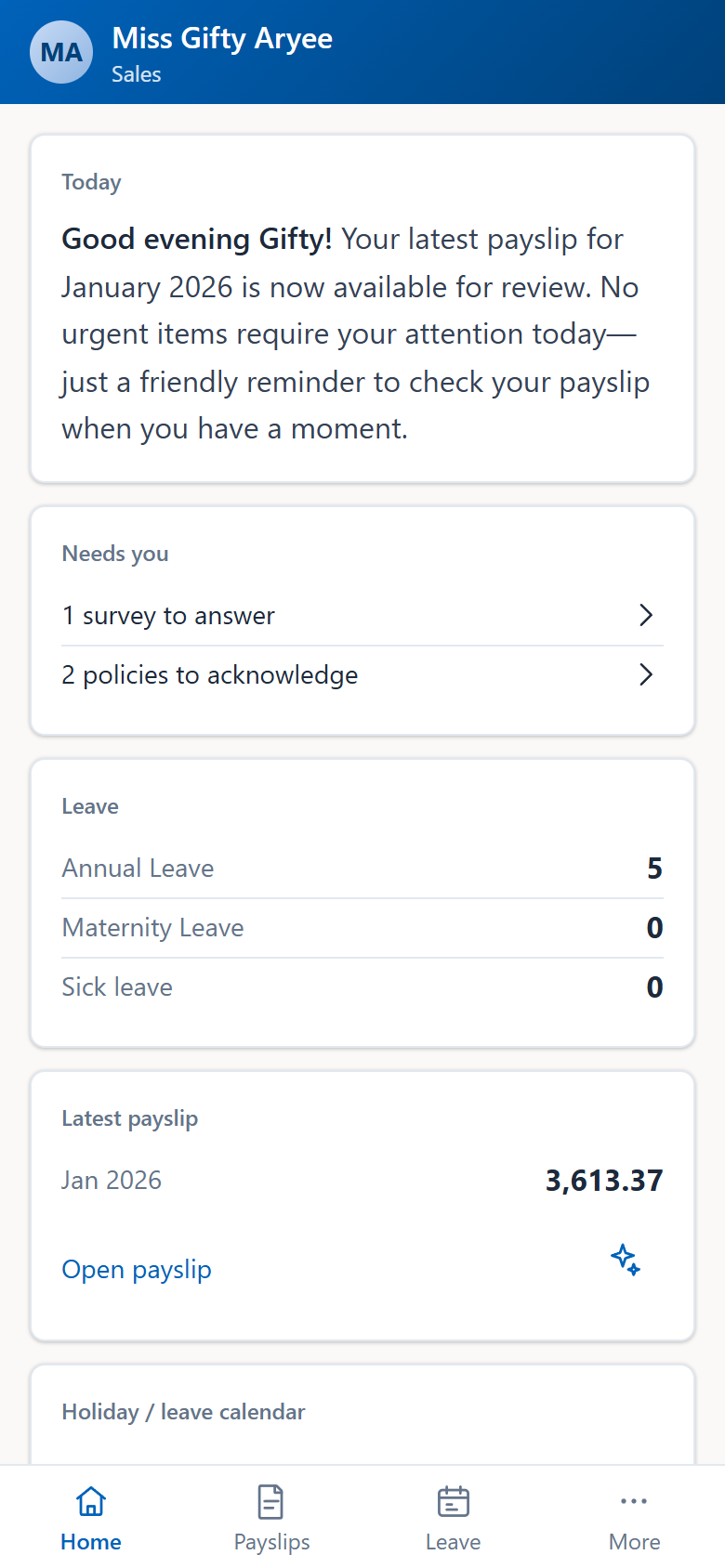
One file per person, carried through to separation, with documents, pay structure and approvals attached. Entitlements accrue to your policy; balances, over-drawn employees and the estimated liability are visible for any period. Unpaid days and overtime reach the pay run without anyone re-typing them.
- Employee records & documents
- Leave entitlement and accrual, liability per period
- Attendance and overtime
- Work schedule assignment per site
- Self-service on desktop and phone: payslips, balances, requests, push notifications
The processes around the job, with a record
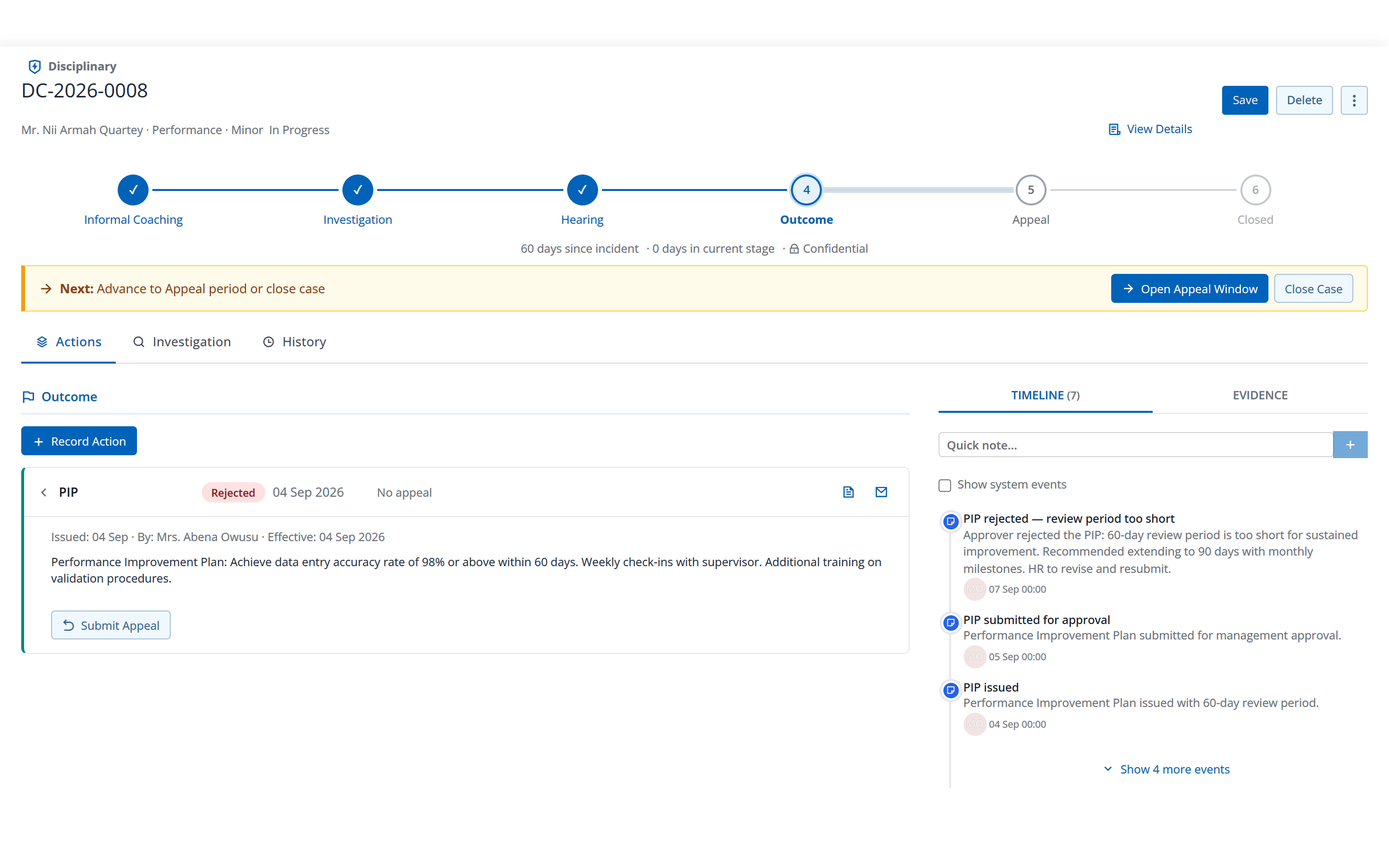
The things that usually live in email and a shared drive, each with an owner, a state and an audit trail.
- Task management
- Disciplinary cases
- Separation and clearance
- Employee documents
- Training records
- Policy acknowledgement
- Employee surveys
Because payroll is the most sensitive data you hold
Every change to an employee record, pay structure, approval and policy is kept — who changed it, when, and what it was before. Sign-in is two-factor, optional or mandatory per company. Each company’s data is isolated, so an outside auditor or a labour inspector can trace a figure without seeing anyone else’s.
- Two-factor sign-in, optional or mandatory
- Audit trail on records, pay structure, approvals and policy
- Company isolation on every query
- Hosted by us or on your own servers, your choice
- The assistant switched off on request
Ghana payroll calculations and reporting
Not a template you maintain. The rules are applied per employee, per run, and updated when the law changes.
| Statutory item | What Factura HRMS does with it |
|---|---|
| GRA PAYE | Seven graduated bands, 0 % to 35 %, applied to chargeable income — taxable earnings less the employee’s SSNIT share and their approved reliefs, never gross pay. PAYE guide |
| SSNIT Tier 1 | 5.5 % from the employee and 13 % from you, both on basic salary. Of that 18.5 %, 13.5 % goes to SSNIT as Tier 1. SSNIT guide |
| Tier 2 | The remaining 5 % goes to a licensed trustee, not to SSNIT. Computed as the balance after Tier 1, so the two cannot drift apart or double-count. Tier 2 & 3 guide |
| Tier 3 | Voluntary schemes, several per company, joined per employee with their own start and end dates. Employee contributions attract tax relief in the same run. Tier 2 & 3 guide |
| Overtime and bonus | Qualifying overtime is taxed at 5 %, then 10 %, outside the bands; qualifying bonus at a concessionary rate up to a threshold, with the excess taxed through the bands. PAYE guide |
| Public holidays | Named calendars, one per site if your sites do not close on the same days. A holiday inside a leave range need not come off the balance — that is a setting on the absence code. 2026 holidays |
| Bank transfer files | Thirteen layouts across nine Ghanaian banks — Zenith, Ecobank, GT Bank, Access, ADB, UBA, Standard Chartered, Bank of Africa and First Atlantic — produced from the closed run, ready to upload without reformatting. |
| Ghana | UAE | Bahrain | Bangladesh | |
|---|---|---|---|---|
| HR records, leave, attendance, self-service |
Yes | Yes | Yes | Yes |
| Payroll statutory | Yes | — | — | — |
Only the statutory layer is country-bound. HR runs wherever you operate. Not on the list for payroll? Ask us — most country packs exist because a customer asked.
What is the PAYE on that salary?
Type a monthly basic salary and see the tax band by band. No signup.
Opens the full calculator with your figure, where you can add allowances and reliefs. For SSNIT and the tiers, see the SSNIT guide.
Payroll, self-service, people operations, performance and recruitment
Five areas, each with a page of its own. This is what sits inside them.
Payroll
Everything that has to be right before money leaves your account, and every schedule and file that follows once it has.
- One employee, a group or the whole company
- Mid-month runs alongside the monthly one
- Allowances, deductions and statutory as formulas you can read
- Loans and expense claims carried onto the payslip
- Closing locks each employee’s calculation against recalculation
- Payslips by email, by WhatsApp and to self-service
- Bank transfer files, thirteen layouts across nine banks
- GRA and SSNIT schedules from the same closed run
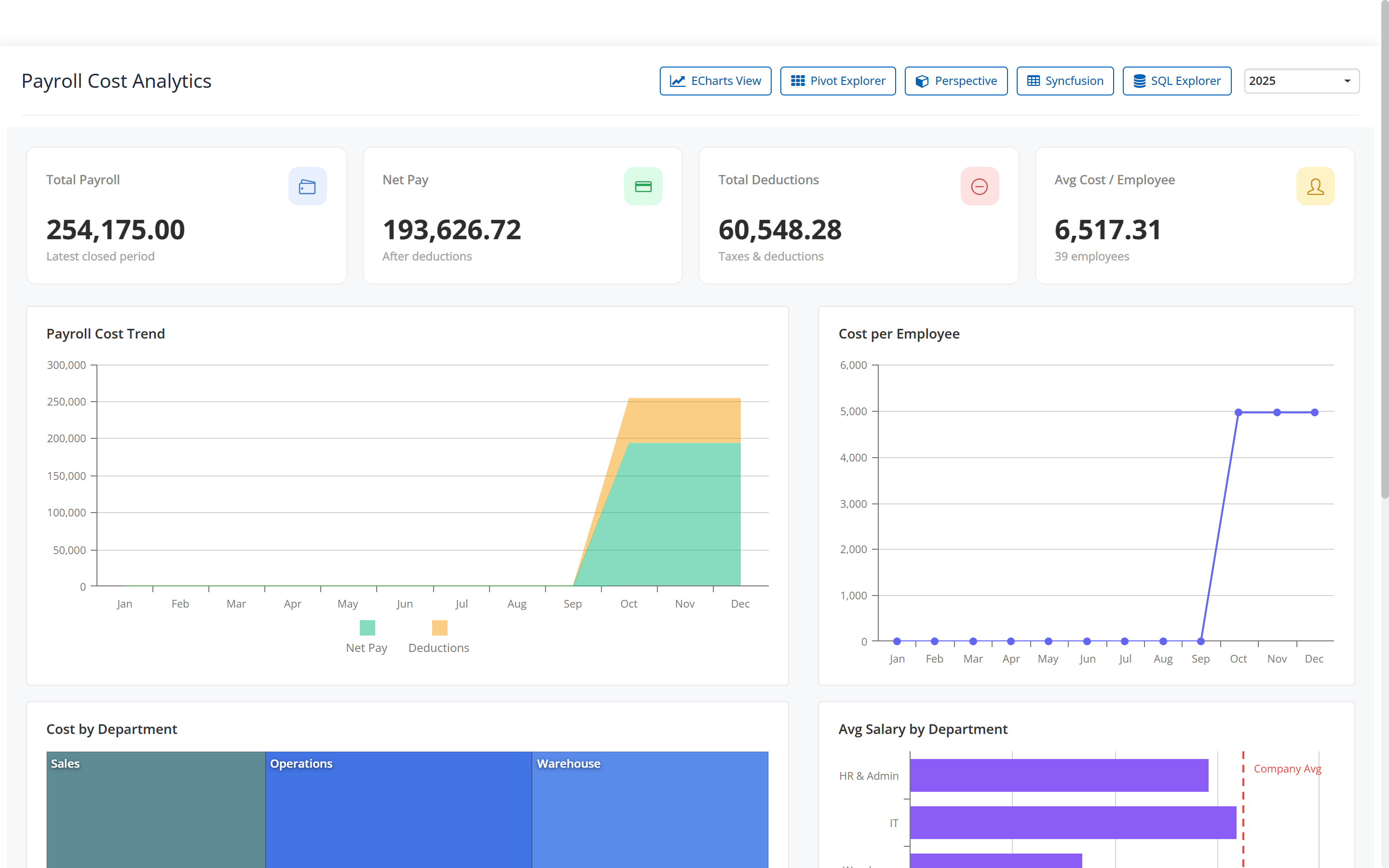
- Payroll cost and variance, with the drivers behind the movement
- A coded journal for your accounts
Self-service
The questions your HR desk answers twice a week, answered by the employee on their own phone instead.
- Read and download payslips, with an explanation of what changed
- Apply for leave and see the balance calendar
- Apply for a loan and follow where it has reached
- File a multi-line expense claim
- Read and acknowledge policies; answer surveys
- See their own documents and upload renewals for HR to verify
- A phone app installed from the browser, no store download
- Push notifications, verified on a real device, at no cost per message
- The desktop portal for people already at a desk
- An approvals inbox for managers: leave, expenses, loans, separation and data changes
People operations
The processes that usually live in email and a shared drive, given a state, a due date and a dated record of who did what.
- Tasks, including recurring ones
- Disciplinary cases: stage, next step, improvement plan, timeline
- Separation and clearance
- Employee documents: typed and versioned, with expiry reminders and a compliance matrix
- Training records, requests and assessments
- Policy acknowledgement, file-backed
- Employee surveys
- One layout and one approval model, so a new process is configured
- Attachments carried through to the approver
- The same permissions and audit trail as payroll
- Training, policies and surveys reach the phone as well as the desk
Performance
New, available now. Review cycles carried from launch to lock, with goals, peer comments, probation outcomes and calibration around them, switched on per company.
- Self and manager reviews, shared and acknowledged
- Goals and check-ins: simple, key results or measured targets
- Peer feedback, shown to the employee without names
- Probation reviews with a recorded outcome and a printable form
- Calibration and the merit matrix
- Improvement plans from a disciplinary case
- Proposed increases come out as a spreadsheet; nothing is written to payroll
- Peer comments carry no rating and no weight in the score
- Extending probation does not change the employee record
- Reviews, goals and plans reach the phone; calibration and HR work stay on the desktop
Recruitment
New, available now. A job taken from a published posting to a new employee record, with a pipeline, interview evaluations and offers the candidate answers online — switched on per company.
- Jobs with a public careers page and a rotatable link
- A fixed pipeline board, with bulk reject and reopen
- Hiring managers see their own jobs and evaluate blind
- Offers from templates, accepted online or recorded offline with evidence
- A handoff that creates the employee through the normal path
- Nothing is ranked, scored or rejected automatically
- Email to candidates is not delivered yet
- No CV upload yet
- No recruitment reports yet
The platform underneath
The same five things sit under every module above, which is why adding a process is configuration rather than another system for your team to learn.
Approval chains you configure — a named approver, a designation, the person someone reports to, or a department manager — at a single level or several, per request type, per company.
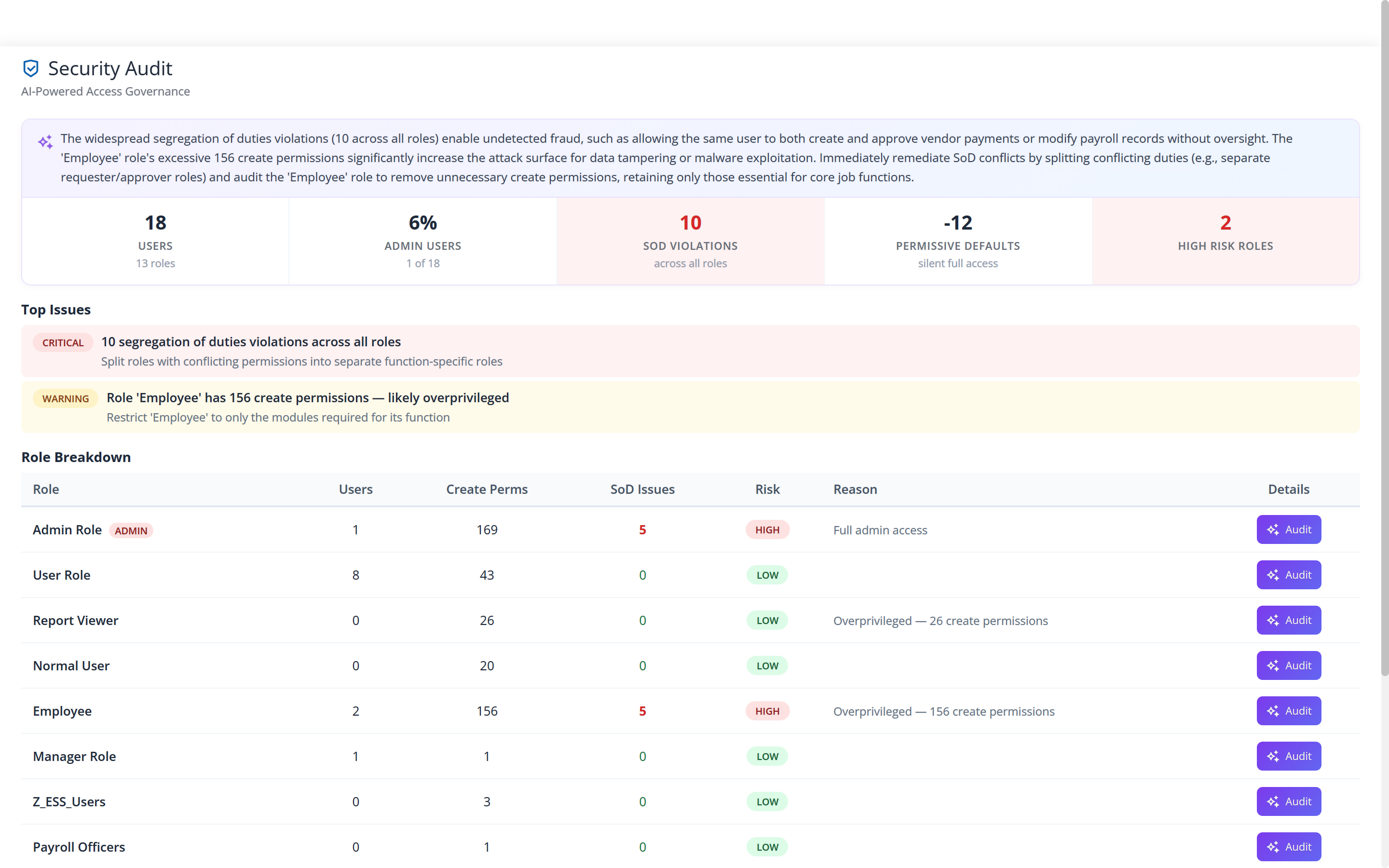
Roles and rights per user, with a security audit screen that lists who holds which rights, where duties are not separated, and which roles carry the most risk.
Every change that is saved is kept — who changed it, when, and what it was before — and it is available through the API. There is no record-level viewer in the product today; if you need the history of one field, we produce it for you.
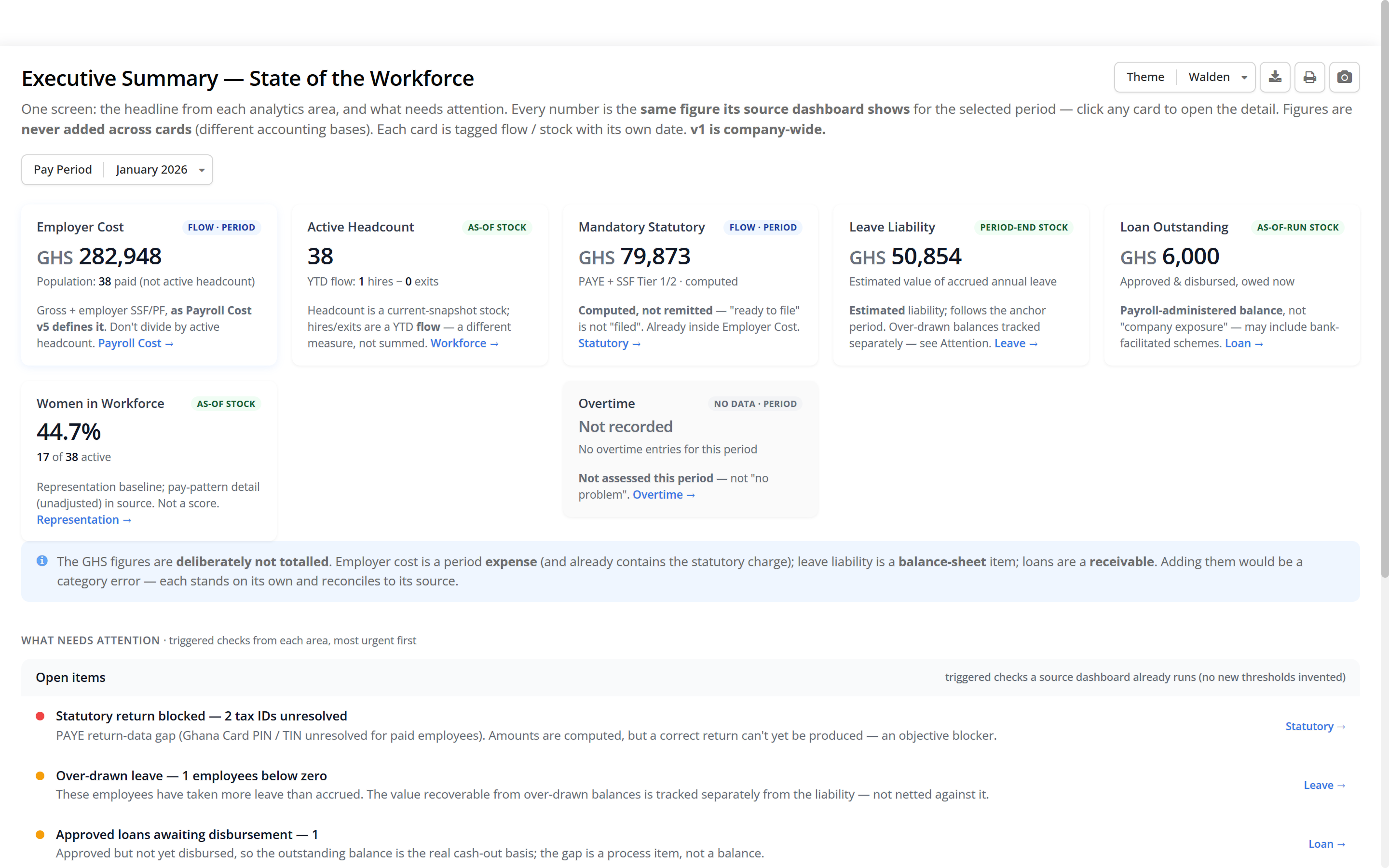
Executive summary, payroll cost, variance, leave balance and liability, workforce, diversity and statutory reconciliation — each reading the run the engine computed, not a second copy of it.
A desktop portal and a phone app over the same employee records, so people read their own payslip and balance instead of asking someone to look it up.
The screens for three of these are in the explorer above: the approval context, the security audit, and the executive summary at the top of this page.
Configured to your rules, not the other way round
Payroll differs by company, site and law. Factura HRMS absorbs that difference in configuration, so a change in your rules, or Ghana’s, is a change to a formula, not a wait for a release.
- Formula-based pay components.
- Allowances, deductions and statutory are formulas per company. When the PAYE bands change, the formula changes, and the copilot can explain or debug it.
- Approval chains you define.
- One level or several, per request type, per company.
- Work schedules per site.
- Shifts and hours assigned where people actually work; overtime and unpaid days follow into the run.
- Built on shared foundations.
- Policy, surveys, training and tasks share one layout and one approval model, so a new process is configured, not built — and not a new system for your team to learn.
- Several companies, one system.
- Separate payrolls and records per company, isolated from each other, for groups that run more than one.
Works with
File formats rather than a wall of logos we cannot licence: what Factura HRMS reads on the way in, and what it writes on the way out.
Nine banks, thirteen layouts: several of the banks carry more than one, because the file an ACH transfer wants is not the file an own-bank transfer wants. The GRA and SSNIT outputs are return-ready schedules produced from the closed run: filing the return and remitting the money stay with you, on the GRA’s and SSNIT’s own channels.
A planned move to Factura HRMS
Three steps, in the same order every time. Nothing switches until the numbers agree.
- Bring your dataEmployees, salary structures, balances and bank details import from Excel — your existing spreadsheet is the normal starting point. We do the mapping with you.
- Set your rulesAllowances, deductions, leave policy and approval chains configured to how your company actually works.
- Check it, then switchWe reconcile your first run against figures you already trust. Where you want the extra assurance, we can run a month in parallel before you switch.
Everything included
Every module in Factura HRMS, in one list.
Human Resources
Employee Records
One file per person, with documents, pay structure and approvals attached.
Employment History
Employment history recorded on the employee file, over time.
Education
Education and qualifications recorded on the employee file.
Property Issued
Company property issued to an employee, recorded on their file.
Job / Position / Skills
Job, position and skills recorded on the employee file.
Dependants
Dependants recorded on the employee file.
Leave Administration
Entitlement and accrual, with balances and liability visible for any period.
Disciplinary & Grievance
Disciplinary and grievance cases: stage, next step, improvement plan and a dated timeline.
Training Records
Training records, requests and assessments, with skills assigned on completion.
Separation & Clearance
Separation carried through with the rest of the employee record.
Employee Documents
ID cards, permits, contracts and certificates by type and version, with expiry reminders, HR verification and a compliance matrix.
Policy Acknowledgement
Policies published and acknowledged, file-backed.
Employee Surveys
Confidential and tracked, with response rates reported back.
Performance & Appraisal
New: review cycles, goals and check-ins, peer feedback, probation, calibration and improvement plans.
Recruitment
New: jobs, a careers page, a pipeline board, interview evaluations, offers accepted online and a handoff to the employee record.
Task Management
Tasks assigned to employees and tracked through to completion.
Payroll
Payroll Dashboard
Employer cost, headcount, statutory and what needs attention, for one pay period.
Formula-Based Allowances & Deductions
Pay components as formulas per company, not a hard-coded rate table.
Loans
Requested, approved with affordability shown, and carried onto the payslip.
Attendance
Attendance and overtime, reaching the pay run without re-typing.
Overtime & Work Scheduling
Shifts and hours assigned per site, feeding overtime and unpaid days.
Single & Group Payroll Processing
One employee, a group, the whole company, or a mid-month run.
Emailing Payslips
Payslips sent by email, by WhatsApp and to self-service from the same closed run.
Payroll Analytics & Reports
Cost, variance, leave liability, workforce, diversity and statutory reconciliation.
GL / Journal Export
A coded journal for your accounts, ready to import into Factura Financials.
Security & Audit Trail
Two-factor sign-in and a change record on every record that is saved.
Employee Self-Service
Payslips, balances and requests, from a desktop portal or a phone.
Workflow & Approvals
Leave, loan and expense requests routed through the chain you configure.
From the people running it
With a factory floor this size, payroll by hand was not possible. Attendance comes in, the run is processed for everyone, and the payslips and the bank file are ready the same day.
I am finding more and more use for Factura every day. I am amazed at how powerful the application can be and I have no hesitation in recommending it to others that are looking for the right software for their business.
We pay ministers and staff across the connexion, each on their own terms. Factura holds each person’s pay structure, so the monthly run is a review and not a recalculation, and the statutory schedules come out of it.
Our clinical staff work shifts across two branches. Leave is requested and approved on the phone; the balances are always right, and payroll picks it all up without me re-entering anything.
We have stations in many places and staff at every location. Payroll is a single run for the whole company, and each station’s people still get their payslips on their phones the same day.
Leave, loans and expense claims go through approvals in the system now. The manager sees the balance and the history before approving, and I am no longer chasing signatures.
We have a large factory workforce. Overtime and attendance feed into the pay run, so I am not retyping hours at month-end.
Our people are often on site. They request leave and see their payslips from their phones, and I am not handling paper from different locations.
Before you ask us
Which bank transfer formats do you produce?
Thirteen layouts across nine Ghanaian banks: Zenith, Ecobank, GT Bank, Access, ADB, UBA, Standard Chartered, Bank of Africa and First Atlantic. Several banks carry more than one layout: GT Bank has an ACH file and two bitwise variants, Access and UBA each have an own-bank and an other-banks version. The file is produced from the closed run, so what is in it is what is on the payslips.
Does it produce the GRA PAYE return?
It produces the schedule the return is built from. The Income Tax report is the per-employee register: gross, taxable components, SSNIT, reliefs applied, chargeable income and PAYE deducted, with company totals. It carries an Export GRA Report action, with an annual equivalent for the year. Submitting the return and remitting the money happen on the GRA’s own channel: Factura HRMS does not file on your behalf and does not move money.
What do we send SSNIT?
The SSF 1st Tier schedule: one line per employee with the social security number, employee code, name, designation, basic pay for the period and the Tier 1 contribution. SSF 2nd Tier is the same shape for the trustee holding the Tier 2 scheme, and each Tier 3 scheme has its own schedule. Employees with a missing social security number are flagged before you close, not after you have filed.
What happens at year-end?
Nothing separate. Periods roll monthly — run, close, open the next one — and there is no year-end procedure to schedule or to get wrong. Annual figures come from a report over a range of periods, and when the PAYE bands change it is the pay-component formula that changes, not a release you wait for.
Who owns the data, and can we get it out?
The data is yours and it sits in your own database. Any report you can run, you can export, and the payroll journal exports as a file. There is no one-button archive of everything — if you need a full extract for a handover or an auditor, ask us and we will tell you what we can produce rather than point at a button that does not exist.
Is our payroll in a database of its own?
Yes. One database per client, not a shared table with a company column doing the separating — and every query is filtered by company on top of that. It is also why a restore, an upgrade or a migration concerns your data alone.
Is two-factor sign-in optional or compulsory?
Whichever you decide, set per company. It can be off, available to users who want it, or required of everyone. Trusted devices, recovery codes and passkeys are part of it.
Where does it run?
Hosted by us, or on your own servers where your policy needs the data to stay in your building. The application is the same either way.
How long before we are live?
It depends on the state of your data, so we will not quote a number before we have seen it. The sequence is the same every time: import, configure, reconcile the first run, then switch — with a month in parallel where you want the extra assurance.
What about recruitment and performance appraisal?
Both are new and available now, each as a module of its own and switched on per company. Performance covers review cycles, goals and check-ins, peer feedback, probation reviews, calibration and improvement plans. Recruitment covers jobs, a careers page, a pipeline, interview evaluations, offers accepted online and a handoff to the employee record. Recruitment does not email candidates yet and has no CV upload, and its page says so.
Does payroll post into our accounts?
It exports a coded journal — salaries, statutory liabilities and cost-centre splits — as a file your accounting system imports. If you also run Factura Financials, that file imports straight in. They are two separate applications, each with its own login.
What does the AI see, and can we turn it off?
It reads what the engine has already computed and writes an explanation; it never approves, pays or files anything. What it is sent, and the off switch, are set out under Factura Intelligence above.
How do we pay for it?
We quote in a short call after the demo.
See a real pay run, end to end
Thirty minutes. We walk a full month — prepare, review, close — and produce the statutory files, and you can stop us anywhere.