
Every asset, with what it cost and what it is worth now.
A register that holds cost, in-service date, residual value and useful life per asset, depreciates them on a method you set per category, and posts every charge, addition and disposal into the same ledger as the rest of the books.
The register holds the asset; the category holds the rules
An asset carries its own facts, what you paid, when it went into service, what it will be worth at the end and how long it should last. The depreciation method, the rate and the ledgers it posts to belong to the asset category above it, so a hundred laptops are set up once.
What it does
- Per asset: a code that is the asset’s identity, cost, purchase, capitalisation and in-service dates, residual value, useful life in months, supplier, and a location down to building, room, rack and bay.
- The detail an insurer or an auditor asks for: serial number, model, brand, barcode, insurer, policy number, insured value and expiry, warranty, last service and next maintenance date.
- Components under a parent asset, so an engine replacement sits under the vehicle rather than beside it.
- Per category: the depreciation method, both rates, and the seven ledgers the category posts to — asset cost, accumulated depreciation, depreciation expense, gain or loss on sale, scrap, revaluation reserve and reserve release.
- Excel import for the register itself — 59 columns, so an existing spreadsheet comes across with its dates, lives, residuals, locations, insurance and vehicle details rather than names and amounts alone.
Where the boundary is. Opening cost and opening accumulated depreciation can be typed onto the asset, or brought in as an opening-balance voucher, one or the other, never both, or the asset is counted twice. Typing them on the master does not touch the ledger; the voucher does. Set the categories up before you load the sheet, because every asset points at one, and an asset whose category has no fixed-asset ledger cannot be posted at all.
Three methods, prorated by day
Depreciation is computed by one formula shared by the schedule report, the depreciation run and the disposal, so the three cannot disagree about the same asset.
- Straight line.
- Cost less residual value, spread over the asset’s useful life in months — or over the category’s rate where no life is set. A life typed on the asset wins over the category rate, which is how one long-lived machine sits inside a category without a category of its own.
- Diminishing value.
- The category rate applied to the written-down value at the start of the period, so the charge falls each year. Residual value is not deducted first on this method.
- None.
- A category that should not depreciate — land, or assets held at valuation — is set to charge nothing, and stays in the register with everything else.
- Prorated by day count, not by month.
- An asset bought mid-period is charged from its in-service date, counting actual days against the days in that financial year.
- Capped at what is left.
- The charge is limited to cost less residual less what has already been written off, so an asset cannot depreciate past its residual value however often the run is used.
The run
Depreciation is posted for a date range you choose: a month, a quarter, a catch-up window, or the whole financial year, which is what it offers by default. It charges the difference between what the register says is due and what has already been posted, so a manual charge entered earlier is topped up rather than doubled, and running it twice over the same window posts nothing the second time. Assets are grouped by their depreciation expense ledger, and each group becomes one voucher dated at the end of the range.
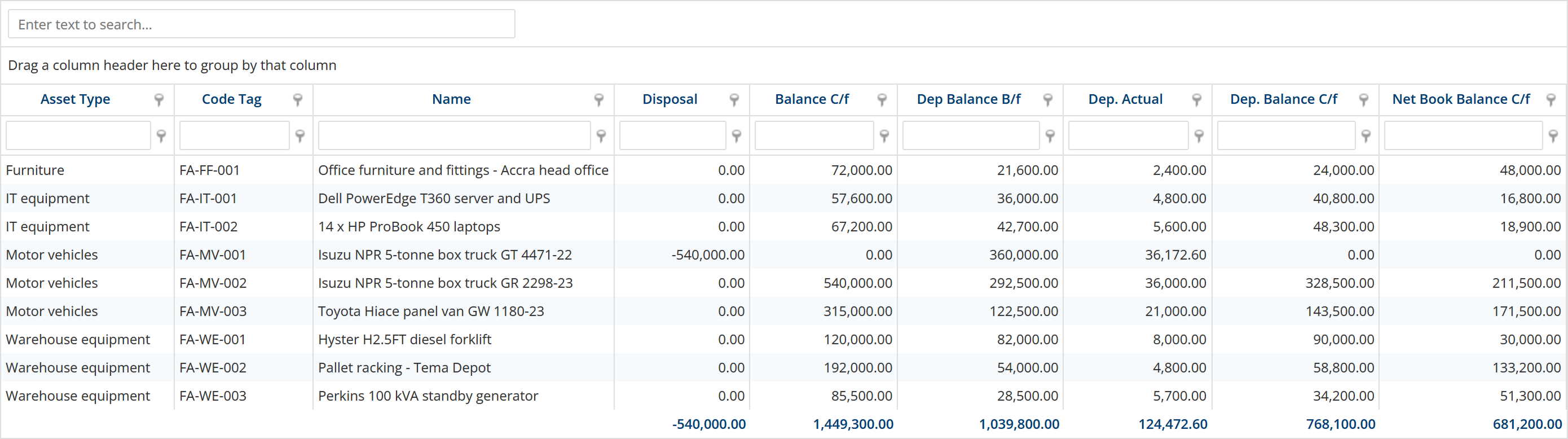
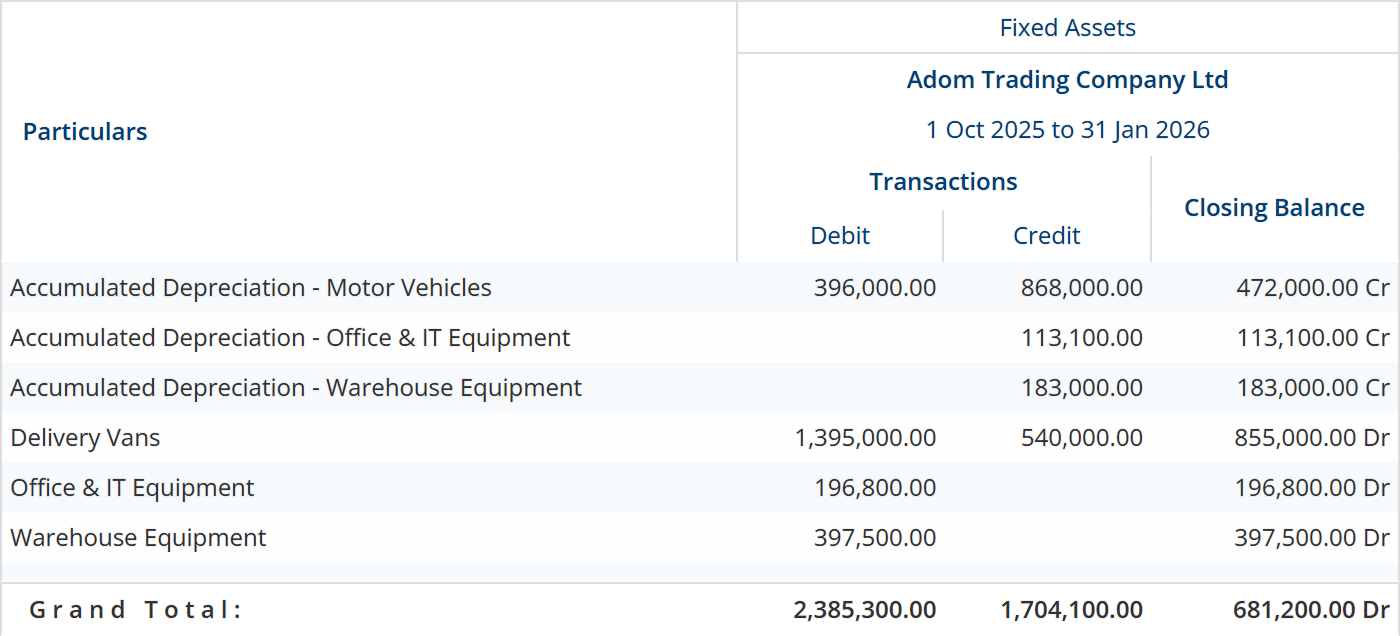
The demo book on this page holds nine assets in four categories, charging 31,075.00 a month. Four runs cover the period to the end of January, and the disposal adds a further 172.60, so depreciation for the period is 124,472.60.
What you spend later, and what you revalue
Money spent on an asset after it is in service is either an expense or part of the asset, and the workbench asks you which: record the repair as a journal, or capitalise it as an addition that raises the cost the register depreciates from. The demo book’s racking extension went on as a 48,000.00 addition in November.
Revaluation is two vouchers, a gain and a loss. Where the category names a revaluation reserve, they follow the reserve rules rather than running through profit: an increase is credited to the reserve, a decrease is absorbed against whatever reserve that asset has built up and only the excess reaches profit, and on disposal the reserve still standing is released inside equity rather than through the gain on sale. Where no reserve ledger is named, both vouchers are a straight two-leg move against the asset and the gain-or-loss ledger.
Selling one, and what the sale is actually worth
A disposal is dated on the day of the sale and carries the proceeds, the reason and, where it applies, output VAT. The cost and the accumulated depreciation come out of the register, the money goes to the account that received it, and what is left over is the gain or the loss.
- The carrying value comes outCost is removed from the asset ledger and the accumulated depreciation against it is removed too, so the asset leaves the register at what it was actually carried at.
- Depreciation to the day of sale is charged firstThe disposal also books the depreciation running from the start of the financial year to the sale date, net of anything already posted for that asset. It deepens the loss of book value, so the gain is measured against a carrying value that is current on the day.
- The difference is the gain or the lossProceeds less that carrying value. A loss on an asset you have marked as scrapped is routed to the scrap ledger instead of the gain-on-sale ledger. Output VAT posts alongside and does not change the gain or the loss.
- Reversal keeps the recordUndoing a disposal cancels the posted voucher and leaves it in place as an audit record rather than removing it, and the asset returns to service. Nothing is quietly deleted.
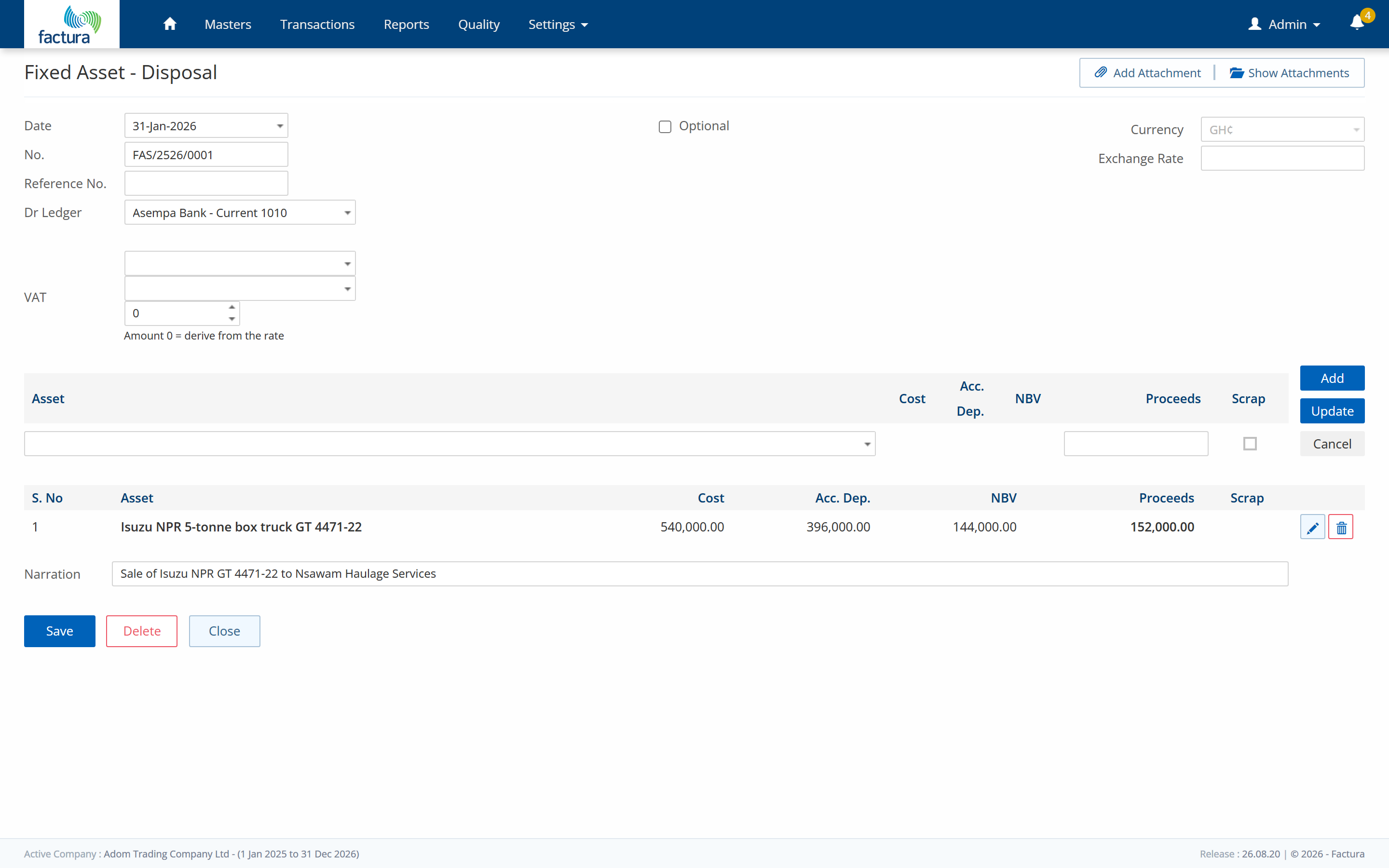
In the demo book, a 540,000.00 truck carrying 396,000.00 of accumulated depreciation was sold on 31 January for 152,000.00. The disposal charged a further 172.60 of depreciation for the month to the sale date, and the sale came out at a gain of 8,172.60. One ordering rule is worth knowing before you plan a month: a disposal cannot be dated on or before a later movement of the same asset, and a depreciation charge on the same date counts as later.

How the register ties to the ledger
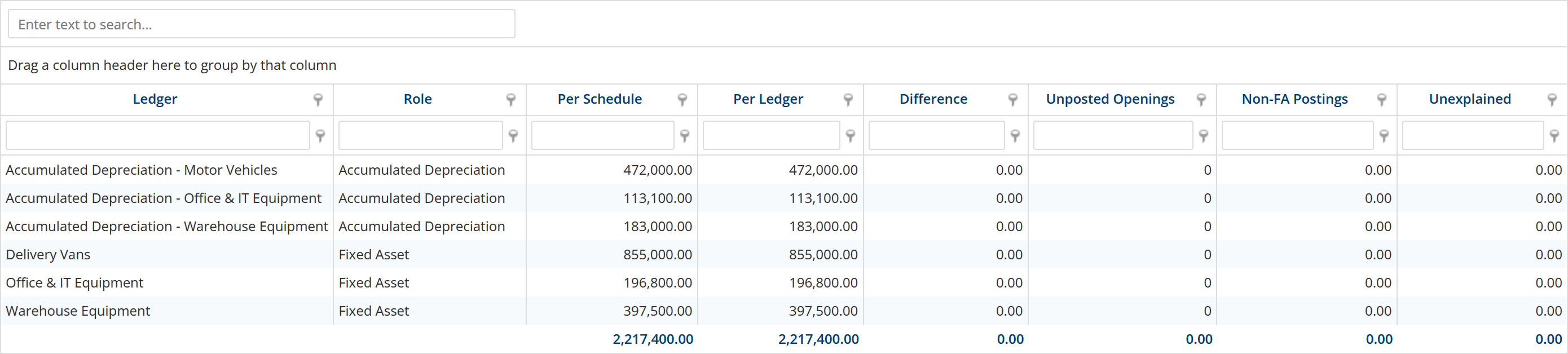
There is no separate fixed-asset ledger to reconcile. Every posting goes through the ledgers named on the asset category, and the register’s net book value is the Fixed Assets figure on the trial balance — the same number, not two that should agree.
Two accounting models, chosen once when a book is set up. By default, depreciation is netted into the single fixed-asset cost ledger: the general ledger carries assets at net book value, and there is no accumulated-depreciation line on the trial balance. Accumulated depreciation is still tracked for every asset, in the register, and on the asset’s own screen, but it does not appear as its own balance.
The alternative is a gross block with a contra ledger: depreciation is credited to a separate accumulated-depreciation ledger per category, so the trial balance shows cost and accumulated depreciation as two figures that net to the same total. It is the model the demo book on this page runs, and it is the figure below. Choose it when the book is opened: moving a book that already has history from one model to the other needs that history reclassified first, and that reclassification is not built.
Where each part of it runs
Three surfaces carry this module between them. It is worth being plain about which piece is where, because it changes who does what.
- In the browser.
- The asset and asset-category masters — adding an asset, editing one, setting the method, the rates and the ledgers on a category.
- In the classic web pages.
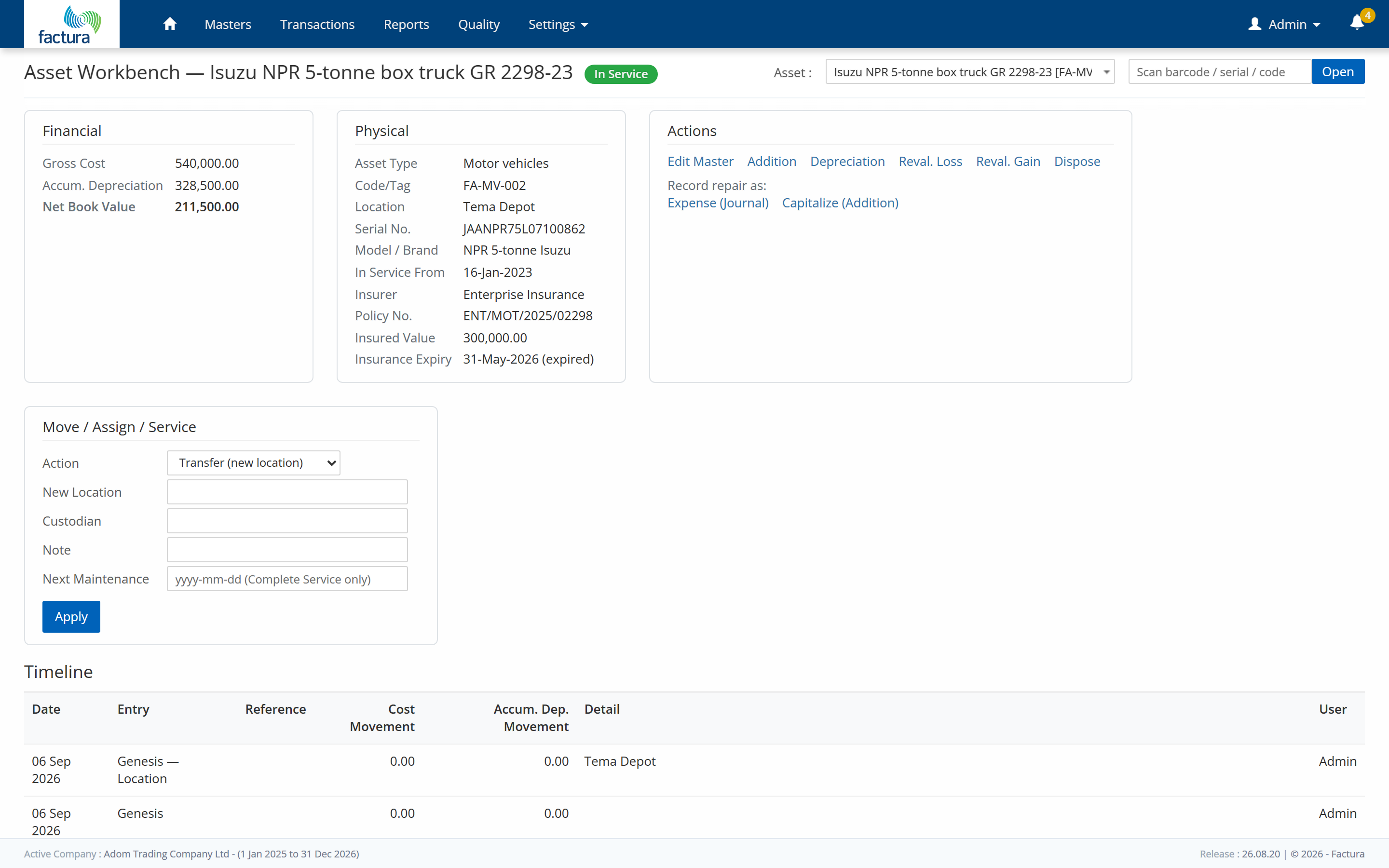
- Voucher entry for all seven fixed-asset vouchers, the depreciation run over a date range, and the per-asset workbench at the top of this page, which is where an addition, a revaluation or a disposal is posted against one asset.
- In the report gallery, in the browser.
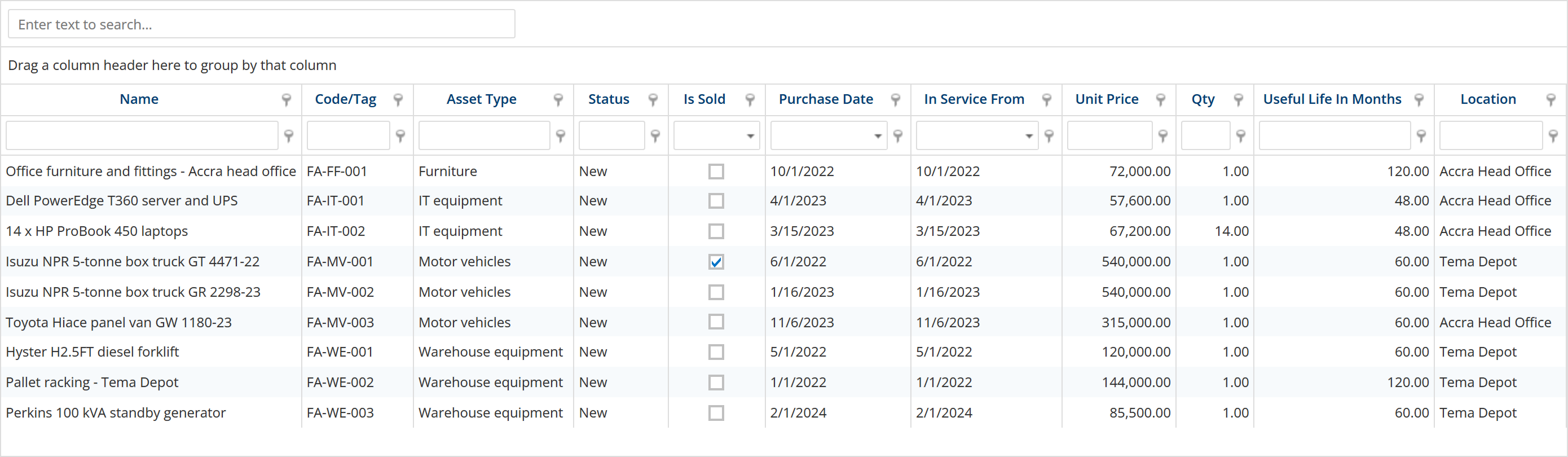
- All twelve fixed-asset reports, under Smart List → Fixed Asset: the asset register and the depreciation schedule — both shown above — with the disposal register, the movement register, the GL tie-out, the stocktake sheet, the maintenance-due list, the asset timeline, the reconciliation dashboard, the auto-depreciation report, the asset-type list and the two-book schedule beside them. They are the same report definitions the desktop runs, rendered in the browser; none of them is desktop-only.
Before you ask us
Can we load the register we already have?
Yes, from Excel: 59 columns covering the dates, useful lives, residual values, locations, insurance and vehicle details, not just a name and an amount. Set the asset categories up first, because every asset points at one and an asset whose category has no ledger cannot post. Bring in opening cost and opening accumulated depreciation either on the sheet or as an opening-balance voucher — one or the other. An import that reports success can still have rejected individual rows, so read the log before you sign it off.
Can we see the register and the depreciation schedule in the browser?
Yes. Both are in the report gallery under Smart List → Fixed Asset, along with the other ten fixed-asset reports: the disposal register, the movement register, the GL tie-out, the stocktake sheet, the maintenance-due list, the asset timeline, the reconciliation dashboard, the auto-depreciation report, the asset-type list and the two-book schedule. They are the same report definitions the desktop suite runs, rendered in the browser. The two shown on this page are the browser rendering the demo book, not a mock-up. Each report you open takes a date range where the report has a period; the register is an as-at list and takes none.
Which depreciation methods are supported?
Straight line, diminishing value, and none — set per asset category, with a useful life on an individual asset overriding the category rate on straight line. All three are prorated by day count from the in-service date. Sum-of-years-digits, units of production and double-declining are not implemented, and we would rather tell you that now than at the end of an implementation.
What happens when we sell an asset?
The cost and the accumulated depreciation are taken out of the register, the proceeds go to the account that received them, and the difference is posted as a gain or a loss on the ledger the category names, or to the scrap ledger if you have marked the asset as scrapped. The same voucher also charges the depreciation owed from the start of the financial year up to the sale date, so the gain is measured against a current carrying value. Output VAT is captured on the disposal and does not change the gain or the loss.
Will fixed assets show on our balance sheet?
Yes. What the balance sheet shows depends on the model the book was opened with. By default, assets appear at net book value on a single line and accumulated depreciation is held in the register rather than in the general ledger. On the gross model, cost and accumulated depreciation appear as two figures that net to the same total. The model is decided when the book is opened, and moving an existing book from one to the other is not something the product will do for you, so it is worth settling before the first asset goes in.
See a month close, end to end
Thirty minutes. Post, reconcile, report — and you can stop us anywhere.