
A web register that sells into your real books.
Factura POS runs in the browser for shops and supermarkets. Every sale posts as a sales invoice in Factura Financials, with bill-wise receivables, godown stock and a shift you can close, count and audit.
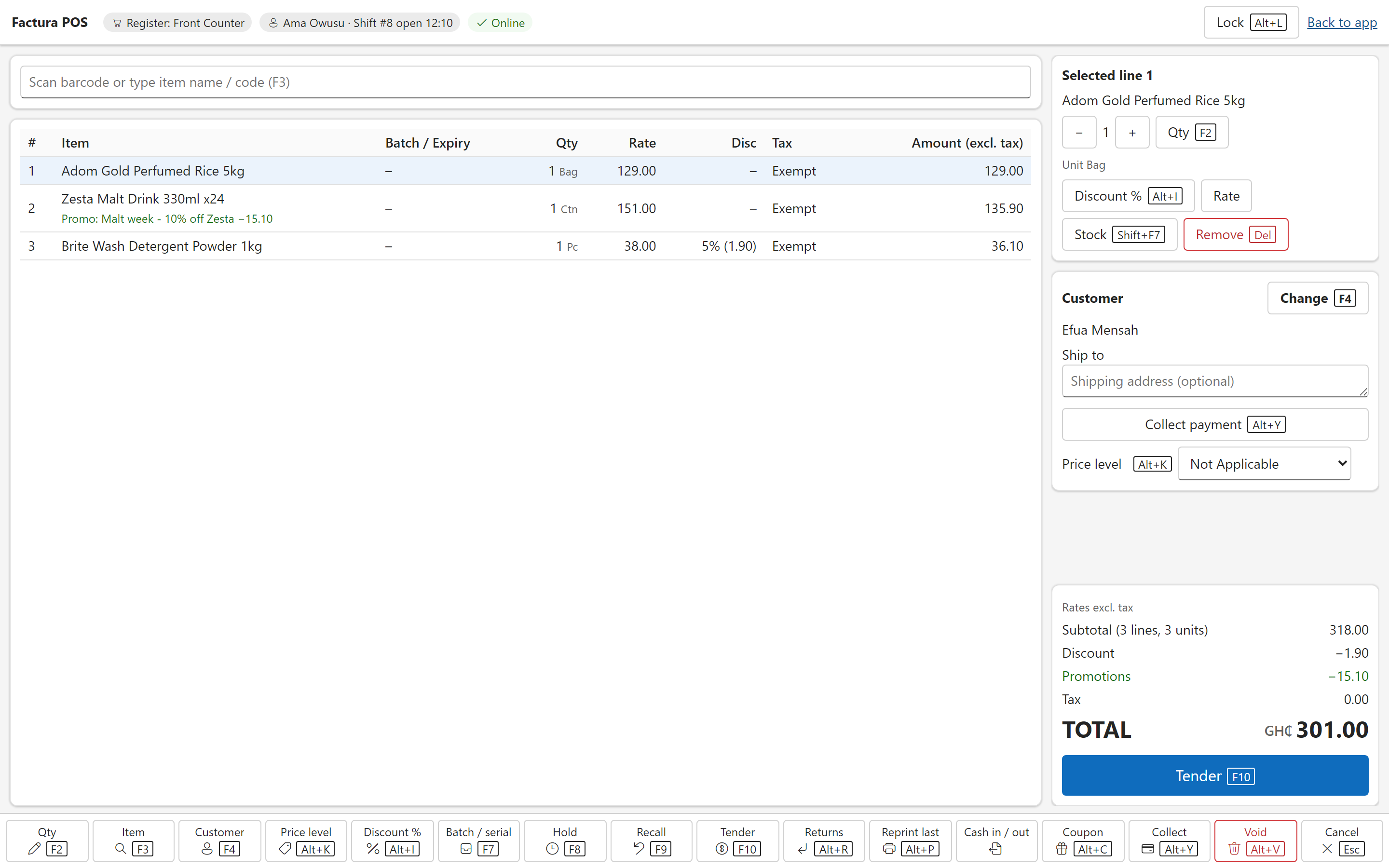
The cashier’s day
One cashier owns one till session. The day has four steps, and each one is a record in the books rather than a screen that disappears.
- Open the shiftThe cashier opens the session with a float. The database allows one active session per register, so two people cannot be working the same till at once. A handover closes the first session and opens the next.
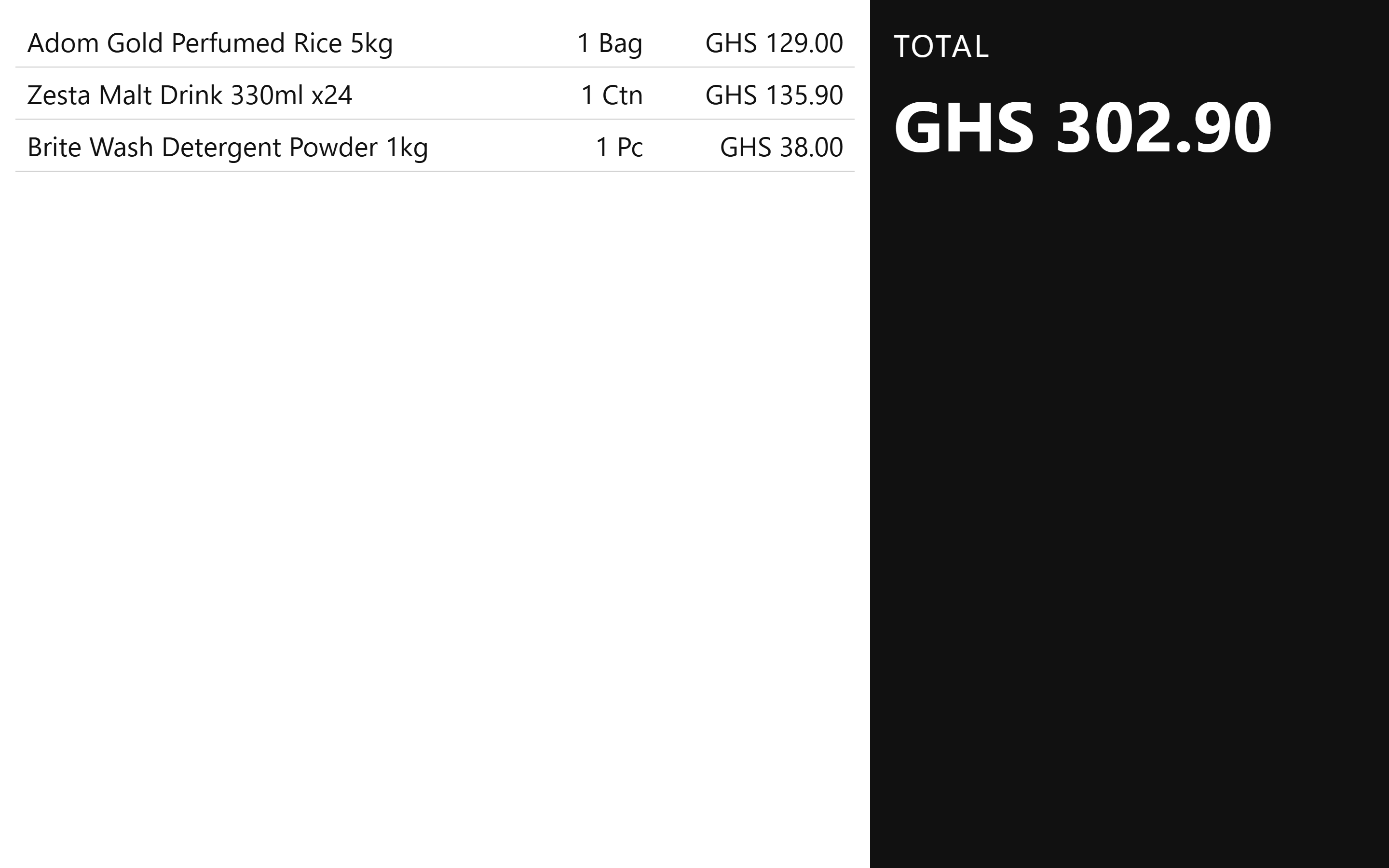
- SellScan or search by barcode, item alias or part number, add a customer, change the price level, hold a sale and recall it later. The register is built to run from the keyboard, with function keys for quantity, search, customer, discount, hold and tender.
- Take the tenderSplit a sale across cash, mobile money, card, cheque, foreign currency and gift voucher. Cash in and out of the drawer needs a reason, and a drop above the limit you set needs an approver.
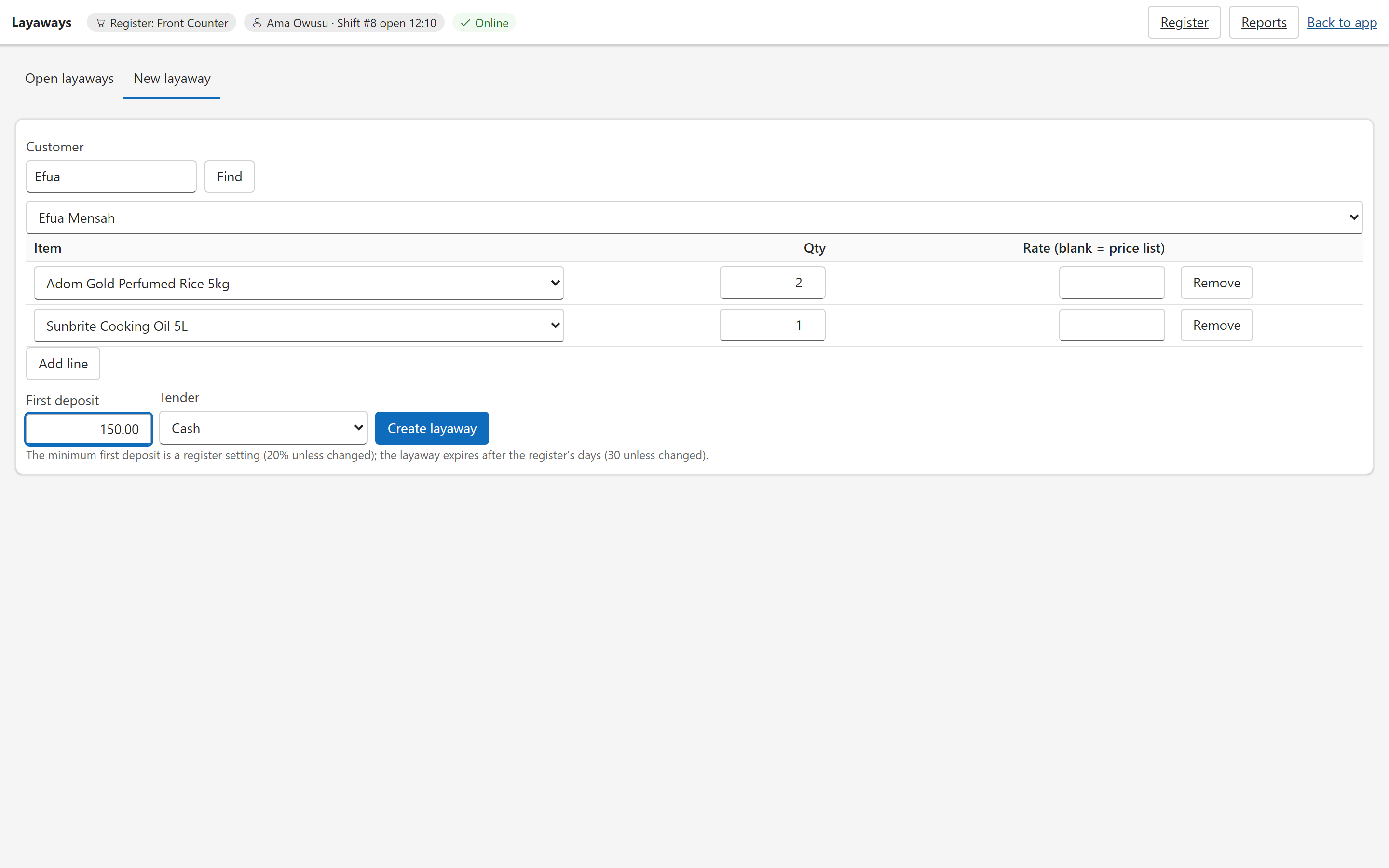
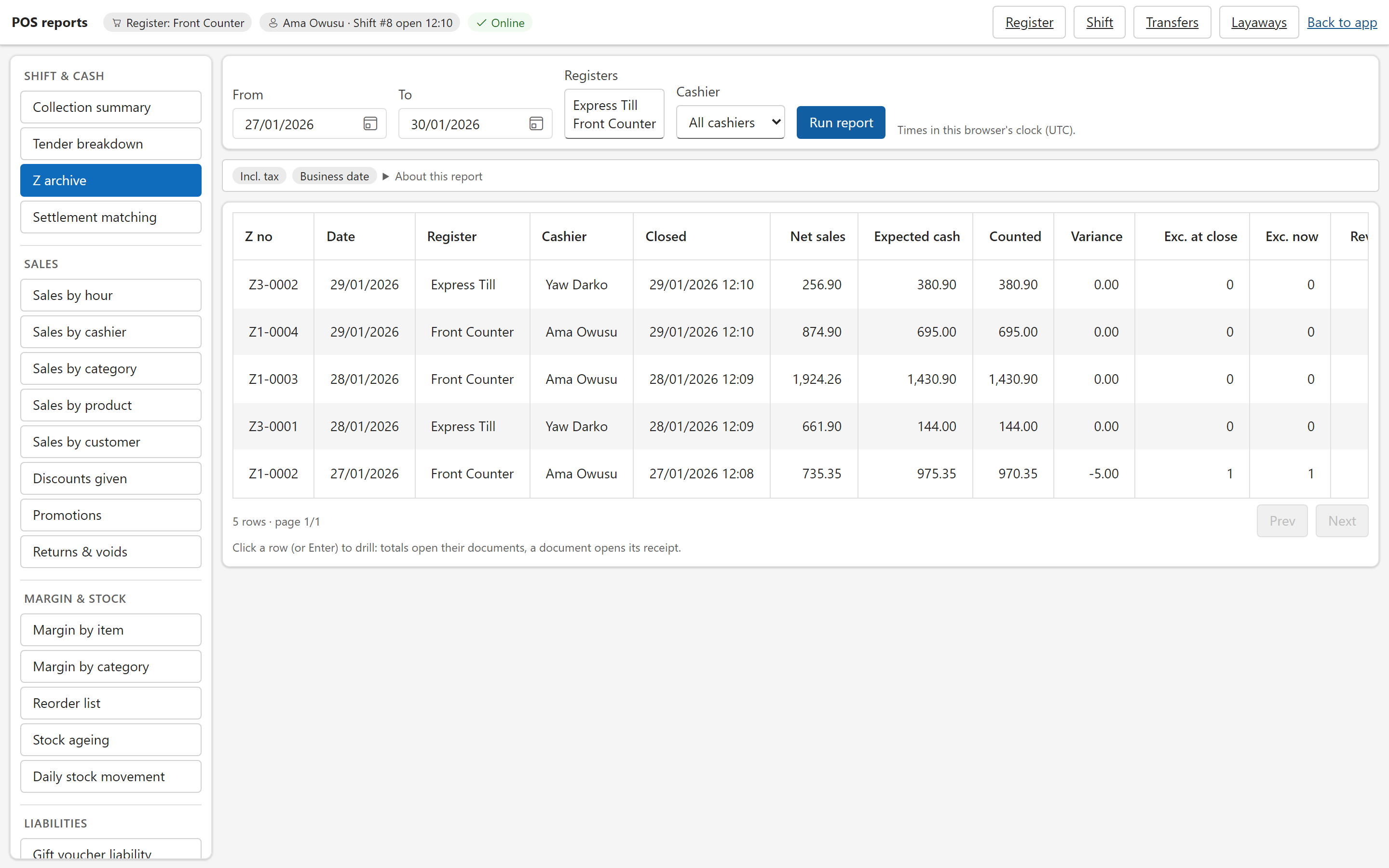
- Close and countThe cashier counts the drawer before seeing what it should hold. The close writes a Z report that is never edited afterwards.
Payments and mobile money
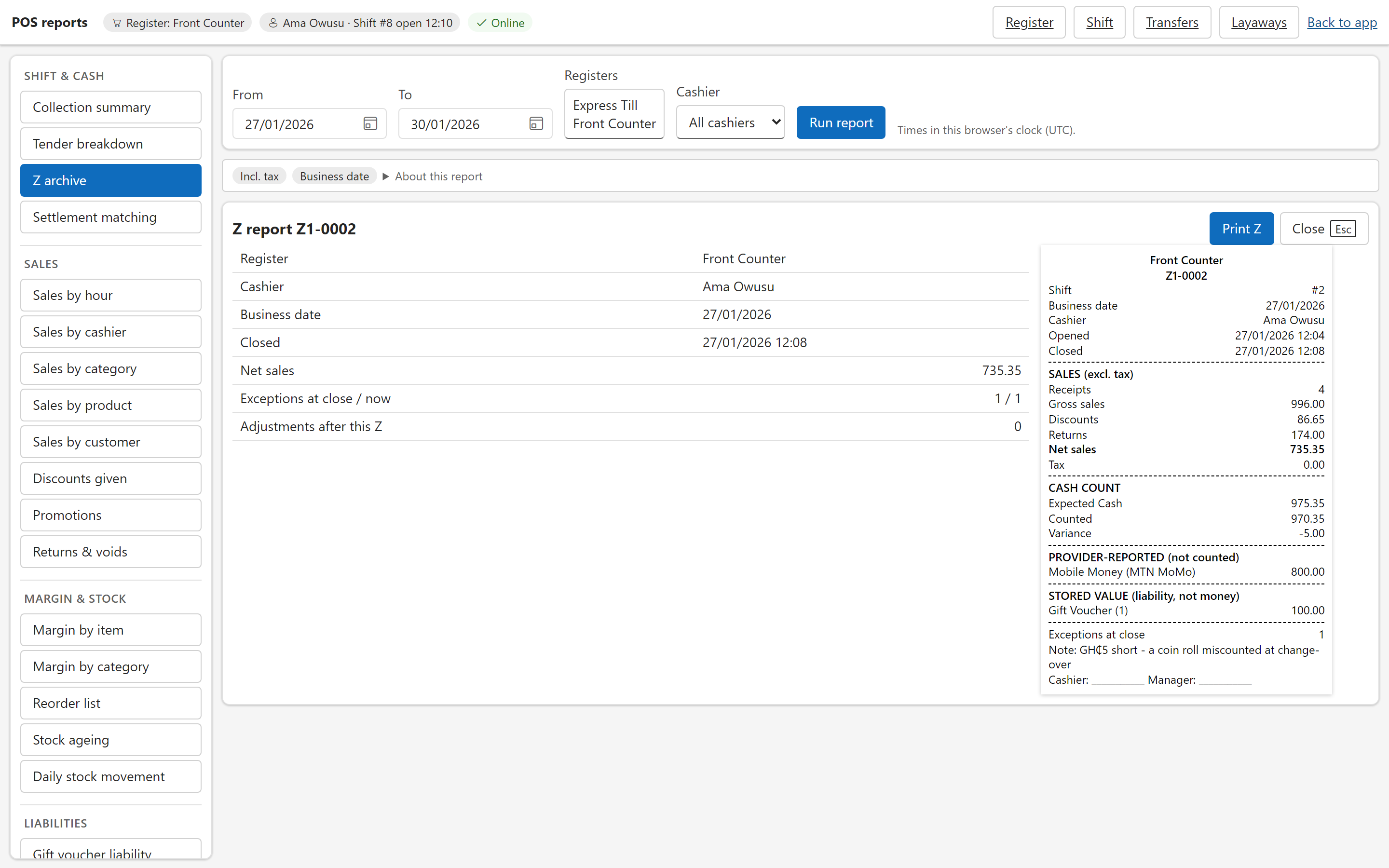
Cash is not the main tender in every market Factura sells into. The register treats a mobile-money payment as something that has to be proved, not something the till assumes.
Today and with a provider account
- Manual reference, today.
- The cashier confirms the payment on the merchant’s phone or card terminal and enters the provider’s reference. The tender is marked as verified outside the register.
- Integrated prompts, with your provider account.
- Adapters are built for MTN MoMo Collections, Hubtel and Paystack mobile money and GhQR in Ghana, and for bKash, Nagad, SSLCommerz and Bangla QR in Bangladesh. Each one needs your own merchant account with that provider and your credentials. They are tested against mocks; none has yet been run against a live provider account.
- Webhooks are checked.
- Only an authenticated answer settles a payment: a webhook whose signature verifies, or a status query to the provider. An unsigned webhook is treated as a hint and checked before it counts.
A lane is never stuck
A customer’s phone prompt can stay live for a minute or two, and an answer can be lost. If a payment is still unknown, a supervisor or an approval can abandon it and the cashier takes another tender. The abandoned attempt keeps being monitored in the background.
- Late money is never silently added to the sale. If the provider confirms an abandoned payment later, it is recorded as an orphan confirmation and raised to a supervisor for refund or reversal. It does not count towards the sale or the drawer.
- A “not found” answer is not a failure. The attempt stays unknown until the provider’s window and a safety margin have passed.
- Final states stay final. A confirmed, failed or cancelled attempt cannot be rewritten by a later message.
Returns, voids and layaway
Each of these leaves a document behind, tied to the sale it relates to.
- Returns and exchanges.
- A return is a credit note against the original sale, or an exchange in the same visit. The window is configurable and defaults to 30 days. A return without a receipt needs a manager and is priced at today’s price.
- Refunds go back where the money came from.
- The default is the original tender. Refunding to a different tender needs a manager, and a return above the amount you set needs a supervisor.
- Voids.
- A sale that has not been signed for GRA can be cancelled. A signed sale is never rewritten; it is reversed by a credit note. Cancelling reverses the ledger, stock valuation and the bill-wise balance together.
- Layaway.
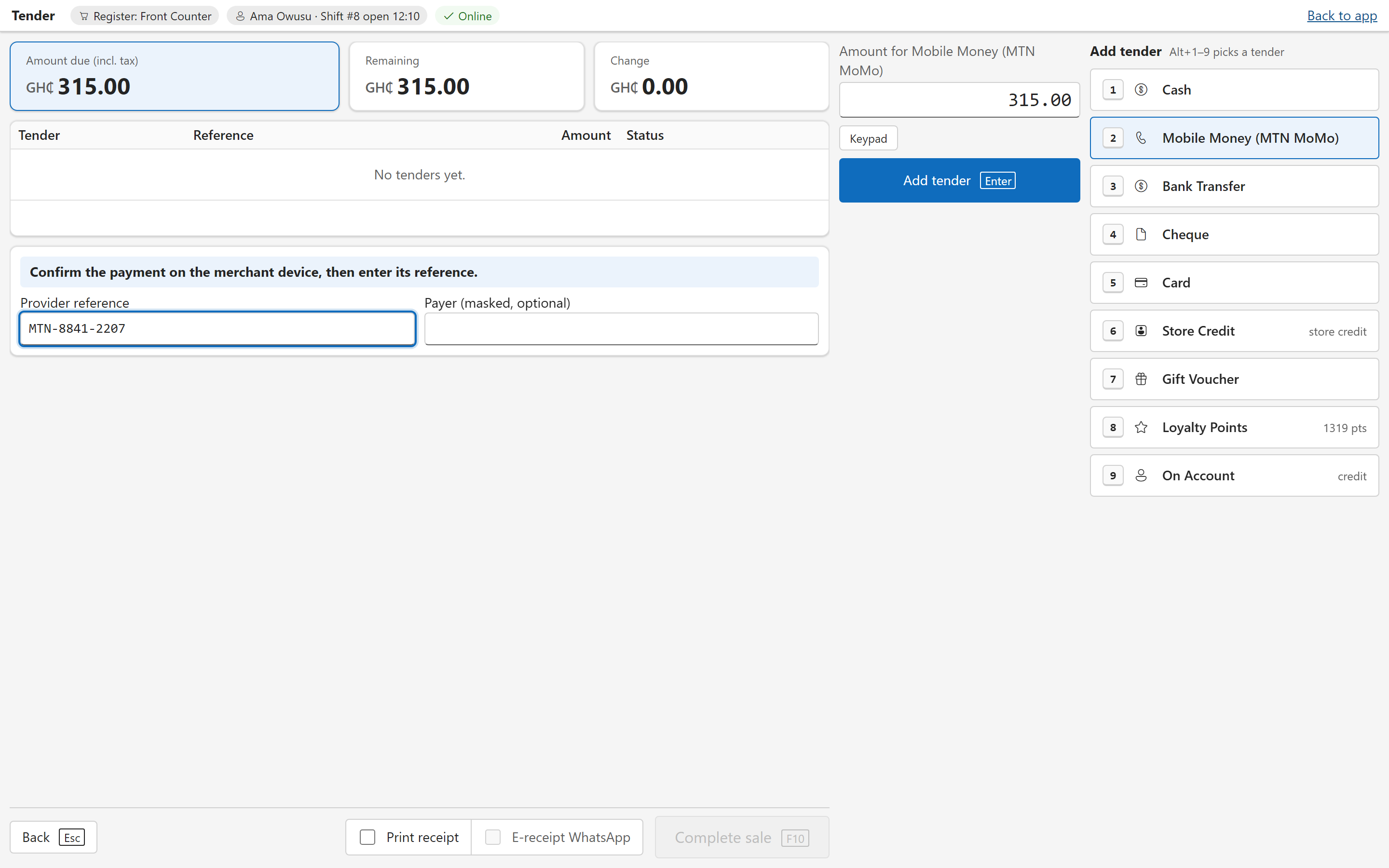
- A layaway is a sales order for a named customer. Deposits are held as an advance against that customer, with a minimum first deposit (20% by default) and an expiry (30 days by default). Completing it is a normal sale that uses the deposits; cancelling refunds them, and after expiry a supervisor can forfeit them to an income ledger. A layaway does not reserve stock.
Promotions, loyalty and gift vouchers
Promotions are worked out on the server, in the quote, so the cashier sees the same price the books will record. All three are switched on per company or register; they are off until you turn them on.
What it does
- Promotions: a percentage or amount off a line, bill slabs, buy X get Y, coupon codes, promotional prices and happy-hour windows, with priority, stacking and usage limits. A manager maintains them in a back-office screen.
- Returns follow the promotion. A refund is the share of what the customer actually paid, and a buy-X-get-Y reward is clawed back pro rata when part of the sale comes back.
- Loyalty: points earn and redeem at separate rates you set, effective from a date, and each earn carries its own expiry.
- Gift vouchers are serialised stock items. The serial is the voucher code. Selling one activates it, redeeming one is a tender, and the unspent value is a liability that reconciles to the ledger.
- Breakage is a decision. Expired value stays in the liability until a manager posts breakage. Nothing is written off automatically.
Controls that survive an audit
A register that handles cash needs rules the cashier cannot negotiate with. These are enforced in the database and on the server as well as on the screen.
- Approvals with a supervisor PIN.
- A rights matrix covers selling, refunds, voids, cash moves, price changes and settings. An approval is tied to the action, the amount and the version of the cart, so it cannot be reused for a different sale. The PIN is rate-limited, and the cashier and the approver are recorded separately.
- Blind count.
- The default is on: expected totals stay hidden until every count is committed. It is a company policy you can change.
- An immutable Z.
- A closed shift is never edited. A manager can reopen it, which creates an amendment revision; the original Z snapshot is kept and its number is not reused.
- An exception queue.
- A pending GRA signature or an unresolved payment at close does not block the close. Each goes to a queue with an owner and an age, and the Z report prints the count.
- Stored value is append-only.
- Gift, loyalty and credit balances are ledgers that are only added to, and a debit cannot take a balance below what it holds.
- No double sale.
- Every sale carries an operation id. After a reload the register looks the id up before restoring a cart, so a sale that already posted is shown as posted, not offered again.
Compliance: Ghana and Bangladesh
The fiscal behaviour comes from the company’s country and VAT registration. It is not a switch a cashier can turn off, and a receipt template cannot drop the fiscal fields.
Ghana: GRA E-VAT
- Each sale is queued for signing. A fiscal queue submits the invoice to the GRA’s E-VAT service with retries, and the signed-invoice data that comes back goes on the receipt.
- The buyer comes from the customer. A sale to a customer with a TIN carries the buyer’s name and TIN. A walk-in sale is issued without one.
- Gift vouchers stay off the fiscal document. Voucher lines are excluded, and a sale of only vouchers is not signed.
- A signature that is still pending is retried, and shows in the exception queue when the shift closes.
We do not claim a GRA approval for the register. Each merchant’s GRA onboarding, item tax classes and outage procedure are confirmed with the GRA at setup. For the levies and the rates in force, see the VAT calculator.
Bangladesh: buyer details
- Buyer name, address and BIN are required on a sale above a threshold you configure.
- Local number formats. Lakh and crore grouping, and optional Bangla digits.
This is the buyer-detail capture, not a statement of compliance. Which NBR route applies to a merchant is confirmed per merchant at onboarding, and we do not describe the register as Mushak-compliant.
Ties into your books
Most point-of-sale products export to an accountant. Factura POS is not a separate system with its own idea of the truth — it posts through Factura Financials.
- A sale is a sales invoice.
- The tender rows sit beside it, and the ledger, VAT and levy entries follow the voucher class your office already uses.
- Bill-wise receivables.
- A sale to a customer on account opens a named bill, and a payment taken at the register settles a customer’s open bills the way the desktop and web do. See Sales and Invoicing →
- Multi-godown stock.
- Stock moves and is valued from the godown the register sells from. Whether a short line is refused or only flagged follows your company’s negative-stock settings. See Inventory →
- Several registers, one set of books.
- Registers and locations can run at the same time against the same company. Numbering is issued by the server per register and is not reset each fiscal year.
- Reports.
- Collections, tender breakdown, sales by hour, cashier, category, product and customer, returns and voids, discounts, gift and loyalty liability, margin and ageing, alongside the rest of the Financials reports. See Analytics →
Hardware and requirements
Stated plainly, including what needs something from you first.
Works today
- Any device with a modern browser. There is nothing to install on the register itself.
- Browser printing of the receipt, and a barcode scanner that types like a keyboard.
- The customer display in a second browser window or screen, linked to its register.
Connects to your provider account or device
- Receipt printer, cash drawer and pole display. A small print agent, installed on the register computer, sends receipts and drawer commands to your printer. It has been tested against a simulated printer and has not yet been signed off on a physical one.
- Weighing scale and weighed barcodes. Weight-embedded barcodes and GS1 barcodes are read by the register. Reading a scale directly needs a compatible scale on the register computer.
- Mobile-money and QR payments. Your merchant account with each provider, as above.
- E-receipts. A receipt can be rendered and sent by email, WhatsApp or SMS, with the customer’s consent recorded. Sending needs your email server or your WhatsApp and SMS accounts.
What it needs
- An internet connection.
- Every sale is made online. There is no offline selling. If the connection drops, the register says so and Tender is disabled until it returns; a cart in progress is recovered after a reload.
- Factura Financials on SQL Server.
- Point of sale needs a multi-user SQL Server company, not a single-user file company.
- A user right per role.
- Your admin grants who may sell, refund, void, move cash and change settings.
- Setup per register.
- Each register is set up with its godown, receipt header and footer, tenders and the limits above.
Before you ask us
Can it sell when the internet is down?
No. Factura POS needs a connection for every sale. If the connection drops, the register shows a banner and disables Tender until it is back, and a cart in progress is recovered after a reload. Offline selling is not part of the product today.
Does it connect to MTN MoMo, bKash and the other providers?
Adapters are built for them, and each connects to your own merchant account with the provider. They have not yet been run against a live account. Until then the cashier confirms a mobile-money payment on the merchant’s phone and enters the reference, which works today.
What happens if a mobile-money payment is stuck?
A supervisor, or an approval, can abandon it and the cashier takes another tender. The abandoned payment is still monitored. If it is confirmed later, it goes to a supervisor as a refund or reversal and is not added to the sale.
Is it GRA-approved, or Mushak-compliant?
We do not claim either. For Ghana, the signing path to the GRA’s E-VAT service is built and each merchant’s GRA onboarding is confirmed at setup. For Bangladesh, the register captures buyer name, address and BIN above a threshold you set; which route applies to a merchant is confirmed with them.
Does it post to the same books as the rest of Factura?
Yes. A sale is a sales invoice with its tender rows, a return is a credit note against it, and stock and receivables move through the same engine as the desktop and web.
Can a shift be edited after it is closed?
No. A manager can reopen it, which creates an amendment revision. The original Z report is kept and its number is not reused.
Selling from somewhere else
The register is one way into the same books.
- On a phone, in the field.
- Orders, invoices, collections and a cash-sale screen for a route rep. See Mobile Sales →
- At the desk.
- Quotations through to receipt on one chain of documents. See Sales and Invoicing →
- For a trading business.
- Stock, depots and receivables for a distributor or wholesaler. See Trading and Distribution →
- All of it together.
- Back to Factura Financials →
See a month close, end to end
Thirty minutes. Post, reconcile, report — and you can stop us anywhere.