
When payroll has outgrown the spreadsheet.
Written for a Ghanaian employer running payroll on a spreadsheet, or through a payroll bureau, and wondering whether Factura HRMS is the next step. It covers what a run looks like, what moving involves, and when a spreadsheet or a bureau is still the right answer.
The problems you already recognise
None of these are spreadsheet faults. They are what happens when a payroll grows past what a file and a person can hold between them.
- One person understands the sheet.
- The formulas are correct because of who wrote them, not because anyone else can read them. When that person is on leave in the week payroll runs, the business finds out how much of its process was a habit rather than a procedure.
- The same figures are re-keyed into separate schedules.
- PAYE into one return, SSNIT Tier 1 into another, Tier 2 and each Tier 3 scheme into their own — each assembled after the fact from a payroll that has already moved on. A late correction means every schedule is now a version behind, and nothing tells you which ones.
- There is no trail of who changed what.
- A cell changed value. It cannot say when, or who, or why, and a month you have already paid can be quietly restated by an edit made afterwards.
- The bank file is a second piece of manual work.
- Names, account numbers and amounts transcribed into whatever layout the bank wants, checked by eye, and wrong in a way that is expensive rather than obvious.
- With a bureau, the arithmetic is fine and the visibility is not.
- The run happens correctly and elsewhere. What you get back is an output; what you cannot do is open a figure and see the record it came from, on your own timetable.
What a run looks like in Factura HRMS
Five steps, the same five every month. Nothing downstream can run before the step above it is done, which is the point: the bank file and the statutory schedules are produced from a run you have already signed off, not assembled separately afterwards.
- PrepareJoiners, leavers, salary revisions, absence, overtime and loan movements. Most of it is already on the employee record, because that is where it was entered when it happened.
- ReviewThe register per employee, gross to net, with anything unusual flagged and the reason beside it rather than in a separate exception list. A missing tax ID or an unresolved social security number is surfaced before you close, on the same screen as the totals.
- CloseEach employee's calculation is marked closed and stops recalculating, so a later change cannot quietly restate a month you have already paid. Periods close in order: the earliest open period is the one you can close.
- ProcessPayslips out by email, WhatsApp, desktop and phone self-service, and the bank transfer file in your bank's own layout — thirteen layouts across nine Ghanaian banks, because an ACH transfer and an own-bank transfer are not the same file.
- FileThe GRA and SSNIT schedules, and the Tier 3 scheme schedules, read off the same closed run. Each Tier 3 scheme carries its own schedule.
Because payslips, bank file and schedules share one closed source, the payslips add up to the register and the register adds up to the bank file. Every input change carries an audit trail. Reopening a closed period is possible and is a deliberate action a user takes; it is not gated behind its own separate permission today, so treat it as you would any other administrative right. The full monthly cycle, in detail →
The schedules come out of the run, not out of a rebuild
This is the difference that is hard to see in a demo and obvious in month three.
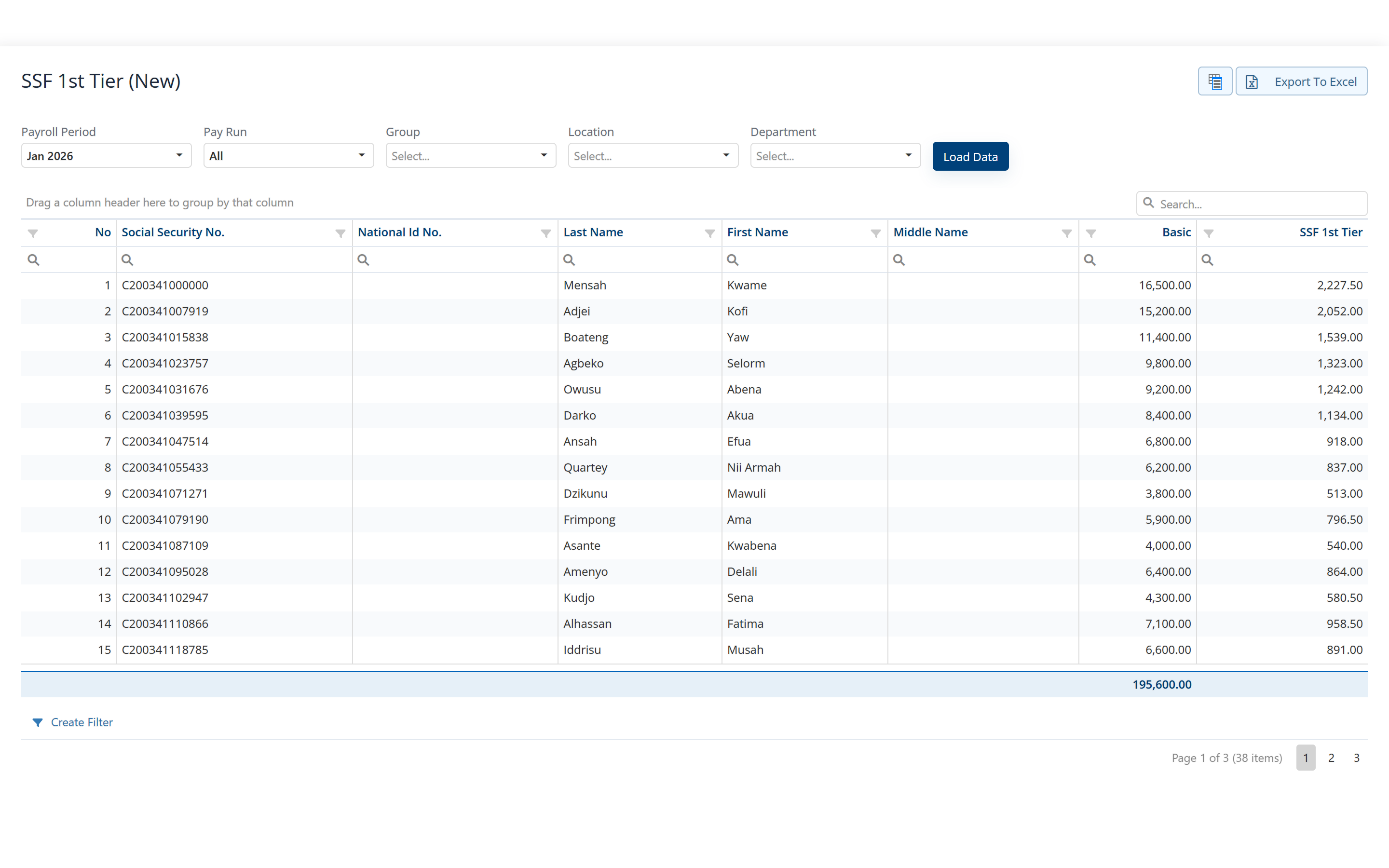
Filing and remittance stay on the GRA's and SSNIT's own channels. Factura HRMS produces the schedules; it does not submit a return on your behalf and it does not move money. Guides to the underlying rules: PAYE · SSNIT · Tier 2 & 3
What moving involves
Four steps, in the same order every time. Nothing switches until the numbers agree.
- Bring your employee masterEmployees, employment details, addresses, dependants, bank accounts, leave, loans and expenses come in from Excel — your existing spreadsheet is the normal starting point. We do the mapping with you.
- Set your pay structurePay components, benefits, pay scales and pay periods import from Excel as well. Allowances, deductions, statutory items and accumulators are then expressions per company, in a formula an accountant can read, and each component is assigned per employee — including the statutory ones.
- Pick the month you startPAYE, SSNIT and the tiers are computed month by month, on that month’s figures, so the first run in Factura is correct without opening year-to-date balances and you can move in any month. Factura does not import the earlier months: their totals stay in your previous records, and you add them when you report on the full year. Starting in January avoids that split.
- Reconcile, then switchWe reconcile your first run against figures you already trust. Where you want the extra assurance, we can run a month in parallel before you switch.
When a spreadsheet or a bureau is still the right answer
At a handful of employees on stable salaries, with few allowances, no loans and little movement, a spreadsheet is not a problem waiting to happen. It is a proportionate tool, and a payroll system is more setup than the payroll justifies. Stay where you are.
A bureau remains the right answer when you would rather not hold the payroll capability in-house at all — when nobody on the team wants to own statutory changes, and outsourcing that judgement is the point rather than a compromise. What a bureau cannot give you is the ability to open a figure yourself, on your own timetable, and reach the record underneath it.
The move is worth making when headcount, allowance complexity or the number of schemes has grown past what one person can hold in their head, or when you need a figure traceable to a record without asking someone else for it.
Before you ask us
Do we lose our existing spreadsheet structure?
No. Your spreadsheet is the normal starting point for the move: employees, employment details, bank accounts, pay components, benefits, pay scales and pay periods all come in from Excel, and we do the mapping with you.
Does Factura file our PAYE and SSNIT returns?
No. It produces the schedules from the closed run: the per-employee income tax register the PAYE return is built from, the first and second tier social security schedules, and a schedule per Tier 3 scheme. Filing the return and remitting the money stay with you, on the GRA's and SSNIT's own channels.
What happens when the PAYE bands change?
Pay components are formulas per company rather than fixed arithmetic, so when Ghana's rules change it is the formula that changes. There is no separate year-end procedure to schedule: periods roll monthly, and annual figures come from a report over a range of periods.
Can we still pay someone mid-month?
Yes. A mid-month run is a run of its own, with its own detail and its own outputs, sitting alongside the monthly one rather than being carried as an adjustment on the next payslip.
Does this replace our accounting system?
No. Factura HRMS exports a coded journal of salaries, statutory liabilities and cost-centre splits that your accounting system imports. Factura Financials is a separate application with its own login; if you run it, that journal imports straight in.
Is payroll statutory covered outside Ghana?
No. Payroll statutory is Ghana only. The HR side of Factura HRMS runs anywhere, and it is sold outside Ghana without local payroll. If your country is not covered, tell us anyway, because most of the country packs that exist were built around a real customer's requirement.
See a real pay run, end to end
Thirty minutes. We walk a full month — prepare, review, close, and produce the statutory files — and you can stop us anywhere.