
A month of payroll, from the first joiner to the bank file.
This page follows one monthly cycle the whole way through: what you prepare, what the review shows you, what closing locks, and every file and schedule that comes out of the closed run. It is the detail behind the payroll summary on the Factura HRMS page.
The month, in the order it happens
Five steps, the same five every month. Nothing downstream can run before the step above it is done, which is the point: the bank file and the statutory schedules are produced from a run you have already signed off, not assembled separately afterwards.
- Prepare: joiners, leavers, salary revisions, absence, overtime and loan movements. Most of it is already on the employee record, because that is where it was entered when it happened
- Review: the register per employee, gross to net, with anything unusual flagged and the reason beside it rather than in a separate exception list
- Close: each employee’s calculation is marked closed and stops recalculating. Periods close in order — the earliest open period is the one you can close
- Process: payslips out by email, WhatsApp and self-service, and the bank transfer file in your bank’s own layout
- File: the GRA and SSNIT schedules, and the Tier 3 scheme schedules, read off the same closed run
Reopening a closed period is possible and is a deliberate action a user takes, not something the system does on your behalf. It is not gated behind its own separate permission today, so treat it the way you would treat any other administrative right: give it to the people who should have it. We would rather say that plainly than let you find it out later.
One employee, a group, or everybody
A run is scoped when you start it. That is what makes a correction cheap: you do not reprocess forty people because one person’s allowance was wrong.
- Single, group and company-wide runs.
- Process one employee, one group or one location, or the whole company. The same engine and the same components either way, so a re-run of one person produces the figure the company-wide run would have produced for them.
- Mid-month runs alongside the monthly one.
- A mid-month payment is a first-class run with its own detail, not a manual adjustment carried on the next payslip.
- Pay components are formulas you can read.
- Allowances, deductions, statutory items and accumulators are expressions per company. A Tier 3 employee deduction is written as five per cent of basic, rounded to two decimals, in a formula an accountant can read. When the arithmetic in your company changes, or Ghana’s does, it is the formula that changes.
- Components are assigned per employee.
- Including the statutory ones. A component only computes for someone who has it on their record — there is no invisible “applies to everyone” component running behind the run. It is more setup on day one and no surprises on day two hundred.
- Loans and expense claims arrive already approved.
- A disbursed loan’s instalment falls due inside the period and comes onto the payslip as a deduction; an approved expense claim comes on as a payment. Neither is re-keyed, and neither can appear without having gone through its approval chain.
Two things worth stating because a demo will not surface them: unpaid days and a mid-period joining date do not reduce pay on their own. Both are ordinary payroll arithmetic and both are expressible as a formula on your basic-pay component; we set that up with you if your policy pro-rates. What we will not do is let you assume it is already happening.
The checks that stop a bad return
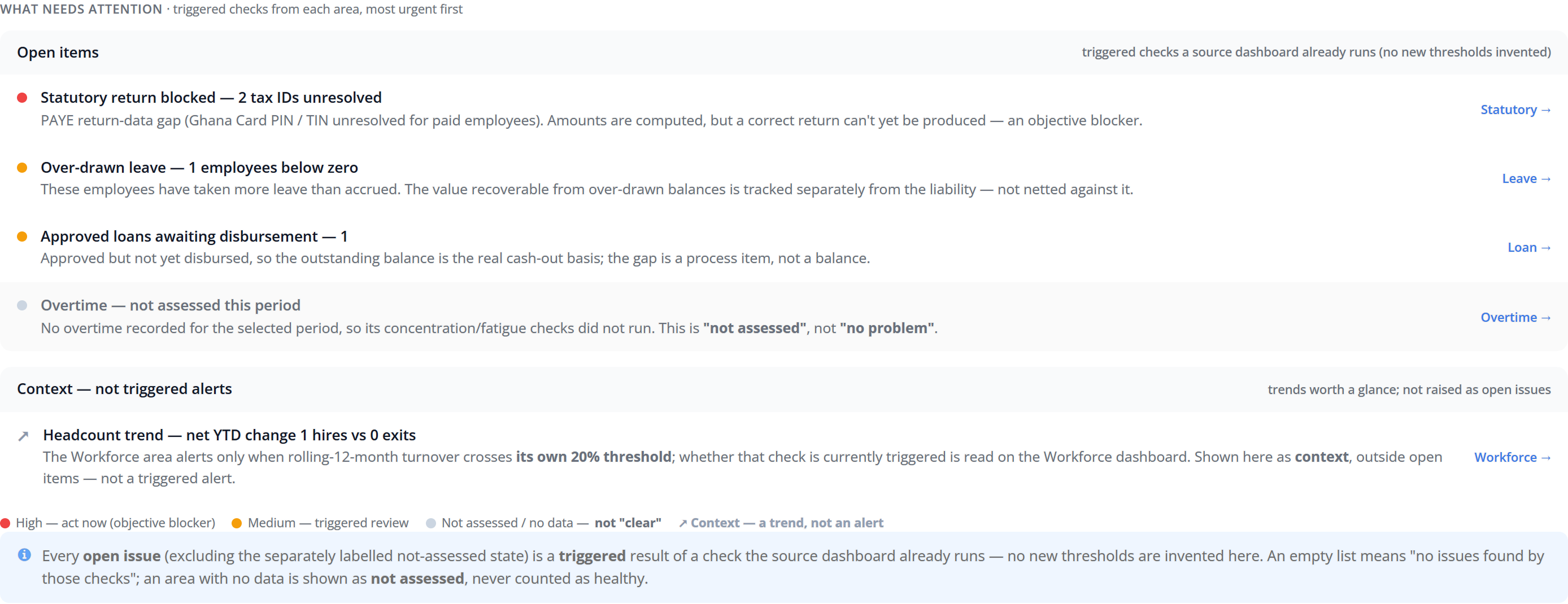
The expensive payroll mistakes are not arithmetic. They are a missing tax ID, an unresolved social security number, an approved loan nobody disbursed — things that are invisible in a register and fatal in a filing. Those are surfaced before you close, on the same screen as the totals. Where an indicator cannot be assessed — no overtime hours posted for the period, for instance — it says so, rather than showing a reassuring zero.
What the closed run produces
Four kinds of output, all from the same closed period. Because they share a source, the payslips add up to the register and the register adds up to the bank file.
| Output | What it is |
|---|---|
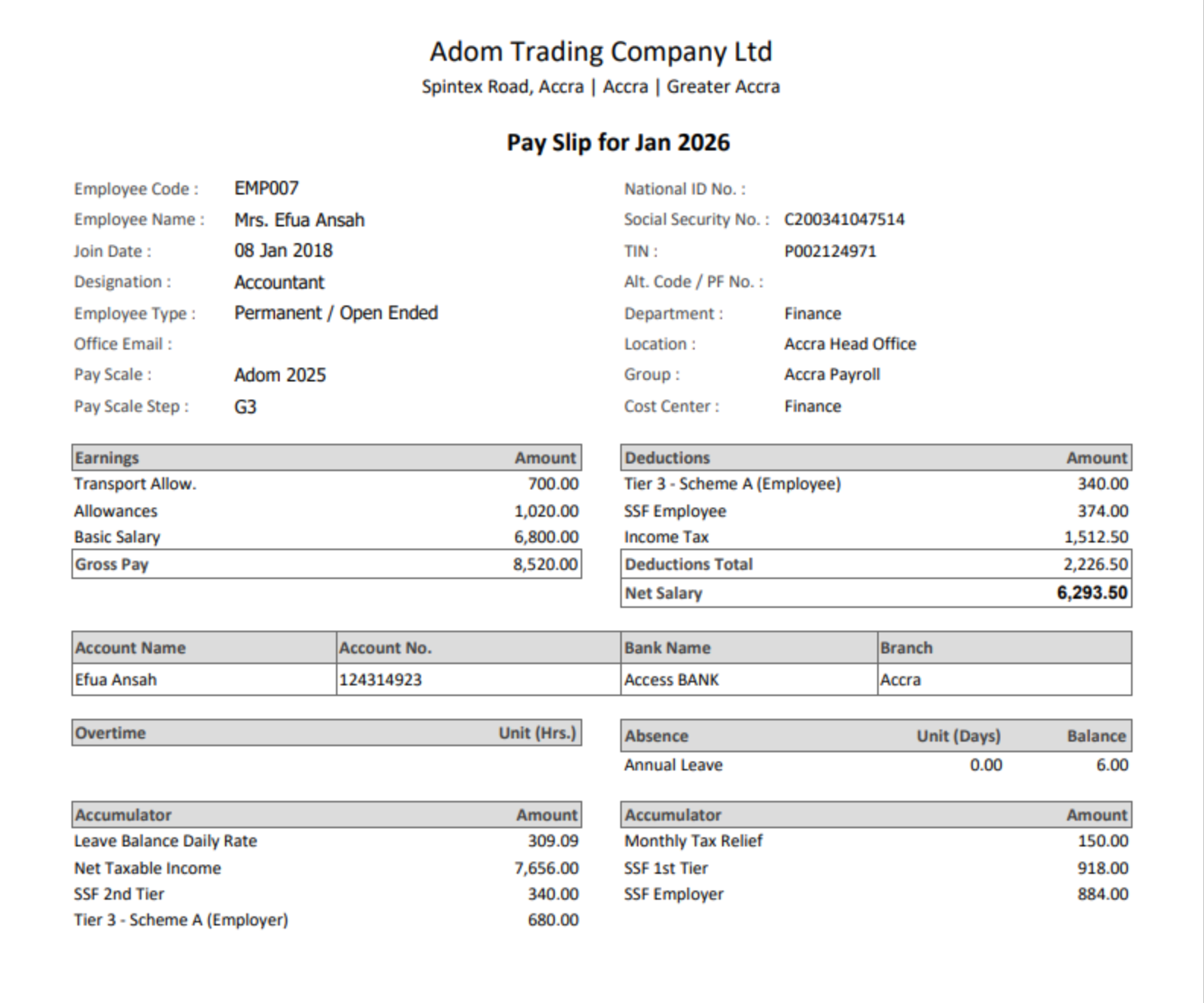
| Payslips | Sent by email, sent by WhatsApp as a pre-approved message with a link to the payslip, published to desktop and phone self-service, and announced by push notification. Four channels, one document, and a send that does not fail because one channel had a problem. |
| Bank transfer files | Thirteen layouts across nine Ghanaian banks — Zenith, Ecobank, GT Bank, Access, ADB, UBA, Standard Chartered, Bank of Africa and First Atlantic. Several banks carry more than one, because an ACH transfer and an own-bank transfer are not the same file. |
| GRA PAYE | The Income Tax report is the per-employee register the return is built from — gross, taxable components, the SSNIT share, reliefs applied, chargeable income and PAYE deducted, with company totals — and it carries an Export GRA Report action. Annual Income Tax is the same for a year. PAYE guide |
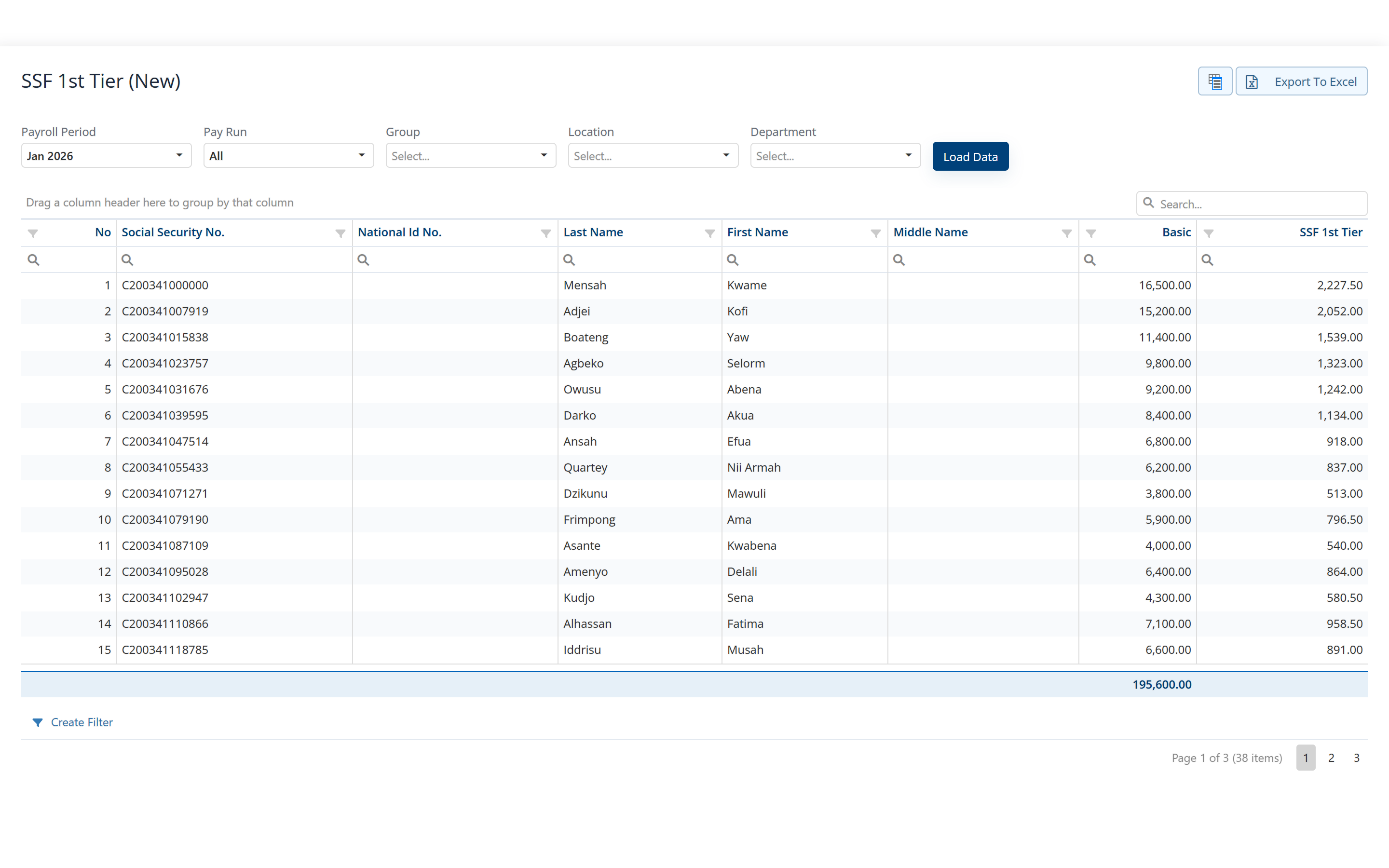
| SSNIT and Tier 2 & 3 | SSF 1st Tier and SSF 2nd Tier schedules, one line per employee with the social security number, code, name, designation, basic pay and the contribution. Each Tier 3 scheme carries its own schedule, and there is a contribution history per employee. Tier 2 & 3 guide |
| Payroll journal | Salaries, statutory liabilities and cost-centre splits as a coded journal, by default, by cost centre or by group, with an Export To Factura Financials action. Expense claims carry an equivalent journal of their own. |
Filing and remittance stay on the GRA’s and SSNIT’s own channels. Factura HRMS produces the schedules; it does not submit a return on your behalf and it does not move money.
What the run cost, and why it moved
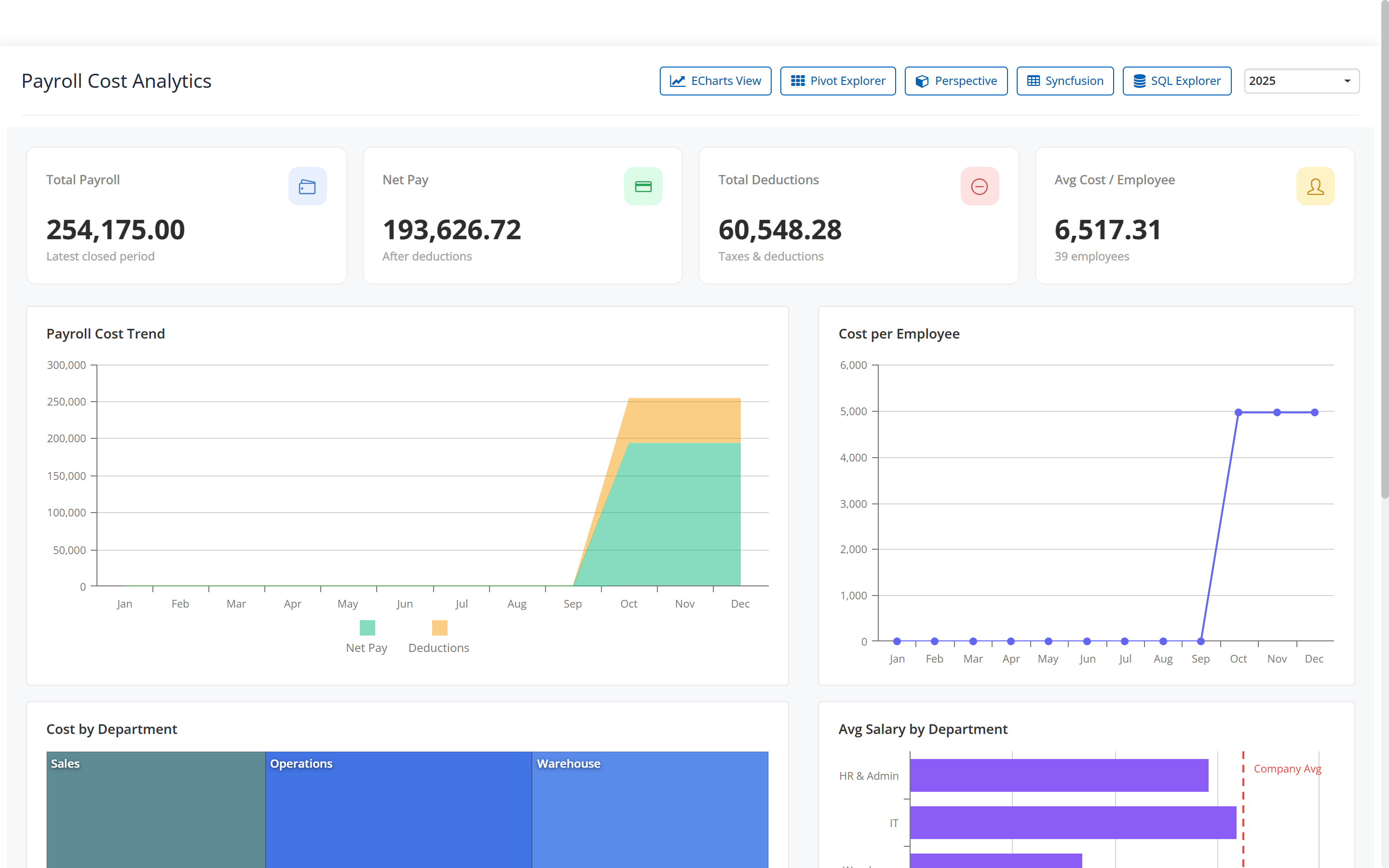
Two questions get asked about every payroll: what did it cost, and why is it different from last month. Both are answered from the closed periods rather than from a spreadsheet somebody rebuilds.
- Cost.
- Total payroll, net pay, total deductions and average cost per employee, by period and by department, with the trend across the periods you have closed.
- Variance.
- Two periods side by side, the movement between them, and the drivers underneath it, a leaver, a joiner, a salary revision. In the demo company, January 2026 came in GH¢6,325 below December 2025, and two leavers, one joiner and one basic revision account for the whole of it.
- The narrative is written, not calculated.
- The assistant reads the driver table the engine produced and puts it into a sentence. It does no arithmetic, and it approves, pays and files nothing. It runs on an external model provider; we walk you through exactly what it is sent before it is switched on for your company, and we switch it off on request.
The whole analytics set — executive summary, cost, variance, leave liability, workforce, statutory reconciliation — has a page of its own. Payroll analytics in detail →
Before you ask us
What exactly does closing a period lock?
Each employee’s calculation for that period is marked closed and stops recalculating, so a later change to a salary or a component cannot quietly restate a month you have already paid. The period itself is closed too, and periods close in order — the earliest open one is the one you can close next. Reopening is possible and deliberate; every input change carries the audit trail.
Can we run payroll twice in a month?
Yes. A mid-month run is a run of its own, with its own detail and its own outputs, sitting alongside the monthly one rather than being carried as an adjustment on the next payslip.
What happens at year-end?
Nothing separate. Periods roll monthly — run, close, open the next one — and there is no year-end procedure to schedule or to get wrong. Annual figures come from a report over a range of periods, and when the PAYE bands change it is the pay-component formula that changes.
Does payroll post into our accounts?
It exports a coded journal — salaries, statutory liabilities and cost-centre splits — as a file your accounting system imports. If you also run Factura Financials, that file imports straight in. They are two separate applications, each with its own login.
The rest of Factura HRMS
Everything below feeds the run on this page, or reads it.
- Self-service.
- The payslip, the balance and the request, on an employee’s own phone. See Self-service →
- Leave and attendance.
- Entitlement, accrual, balances, liability, work schedules and overtime. See Leave & attendance →
- Workflows and audit.
- Approval chains, permissions, two-factor sign-in and what is kept. See Workflows & audit →
- Analytics.
- Executive summary, cost, variance, liability, workforce and statutory. See Analytics →
- People operations.
- Tasks, disciplinary, separation, training, policy and surveys. See People operations →
- Performance.
- New: review cycles, goals and check-ins, peer feedback, probation, calibration and improvement plans. See Performance →
- Recruitment.
- New: jobs, a careers page, a pipeline board, offers accepted online and a handoff to the employee record. See Recruitment →
- All of it together.
- Back to Factura HRMS →
See a real pay run, end to end
Thirty minutes. We walk a full month — prepare, review, close, and produce the statutory files — and you can stop us anywhere.