
The questions your HR desk answers twice a week, answered by the person asking.
A desktop portal and a phone app over the same employee records. Payslips, balances, requests, policies and surveys, plus an approvals inbox for the managers who have to say yes. This is the detail behind the self-service summary on the Factura HRMS page.
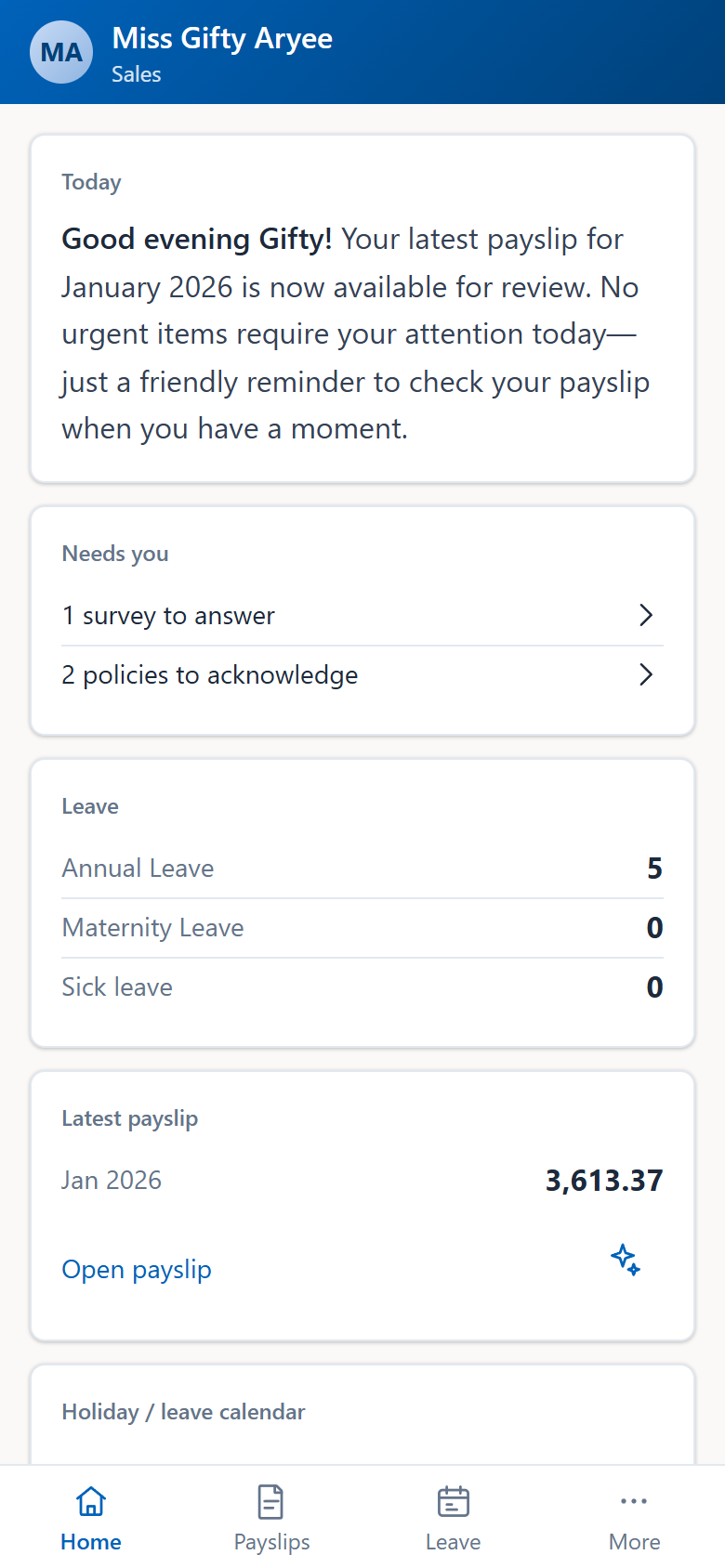
What an employee does without you
Every item below is the same record the payroll and HR teams work in. Nobody is reading a copy, and nothing has to be re-entered on their behalf.
- Payslips.
- The current one and the history, downloadable, with a plain-language explanation of what changed since last month when they want one.
- Leave.
- Apply, withdraw an application, and see the balance calendar for each leave type they hold.
- Loans.
- Apply, and then follow the application through the approval chain rather than asking where it has reached.
- Expenses.
- File a claim with several lines on it, and attach the receipts.
- Policies.
- Read a policy in the document as it was issued — the viewer handles the file type — and record the acknowledgement against their name.
- Surveys.
- Answer a campaign while it is open.
- Documents.
- See the documents HR holds for them, with expiry dates and a notice before one runs out, and — where the company allows it — upload a renewal or a missing document, which HR verifies before it counts.
- Tasks.
- See the tasks assigned to them, including the recurring ones.
- Attendance.
- Read their own posted attendance for a date range. Reading only, this is not a clock-in surface.
Two surfaces, one set of records
People at a desk and people on a site do not want the same thing. Both get the same data.
- The desktop portal.
- Payslips, leave, loan and expense requests, the daily brief, announcements, the holiday and leave calendar, birthdays and the department directory. It is the default surface for anyone who is already at a computer.
- The phone app.
- Installed from the browser, at a web address of its own — there is no app-store download and no separate release to wait for. It reached the desktop portal’s full feature parity in September 2026, so the phone is not the cut-down version.
- Push notifications.
- Verified on a real device, and there is no per-message cost, because they travel over the phone’s own notification service rather than as text messages you pay for.
- Signing out means signing out.
- The app unsubscribes the device from push, clears its cached data and ends the session. On a shared or handed-back phone that matters.
- An optional app lock.
- A passkey on the device, off by default, for people who want it.
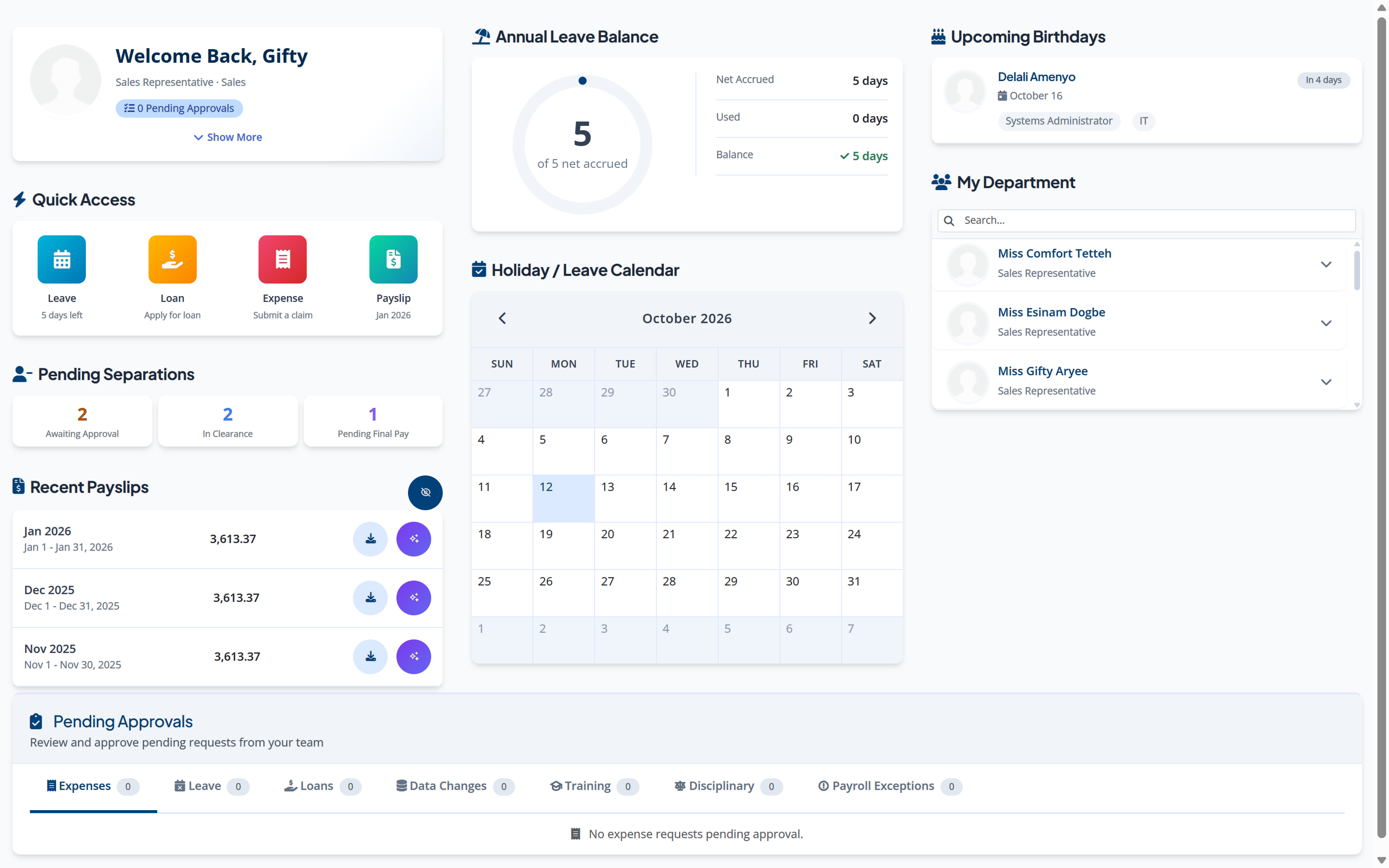
What a manager sees
A manager gets one inbox rather than five. Leave, expenses, loans, separation and data changes all arrive in the same place, with the facts an approver needs attached: the balance, whether a loan instalment is affordable against take-home, anything that looks unusual, and whatever the requester uploaded.
Approval is not an administrative power. Somebody with every right in the product still cannot approve a request they are not the named approver for at its current level. Who those approvers are is the approval chain you configure, per request type, per company — set it up so that a request never reaches the person who raised it. How approval chains resolve →
- Leave requests
- with the requester’s balance beside them.
- Expense claims
- with the lines and the attached receipts.
- Loan applications
- with net salary, instalment, existing loans and the debt-to-income ratio worked out.
- Separation requests
- and their clearance steps.
- Data-change requests
- raised against employee records.
Where self-service stops
Three limits worth knowing before a demo, because a demo will not show you the absence of something.
- The desktop profile screen does not save.
- Employees read their own record there; they do not edit it. Changes to personal details go through a data-change request to their manager, which is the route that leaves a record.
- Disciplinary is not on the phone.
- That is deliberate. Case records belong on the administrative side, in front of the people handling them, not on the subject’s own device.
- Attendance is read-only.
- Employees see what has been posted for them. Posting attendance is an import or a grid entry on the administrative side. How attendance is captured →
Before you ask us
Do employees have to download an app from a store?
No. The phone app is installed from the browser at its own web address, and it updates the way a website does. Nothing goes through an app store, so there is no review queue between a fix and the people who need it.
How does an employee get their payslip if they never sign in?
Four channels carry the same document, and you choose which you use: email, a WhatsApp message with a link to the payslip, the self-service portal, and a push notification on the phone app. The WhatsApp message is a pre-approved template rather than free text, which is the form the channel permits for a business-initiated message.
Can a manager approve their own leave request?
The engine enforces that the person approving is the named approver at the request’s current level. It does not itself compare requester against approver, so the control is the chain you configure. In practice that means a manager’s own requests should route to their own approver, and we set that up with you rather than leaving it to a default.
Does self-service cost per employee to send messages?
Push notifications carry no per-message cost, because they go over the phone’s own notification service. Email is your mail server. WhatsApp is billed by the channel, not by us.
The rest of Factura HRMS
What the portal reads, and what it writes into.
- Payroll.
- The monthly cycle, the bank file and the statutory schedules. See Payroll →
- Leave and attendance.
- Entitlement, accrual, balances, liability, work schedules and overtime. See Leave & attendance →
- Workflows and audit.
- Approval chains, permissions, two-factor sign-in and what is kept. See Workflows & audit →
- Analytics.
- Executive summary, cost, variance, liability, workforce and statutory. See Analytics →
- People operations.
- Tasks, disciplinary, separation, training, policy and surveys. See People operations →
- Performance.
- New: review cycles, goals and check-ins, peer feedback, probation, calibration and improvement plans. See Performance →
- Recruitment.
- New: jobs, a careers page, a pipeline board, offers accepted online and a handoff to the employee record. See Recruitment →
- All of it together.
- Back to Factura HRMS →
See a real pay run, end to end
Thirty minutes. We walk a full month — prepare, review, close, and produce the statutory files — and you can stop us anywhere.