
Review cycles that reach the end, with a record of every step.
New, available now. Self and manager reviews, goals with check-ins, peer feedback, probation reviews, calibration and improvement plans, on the same employee records, reporting lines and permissions as the rest of Factura HRMS, and switched on per company when you are ready to use it.
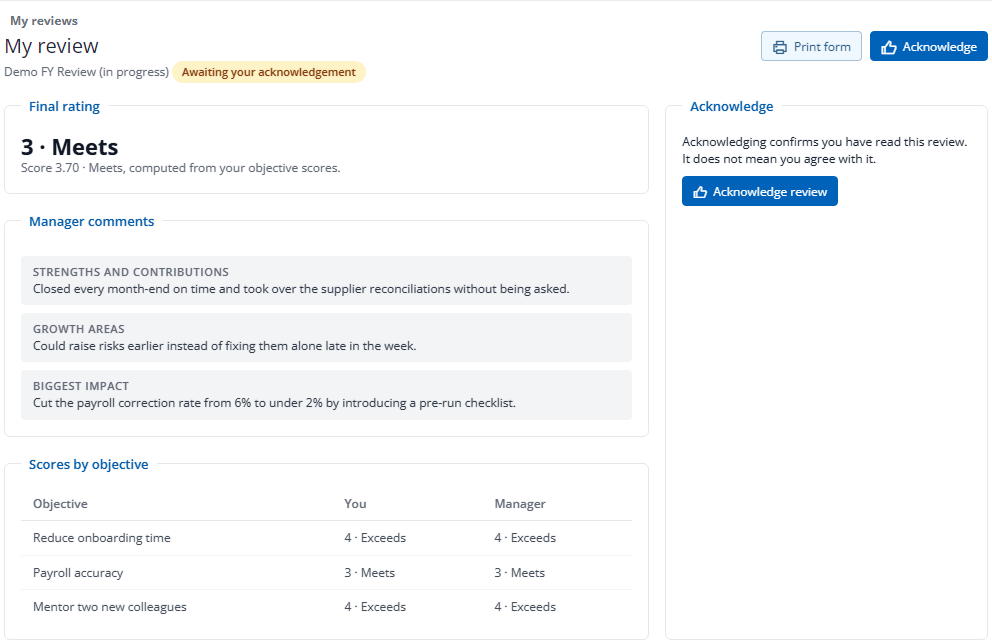
How a review cycle runs
Annual, half-year, quarterly, probation or ad hoc — every cycle follows the same six steps, and every person in it has a status you can see from one console.
- Set it upYour rating scale, your questions, and who is in scope: everyone, a department, a location, a group or named people. Goals, competencies and the self review are weighted, and the weights must add up to 100.
- Check every managerBefore launch, the cycle lists anyone in scope with no usable manager. You set one or exclude the person with a reason. A cycle with a gap in its reporting lines does not launch.
- Self and manager reviewThe employee writes theirs; the manager writes theirs with the employee’s answer shown under each question. Drafts stay private until they are submitted, and reminders go out before each due date and again when a review is overdue.
- ShareThe manager checks the final rating and comment, then shares. The score is computed from the goal ratings and the weights; a different final rating needs a reason.
- AcknowledgeThe employee confirms they have read the review. That is all it confirms. It is not agreement, and the screen tells them so.
- LockHR locks the cycle and nothing changes after that. Each submit, share, acknowledgement and lock keeps a fixed copy of the review as it stood.
- The console.
- Self and manager reviews submitted, shared, acknowledged and overdue, per cycle, with one row per person. From a row HR opens the full review, extends a due date, reopens a submitted review, shares on the manager’s behalf or hands the review to another manager. Every override needs a reason, and the reason is kept.
- When people move.
- If a manager or employee leaves, or a reporting line changes mid-cycle, the review is flagged for a decision rather than left to stall: keep it, reassign it, reissue it, or close it with an exception.
- Your own review.
- Nobody can share, reopen or close their own review, HR rights or not.
Goals that get checked on during the year
A goal set written in January and opened again in December is a formality. Check-ins are what make it a record of the year.
- Three kinds of goal.
- A simple goal, an objective with key results, or a measured target with a reading. Each carries a weight and a due date.
- Check-ins.
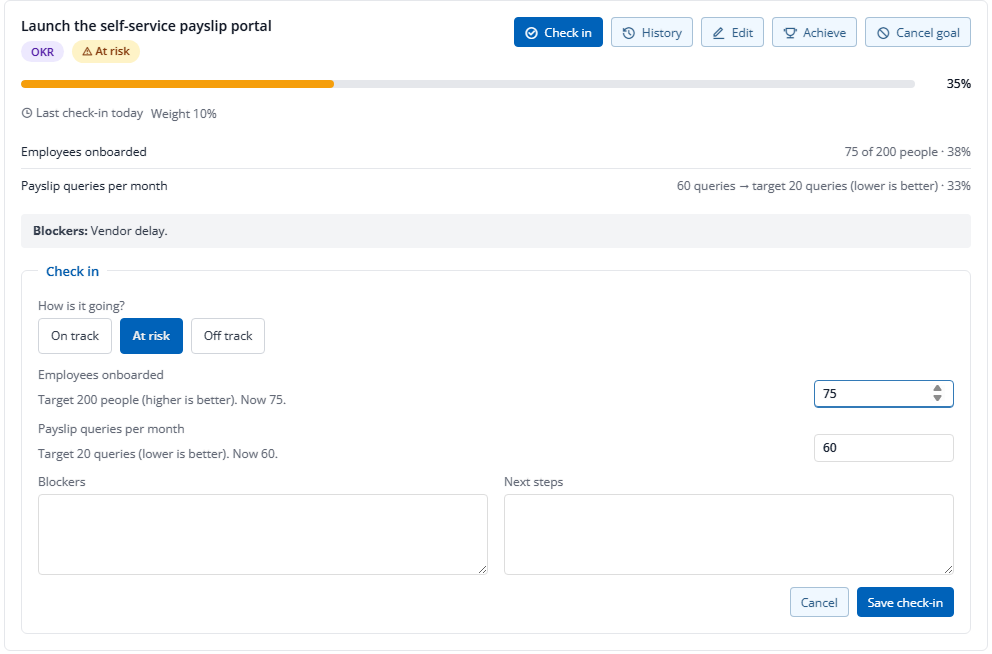
- On track, at risk or off track, the latest progress or reading, next steps and blockers. A goal with no check-in for fourteen days moves to the top of the employee’s list.
- The manager’s view.
- Team goals at risk, off track or with no recent check-in appear on the manager’s own Performance home, with a way to ask for a check-in.
- Frozen at review.
- Once the manager submits the review, the goal set for that cycle stops changing. Check-ins carry on.
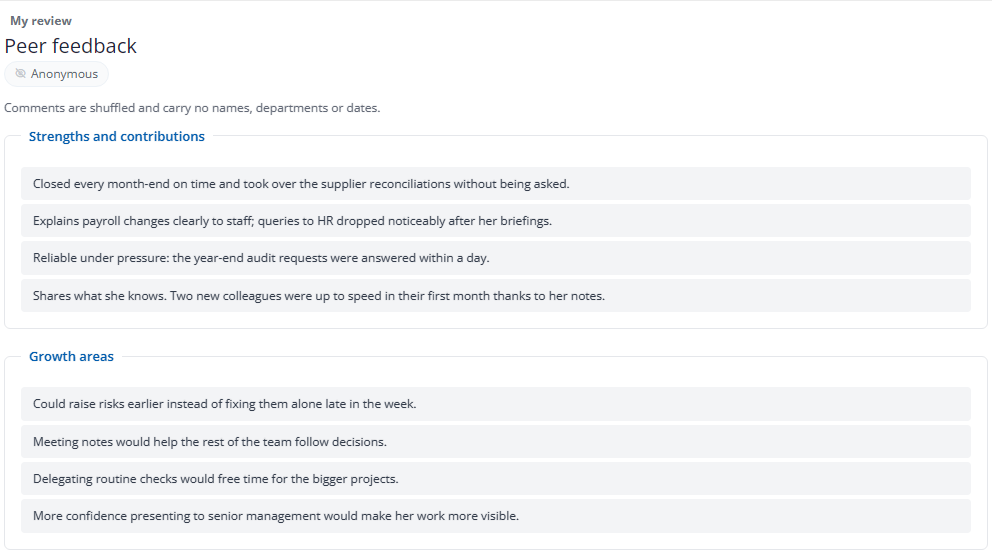
Peer feedback the employee can read without names
Colleagues see things a manager does not. They will only write them down if they trust how the comments are shown, so the rules are fixed in the product rather than left to goodwill.
- Chosen, then approved.
- The employee picks colleagues — never their manager or their own reports — and the manager approves or changes the picks.
- A minimum before anything shows.
- A question’s comments reach the employee only once enough peers have answered it: four by default, never fewer than three. Below that, the manager is told to summarise the feedback in their own words.
- Who sees names.
- The employee never does. Comments are shuffled and carry no names, departments or dates. Managers see them without names unless HR switches names on for the cycle. HR always sees who wrote what.
- Comments, not scores.
- Peers give no ratings, their comments carry no weight in the score, and a review can be shared even if some peers have not answered.
Probation reviews, with the outcome recorded
A probation cycle runs like any other review, plus the decision you actually need at the end of it — and a form your people can sign.
- The outcome.
- Confirm, extend to a new end date, or recommend not to confirm, with a note only HR can read. A probation cycle cannot be locked while anyone shared in it has no outcome.
- The letters.
- The outcomes export as one row per person for a mail merge into your confirmation letters. Notes and ratings stay out of the file.
- The signed form.
- A printable appraisal form with both reviews, the goals, the final rating, the outcome and blank signature lines for the employee, the manager and HR. It never shows peer feedback, calibration or HR notes.
- Where it stops.
- Extending probation records the recommendation and the new date. It does not change the employee record; you update the probation date there yourself.
Calibration before anyone is told
One manager’s “meets” is another’s “exceeds”. Switch calibration on for a cycle and no review in it is shared until the ratings have been compared across teams.
- A session.
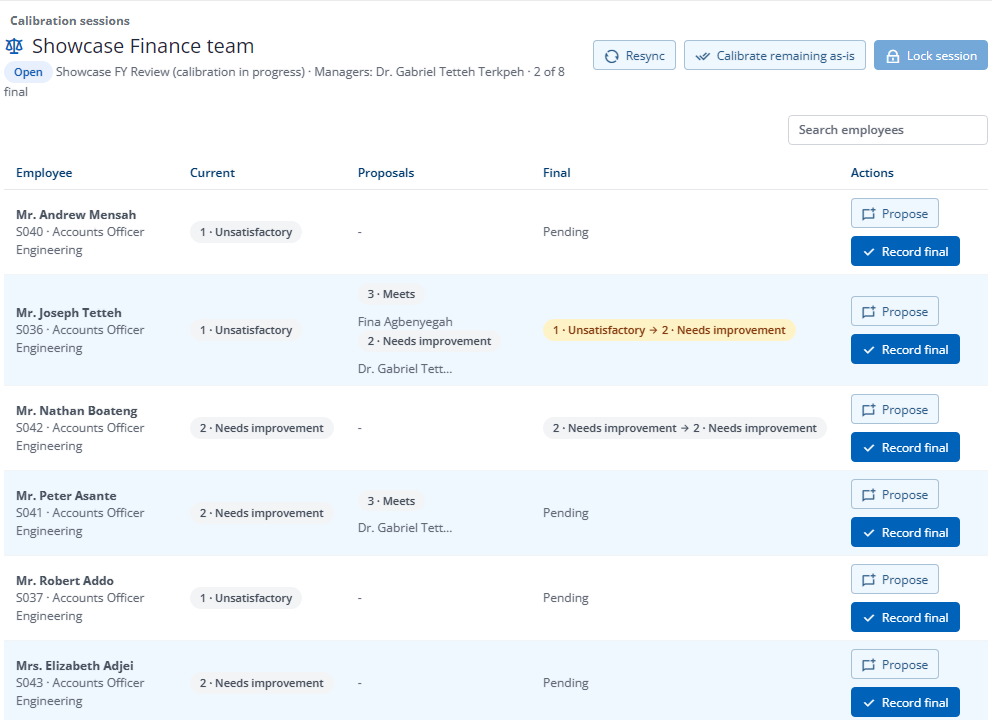
- HR picks the scope — everyone, some departments or some managers’ teams — and invites managers to propose changes. Each proposal needs a reason. The facilitator records the final rating for each person and locks the session, and the changes apply in one step.
- Who sees what.
- Proposals and reasons stay with the session’s participants and HR. Employees and managers outside it never see them; a changed review simply reads that the rating was confirmed at calibration. A calibrator never sees their own row.
- After sharing.
- HR can still change the final rating alone, with a reason, without reopening the review. The employee is asked to acknowledge again.
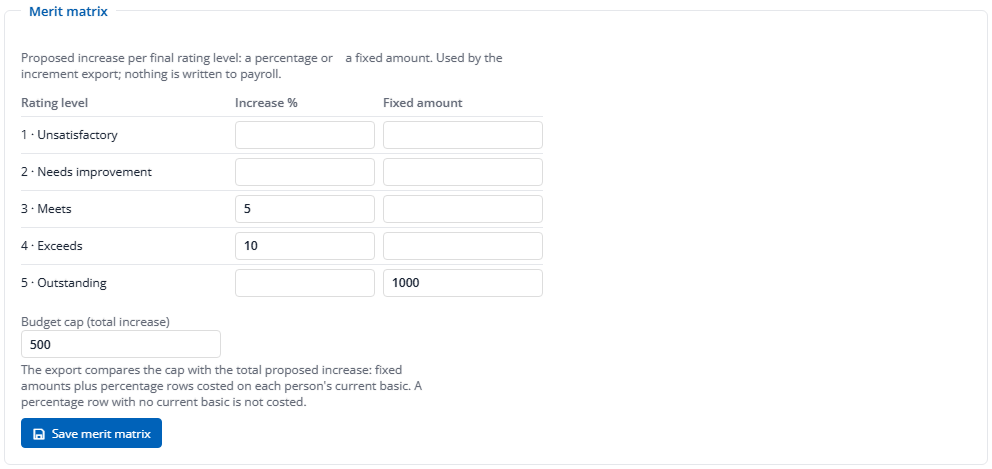
- The merit matrix.
- For each rating level, a percentage increase or a fixed amount, with an optional budget cap for the cycle.
- The increment export.
- Once the cycle is locked, a spreadsheet with one row per person: the final rating, whether it was calibrated, the proposed increase, current basic and new basic, and the total against the cap at the foot.
- Pay stays a separate decision.
- Nothing is written to payroll. You apply the increases in the pay run yourself, from the file, when you have approved them.
Improvement plans, tied to the disciplinary record
A performance improvement plan is usually agreed in a disciplinary process and then tracked nowhere. Here the plan’s objectives become goals the employee and manager check in against, and the case stays where it belongs.
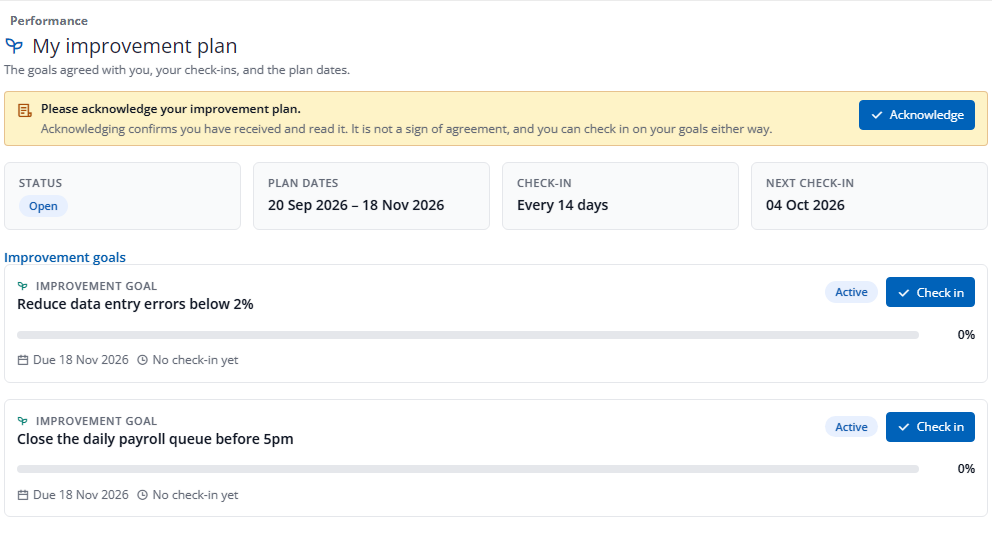
- Started from the case.
- HR opens an approved improvement plan action in Disciplinary and creates the plan from it: the objectives become goals, with a check-in every seven, fourteen or thirty days.
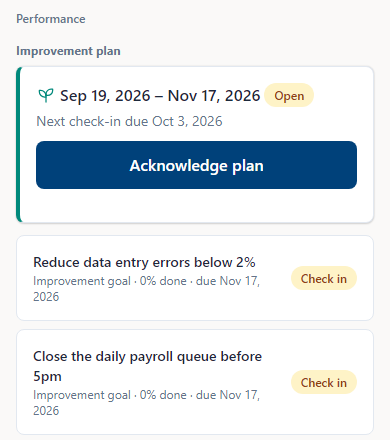
- Acknowledged, then checked on.
- The employee acknowledges the plan — receipt, not agreement — and both the employee and the manager check in on each goal, with reminders when a check-in is due.
- Confidential by design.
- The plan never shows case details. Only the employee, the plan’s manager and HR can open it. When it ends, HR records met or not met with a note the employee and manager do not see.
- Separate from the review.
- Improvement goals carry no weight in the review score.
On the phone, in the inbox, and in the reports
Employees do their part where they already are. HR gets the picture without reading anyone’s review to get it.
- On the phone.
- In the Factura phone app an employee writes a self review, reads and acknowledges their review, checks in on goals, chooses peers, writes peer feedback and follows an improvement plan. Approving peers, calibration and HR work stay on the desktop. See Self-service →
- Notifications.
- Email and phone alerts, immediately or as a daily or weekly digest, with quiet hours for phone alerts. HR sets the company defaults and each employee adjusts their own. A phone alert says only that something is waiting, never who or what.
- Reports.
- A progress dashboard of how many people sit at each stage, plus reports on final ratings, calibration before and after, rater leniency and ratings by department. All counts are hidden for a cycle of fewer than twenty people, and any figure that covers fewer than five.
- The history.
- Changes to cycles, overrides, outcomes, calibration and plans are kept with who made them. Review text and peer comments are deliberately not copied into the history.
Before you ask us
Is Performance part of Factura HRMS or a separate product?
It is a module of Factura HRMS, on the same employee records, reporting lines and permissions. It is new and available now, and it is switched on per company, so you can start it when your review calendar suits you rather than on the day you go live with payroll.
Does a rating change anyone’s pay?
No. The merit matrix produces an increment export, a spreadsheet of proposed increases against current basic — and nothing is written to payroll. Pay changes when you make them in the pay run.
Can an employee find out who wrote their peer feedback?
Not from the product. Comments are shown without names, departments or dates, shuffled, and only once enough peers have answered a question. HR can see who wrote what, so say plainly to your people that the feedback is anonymous to them and to their manager, not to HR.
Can we use our own rating scale and questions?
Yes. You set the levels and their labels, choose whether numbers are shown at all, and write the questions each reviewer answers. A scale or template already used by a running cycle is kept as it was; changes apply to the next cycle.
Does an improvement plan replace the disciplinary process?
No. The disciplinary case remains the record of the case. The plan turns its agreed objectives into goals that the employee and manager check in against, and it never shows the case details.
The rest of Factura HRMS
The same records, the same approvals, the same audit.
- Payroll.
- The monthly cycle, the bank file and the statutory schedules. See Payroll →
- Self-service.
- Where reviews, goals and plans reach the employee’s phone. See Self-service →
- People operations.
- Tasks, disciplinary, separation, training, policy and surveys. See People operations →
- Recruitment.
- Jobs, a careers page, a pipeline board, offers accepted online and a handoff to the employee record. See Recruitment →
- Leave and attendance.
- Entitlement, accrual, balances, liability, work schedules and overtime. See Leave & attendance →
- Workflows and audit.
- Approval chains, permissions, two-factor sign-in and what is kept. See Workflows & audit →
- Analytics.
- Executive summary, cost, variance, liability, workforce and statutory. See Analytics →
- All of it together.
- Back to Factura HRMS →
See a real pay run, end to end
Thirty minutes. We walk a full month — prepare, review, close, and produce the statutory files — and you can stop us anywhere.