
Eight screens, all reading the run the engine already computed.
Not a reporting layer built over a copy of your payroll. Each screen below reads the closed periods themselves, which is why the executive summary, the cost analysis and the statutory reconciliation cannot disagree with each other. It is the detail behind the analytics line on the Factura HRMS page.
What each screen answers
Eight questions, one per screen, and each one a question a finance director or an HR head has actually asked rather than a dashboard tile invented to fill a grid.
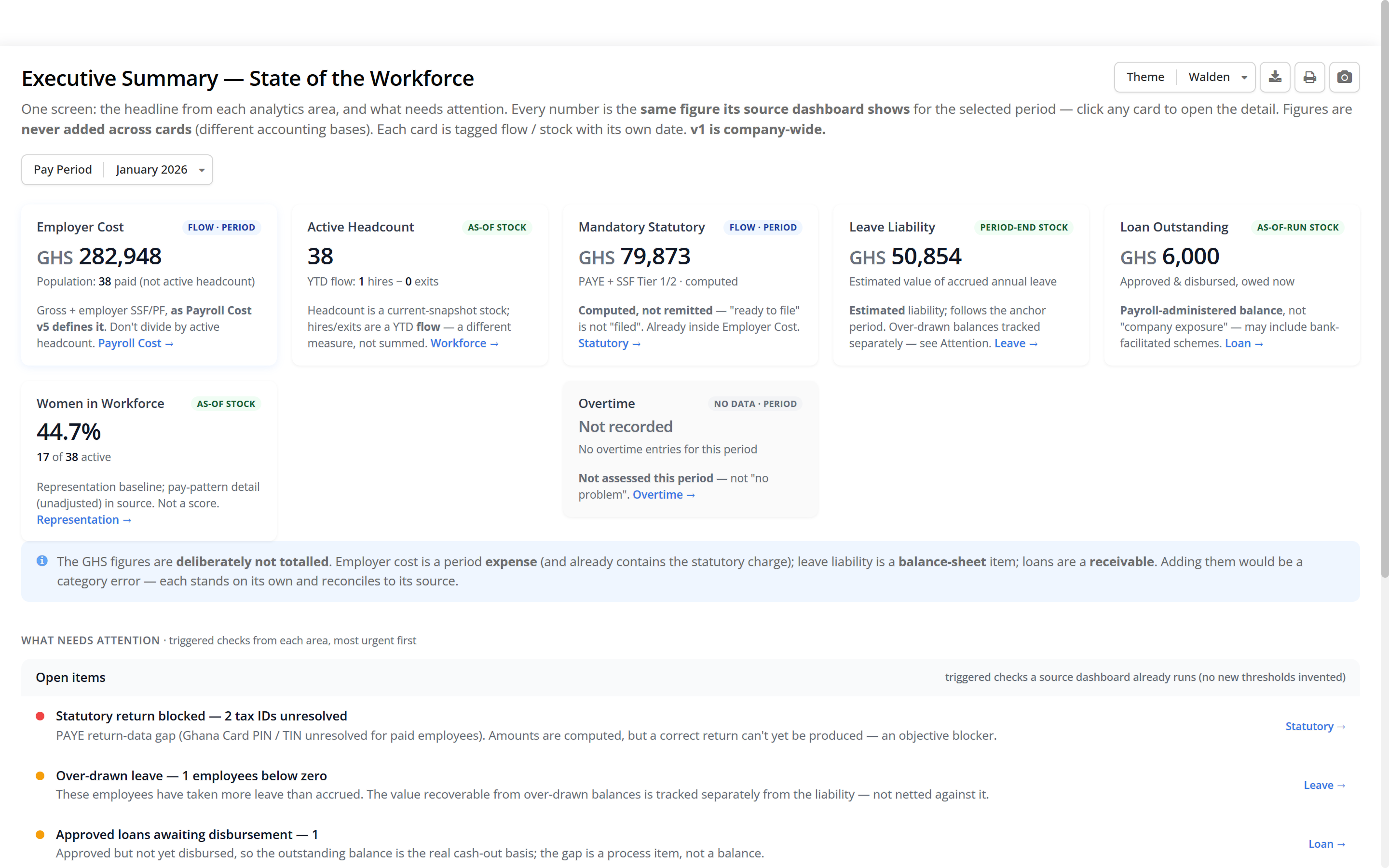
- Executive summary — what did this period look like?
- Employer cost, headcount, mandatory statutory and leave liability for one pay period, with an attention list underneath: unresolved tax IDs, over-drawn leave, an approved loan awaiting disbursement, and an overtime indicator that reads “not assessed” when no hours were posted rather than showing a zero.
- Payroll cost — what are we spending, and where?
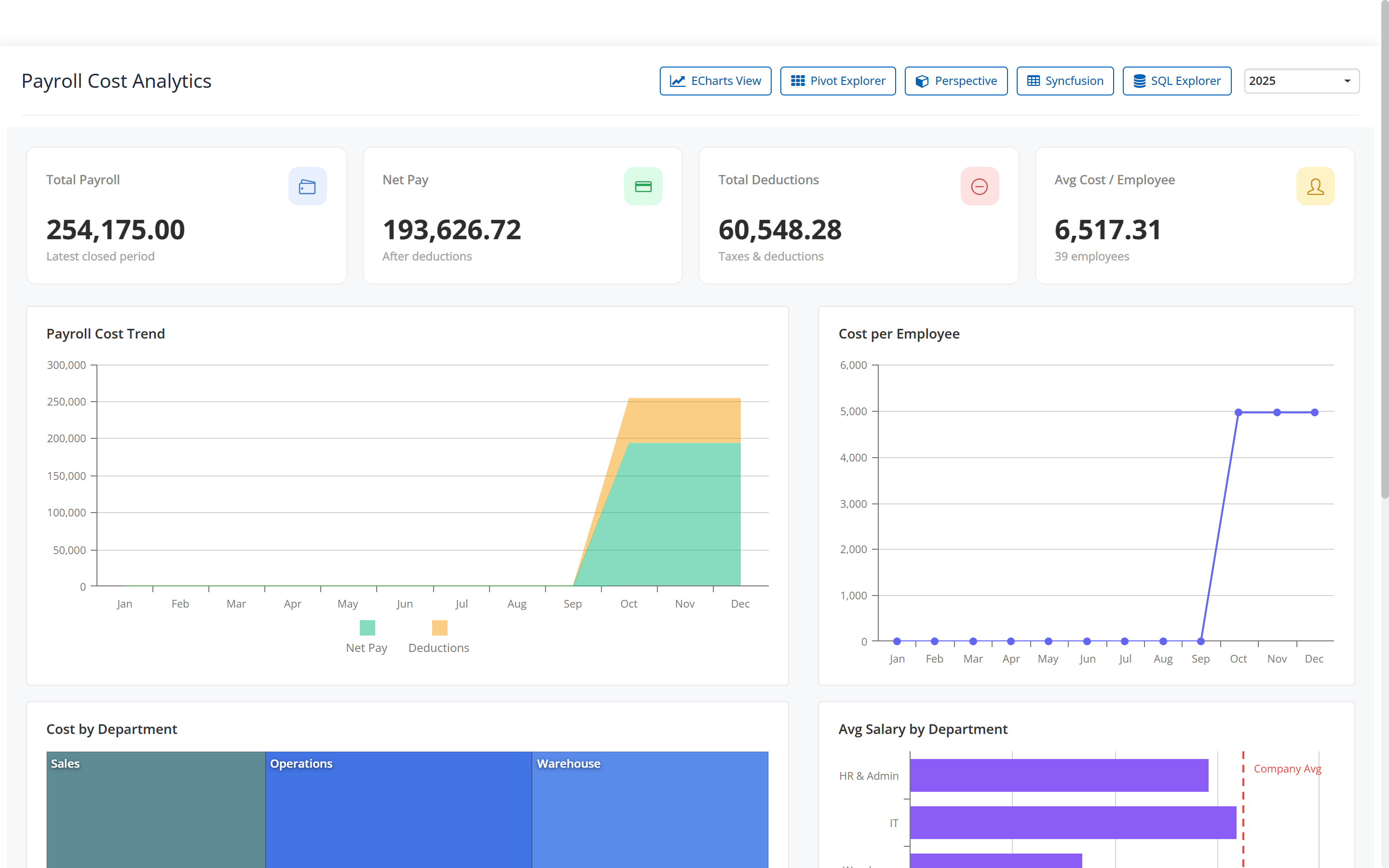
- Total payroll, net pay, total deductions and average cost per employee, by period and by department, with the trend across the periods you have closed.
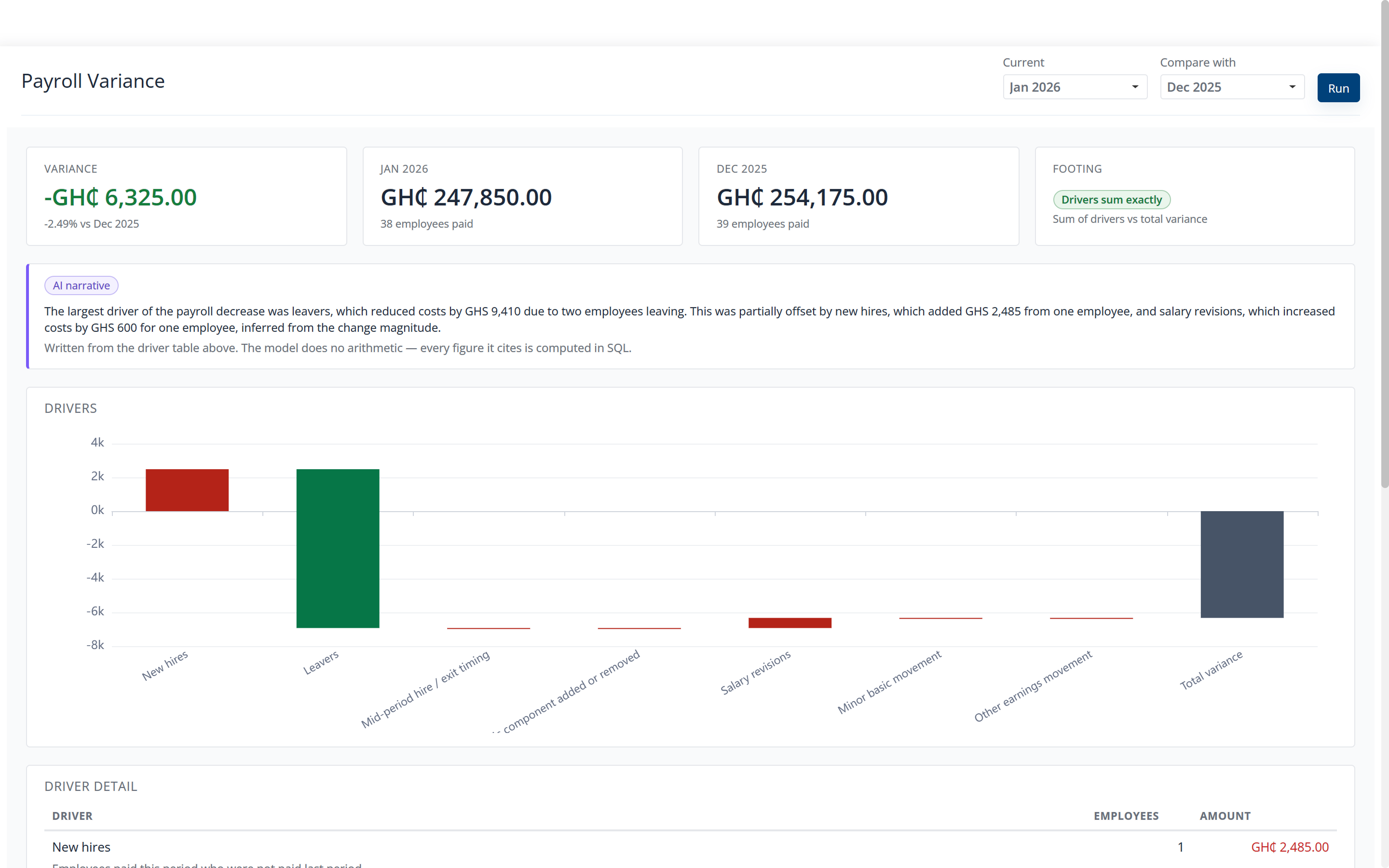
- Variance — why is this month different?
- Two periods compared, the movement, and the drivers behind it.
- Leave balance and liability — what do we owe in days, and what would it cost?
- Opening balance, accrued, used and current balance as a bridge, plus balances by leave type and by department, and the estimated liability reconstructed as at the period you select. More on leave balances →
- Workforce and diversity — who do we employ?
- Headcount composition across the dimensions held on the employee record.
- Statutory reconciliation — does the schedule agree with the run?
- The statutory totals checked back against the closed periods that produced them.
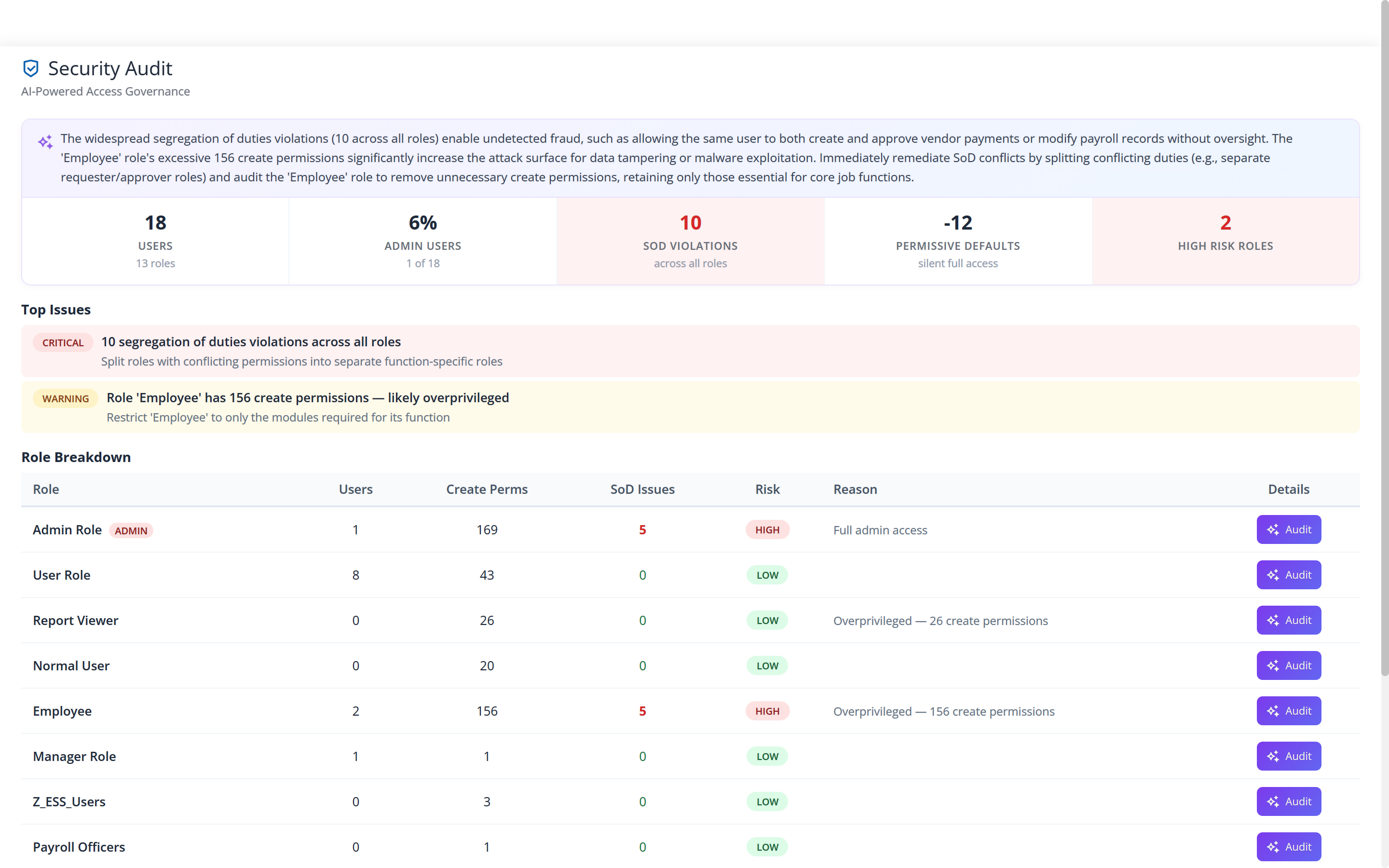
- Security audit — who can do what?
- Rights, administrative share, separation-of-duties findings and the roles carrying the most risk. More on permissions →
- Overtime, exceptions, loan portfolio and data quality.
- Four narrower screens for the teams who live in one of them.
Cost, by period and by department
The figure a board asks for is total employer cost. The figure a manager argues about is their own department’s share of it. Both come off the same closed periods, so the departments add up to the total by construction rather than by reconciliation.
In the demo company below, four closed periods sit at GH¢254,175 of gross for October to December and GH¢247,850 for January, and the payslips issued for each period sum to the register total to the penny.
Variance, and the sentence explaining it
A movement is only useful with its cause attached. The variance screen puts two periods side by side, shows the drivers underneath the movement, and then writes the explanation out in a sentence.
The one screen nobody asks for and everybody needs
Permissions do not go wrong on the day they are set. They go wrong over two years of people joining, moving and covering for each other. Security Audit reads the rights as they actually are now: who holds what, what share of your users carry administrative access, where duties that should be separated are not, and which roles carry the most risk.
Each finding is written out rather than scored, because a sentence naming the conflict is something a director can act on, and “this role can both change a salary and close the run that pays it” is the one that matters in payroll. A risk index is neither.
Before you ask us
Is this a separate reporting database we have to keep in step?
No. The analytics read the closed payroll periods themselves. There is no nightly copy to fall behind, and no reconciliation between the report and the run, because there is only one set of figures.
Does the AI produce any of these numbers?
None of them. Every figure on every screen is computed by the payroll engine. The assistant reads what it produced and writes an explanation in plain language. It does no arithmetic, and it approves, pays and files nothing.
Can we export what we see?
Yes. Any report you can run, you can export, and the payroll journal exports as a file for your accounts. There is no one-button archive of everything — if you need a full extract for a handover or an auditor, ask us and we will tell you what we can produce.
Why does an indicator sometimes say “not assessed”?
Because it could not be assessed. Where no overtime hours were posted for a period, the overtime check says so rather than reporting a zero that reads as “nothing wrong here”. A figure that cannot be computed is more useful marked than guessed.
The rest of Factura HRMS
Where these figures come from.
- Payroll.
- The monthly cycle, the bank file and the statutory schedules. See Payroll →
- Self-service.
- The payslip, the balance and the request, on an employee’s own phone. See Self-service →
- Leave and attendance.
- Entitlement, accrual, balances, liability, work schedules and overtime. See Leave & attendance →
- Workflows and audit.
- Approval chains, permissions, two-factor sign-in and what is kept. See Workflows & audit →
- People operations.
- Tasks, disciplinary, separation, training, policy and surveys. See People operations →
- Performance.
- New: review cycles, goals and check-ins, peer feedback, probation, calibration and improvement plans. See Performance →
- Recruitment.
- New: jobs, a careers page, a pipeline board, offers accepted online and a handoff to the employee record. See Recruitment →
- All of it together.
- Back to Factura HRMS →
See a real pay run, end to end
Thirty minutes. We walk a full month — prepare, review, close, and produce the statutory files — and you can stop us anywhere.