
One set of books, from the ledger to the warehouse floor.
Accounting, sales, purchasing, stock and production in Factura Financials, posting to one ledger, with drill-down from any report to the document that created it.
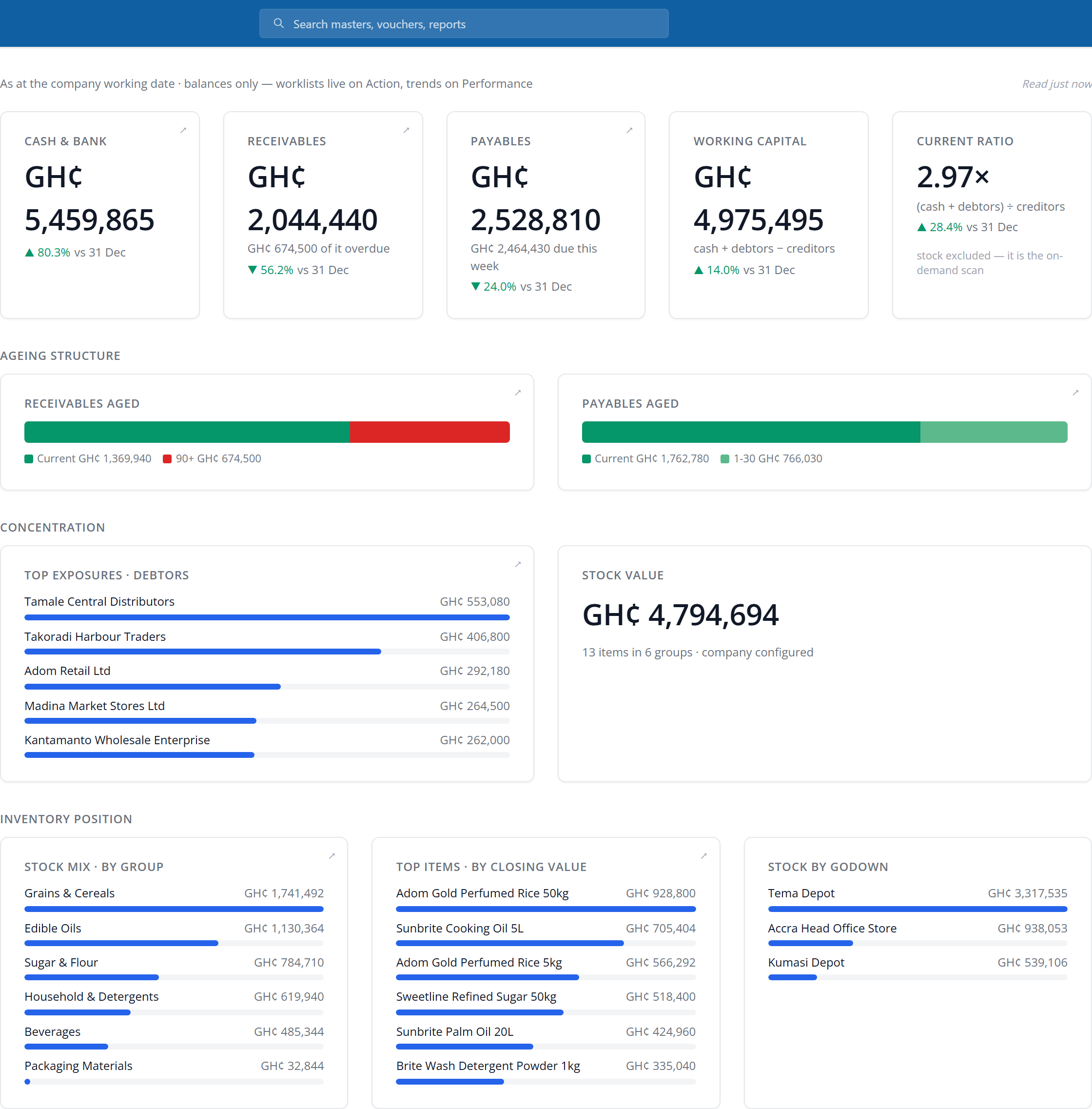
One ledger per company, in the currencies you trade. Factura Financials has kept books since 2004 — today in Ghana, the UAE, Bahrain and Bangladesh, for trading, manufacturing, NGOs, credit societies and oil & gas.


Seven modules that post to the same ledger
Sell something and the stock moves, the receivable opens and the ledger updates in the same action, because there is only one ledger.
General Ledger
The ledger every other module posts into, and the one you close the year on.
- Chart of accounts, journals and 35 voucher types out of the box
- Receivables and payables tracked bill by bill
- Bank reconciliation against the ledger
- Cost centres nested as deep as you need, and project accounting
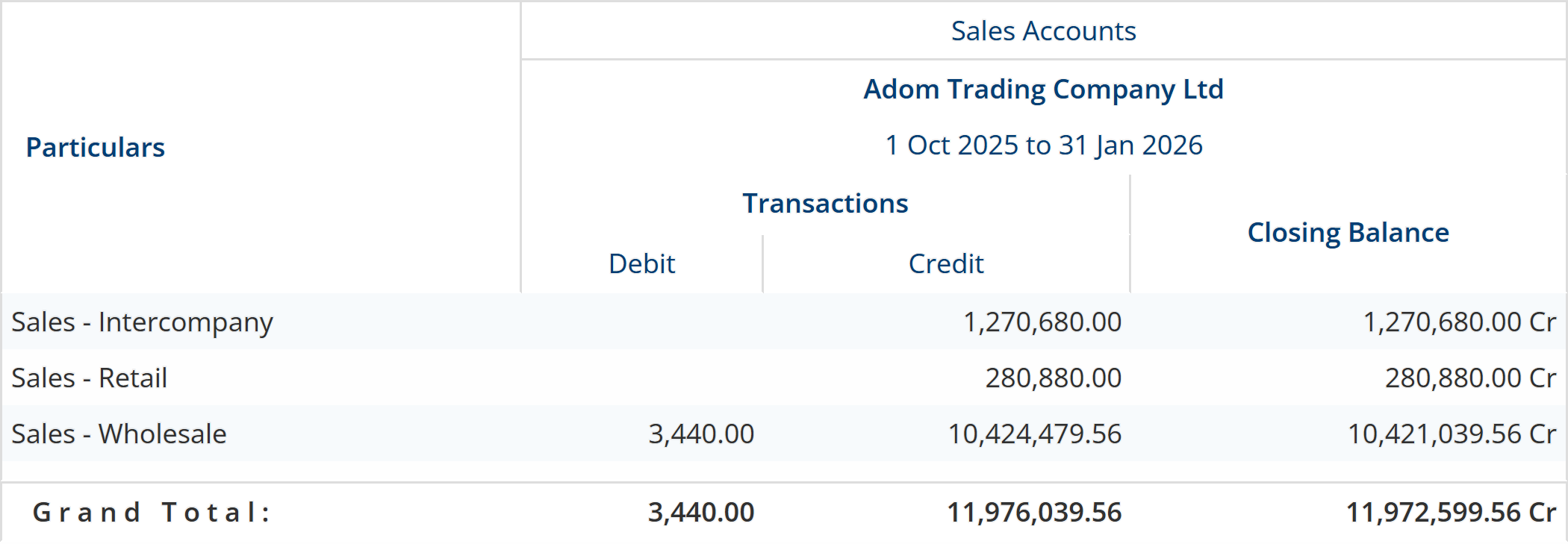
Sales & Invoicing
One chain from enquiry through to the receipt, with the paperwork generated as you go.
- Quotations, sales orders and delivery notes
- Invoices on your own templates, and credit notes
- Point of sale, price levels and dated price lists
- Receivables ageing, returns and commission
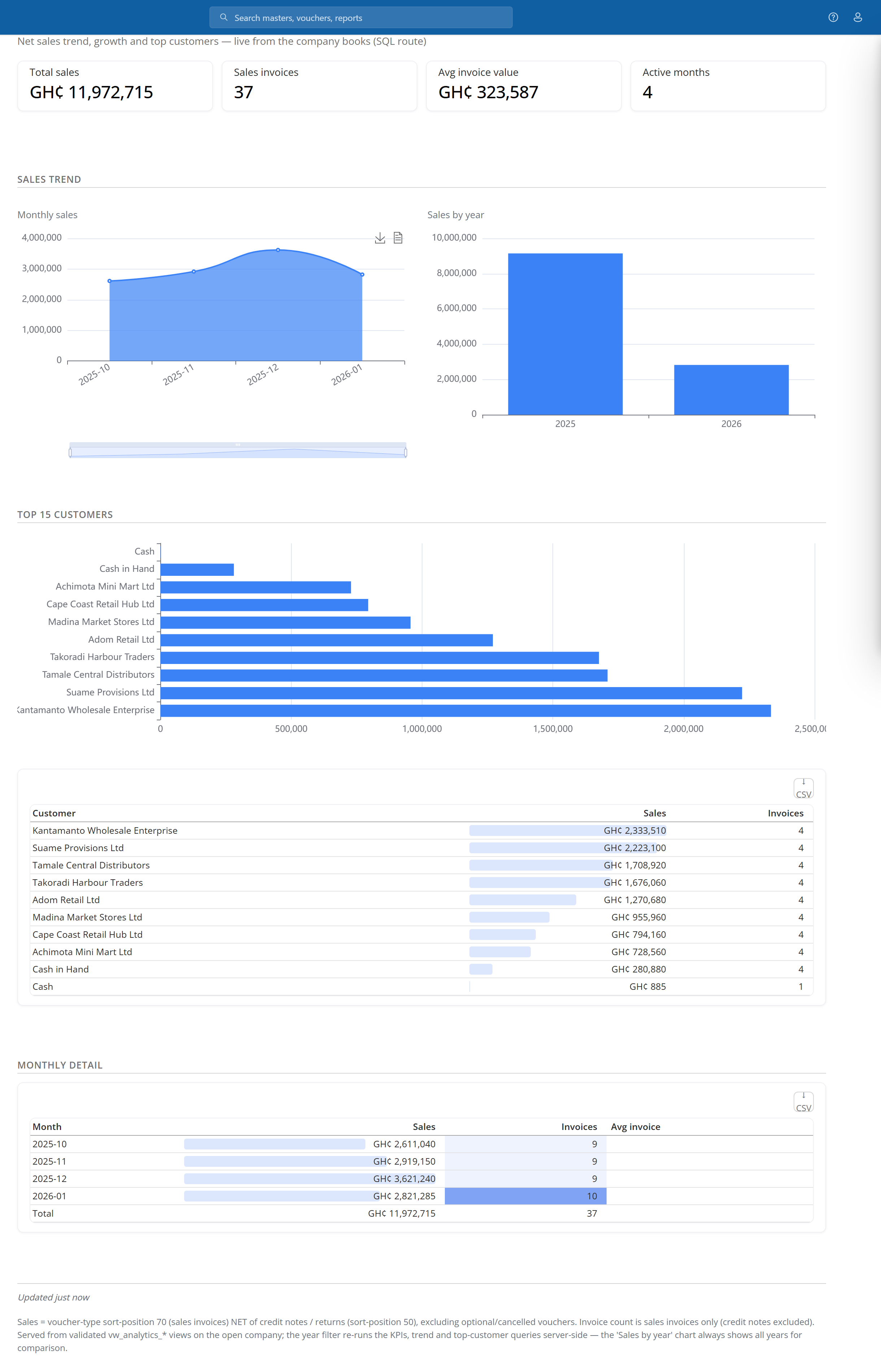
Purchasing
Controlled buying, with the approvals happening before the money is committed.
- Material requests, reorder levels and purchase orders
- Receipt notes, inward quality inspection, additional cost of purchase and returns
- Multi-level approvals on the documents you choose
- Supplier invoices and payables ageing
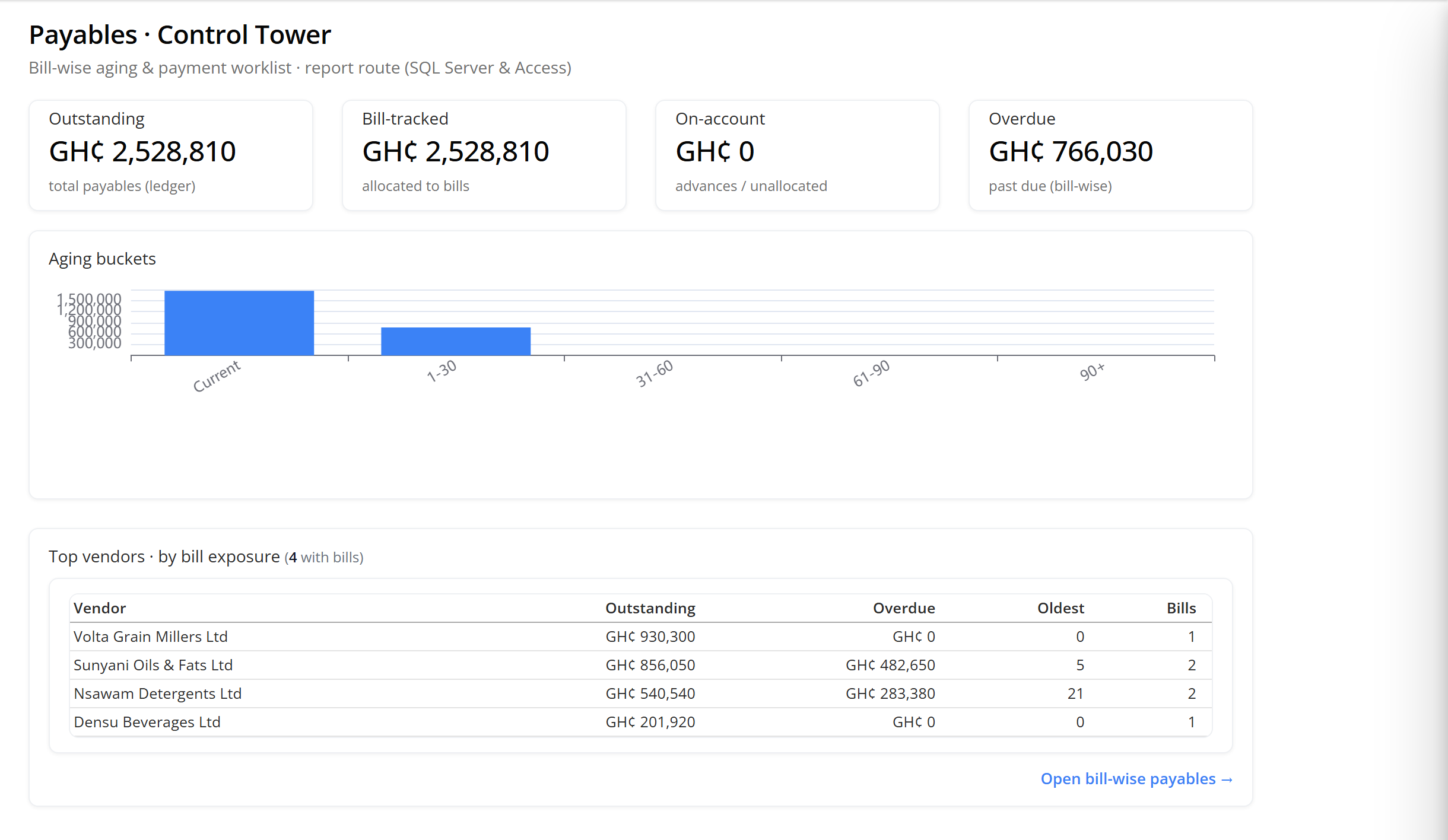
Inventory
Stock you can count and value the same way twice, across every location you operate.
- FIFO, LIFO, weighted average and standard costing
- Multi-location stock, held and valued per location
- Serial and batch tracking, with expiry and date of manufacture
- Movement, fast/slow and profit analysis per item
Manufacturing
Bill of materials through to finished goods, with the material coming off stock as it is consumed.
- Named bills of material per item, and item kits
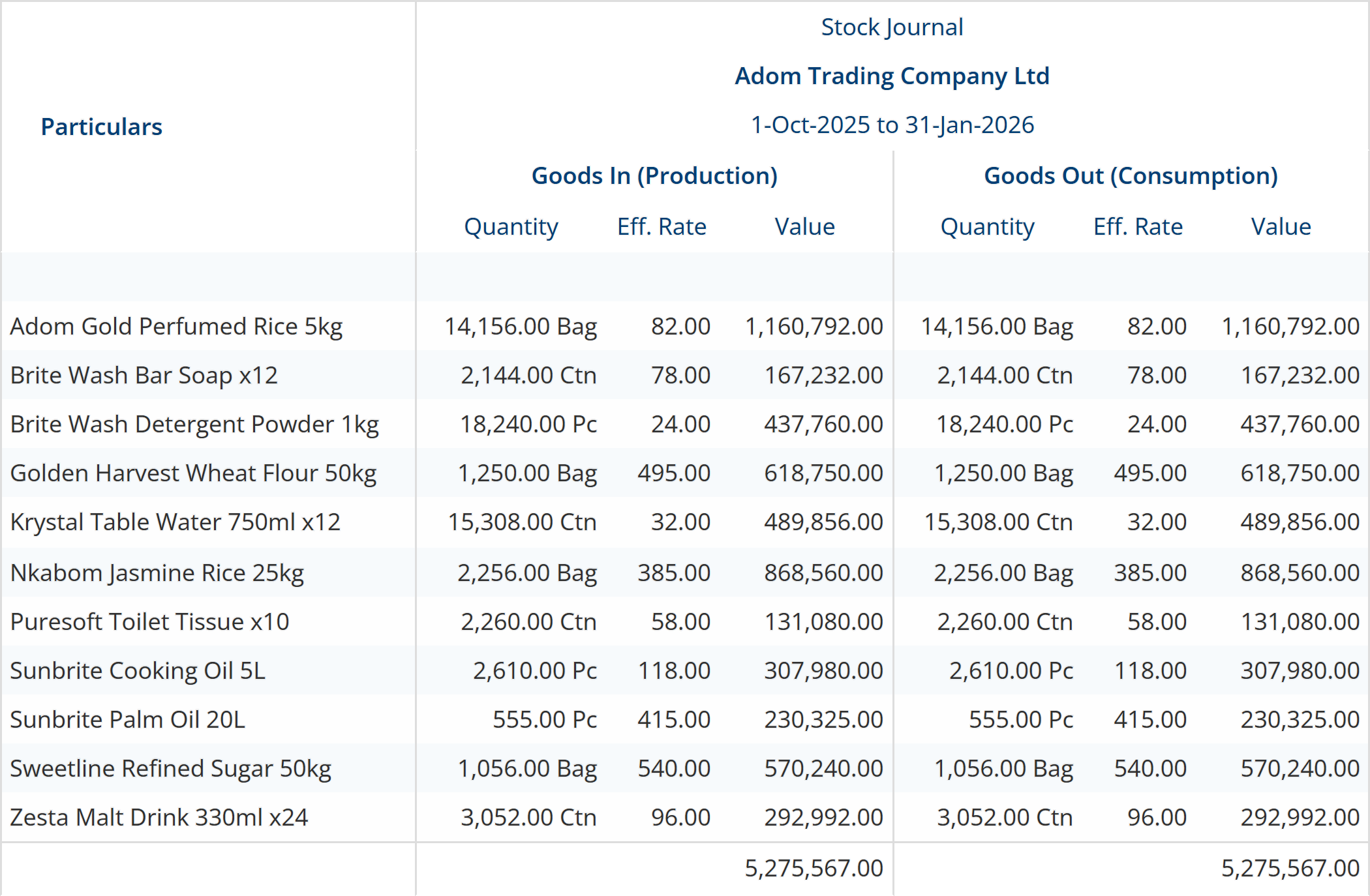
- Stock journal — material out, finished goods in
- Production planning, discrete and mixed-mode runs
- Job costing through cost centres, not a separate module
Fixed Assets
Every asset with its cost, its depreciation and the date it left, on the same ledger as everything else.
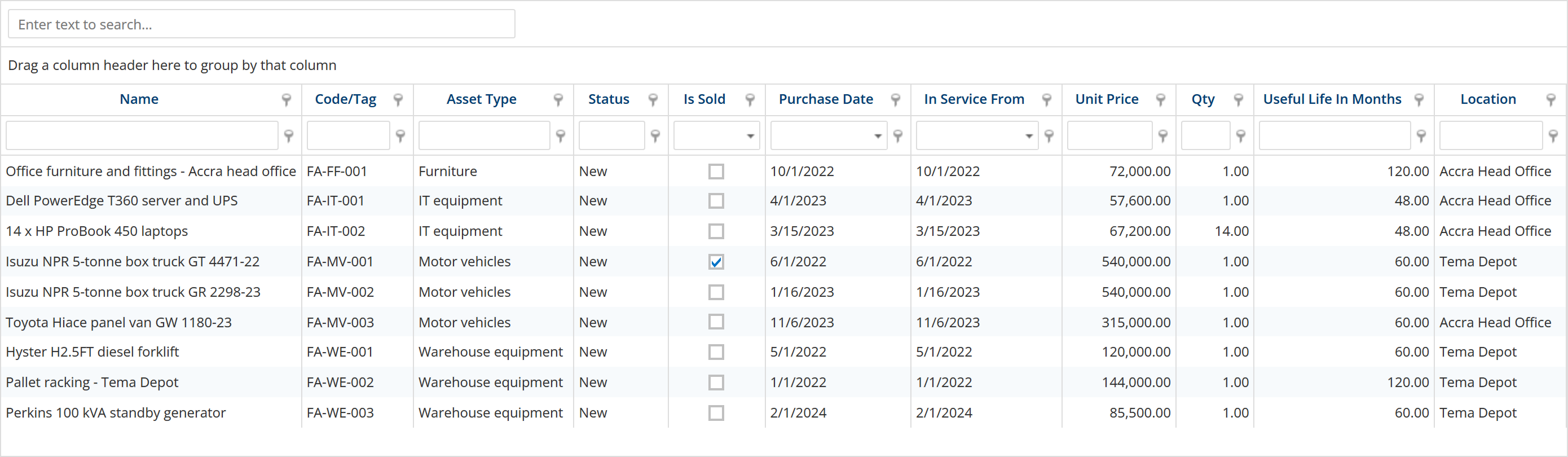
- Asset and asset-type masters, with the ledgers set per type
- Straight line, diminishing value or none, prorated by day count
- Depreciation for any date range, posting only the make-up difference
- Purchase, addition, revaluation and disposal, each its own voucher
Analytics
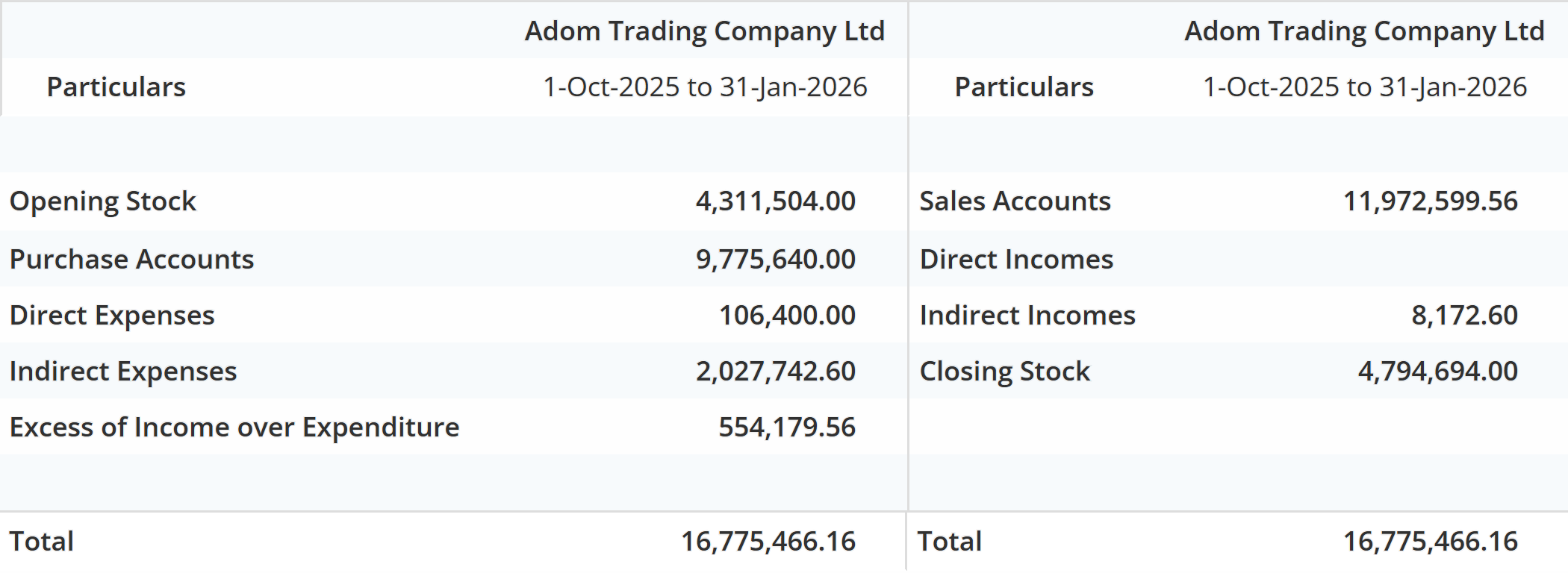
The figures a controller and an owner both need, off the same data, per company, and any figure opens the document behind it. Group totals across your companies — Balance Sheet, P&L and Cash Flow side by side with a combined column — come from Factura Desktop.
- Trial balance, profit & loss, balance sheet
- Receivables and payables ageing, and the cash position
- Budgets, budget vs actual and scenarios
- Over 100 standard reports, each exportable to Excel
One sale, from quotation to trial balance
Each step is a document you can open; each document posts where it should. Month-end is the last two.
- Quotation to orderThe quote becomes a sales order. Customer, prices and terms carry forward.
- DeliveryThe delivery note releases stock from the location it left, and the valuation moves with it.
- InvoiceThe invoice opens the receivable and the ledger entry, against the right cost centre.
- ReconcileBank statements against the ledger, receipts against orders, counts against recorded stock.
- Report and fileThe figure on the trial balance drills back to this invoice. VAT and statutory reports come out in the shape your authority expects.
The same holds for purchasing — requisition, order, receipt note, supplier invoice — and for production, from bill of materials through the stock journal to finished goods.
Stock in the warehouse, and stock on the road
Four things a distributor asks for by name. Each one is a screen, not a promise.
Count your stock one way, value it another
Stock is held and valued per location, so you can read the same stock by group, by item and by depot without re-counting anything. The valuation runs on demand rather than sitting on a figure somebody typed at the start of the month.
See what moved between your depots, and what it was worth
Every transfer is a document, so the movement report shows each item in and out in its own unit, bags, cartons or pieces, at an effective rate and a value, with both sides agreeing. When a depot is short, you can see whether it was sold or sent somewhere else.
The report is the stock movement figure on the Inventory module above. Open the report →
Check stock from the phone, standing in front of the customer
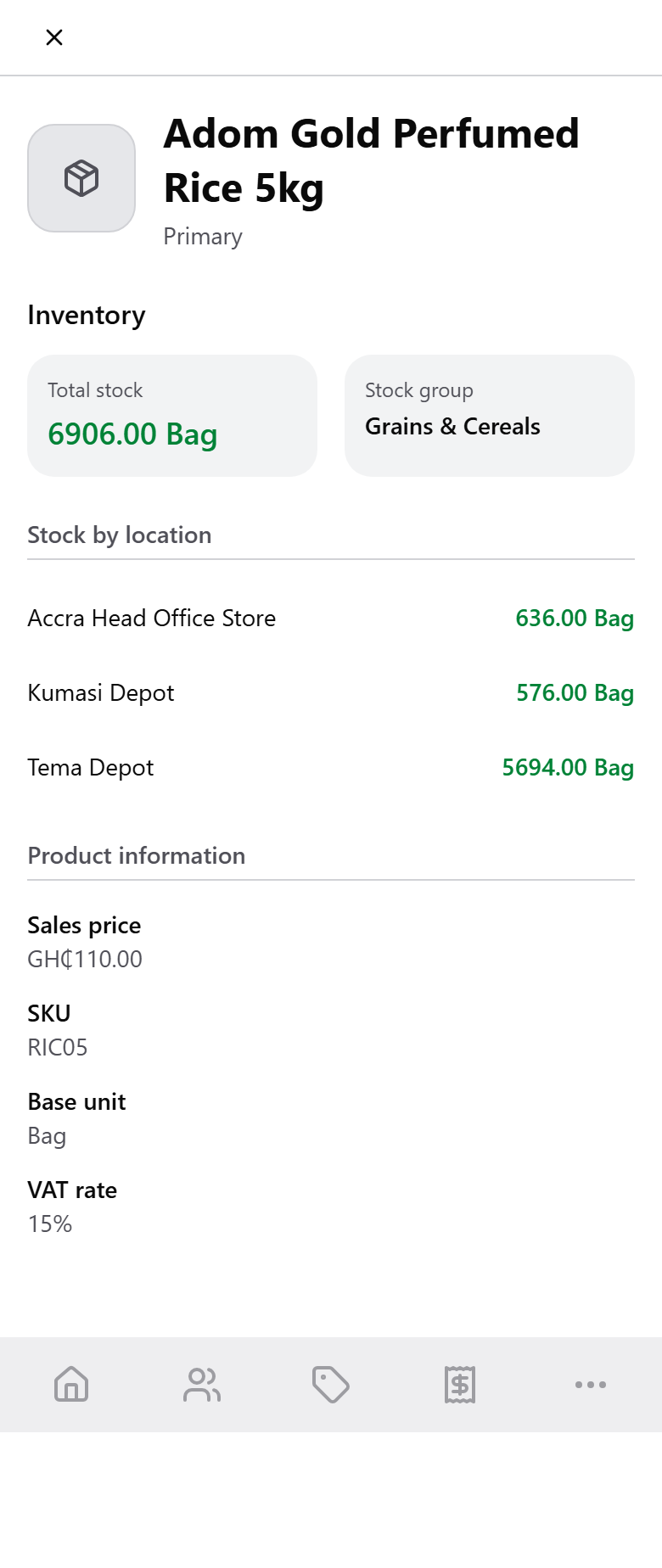
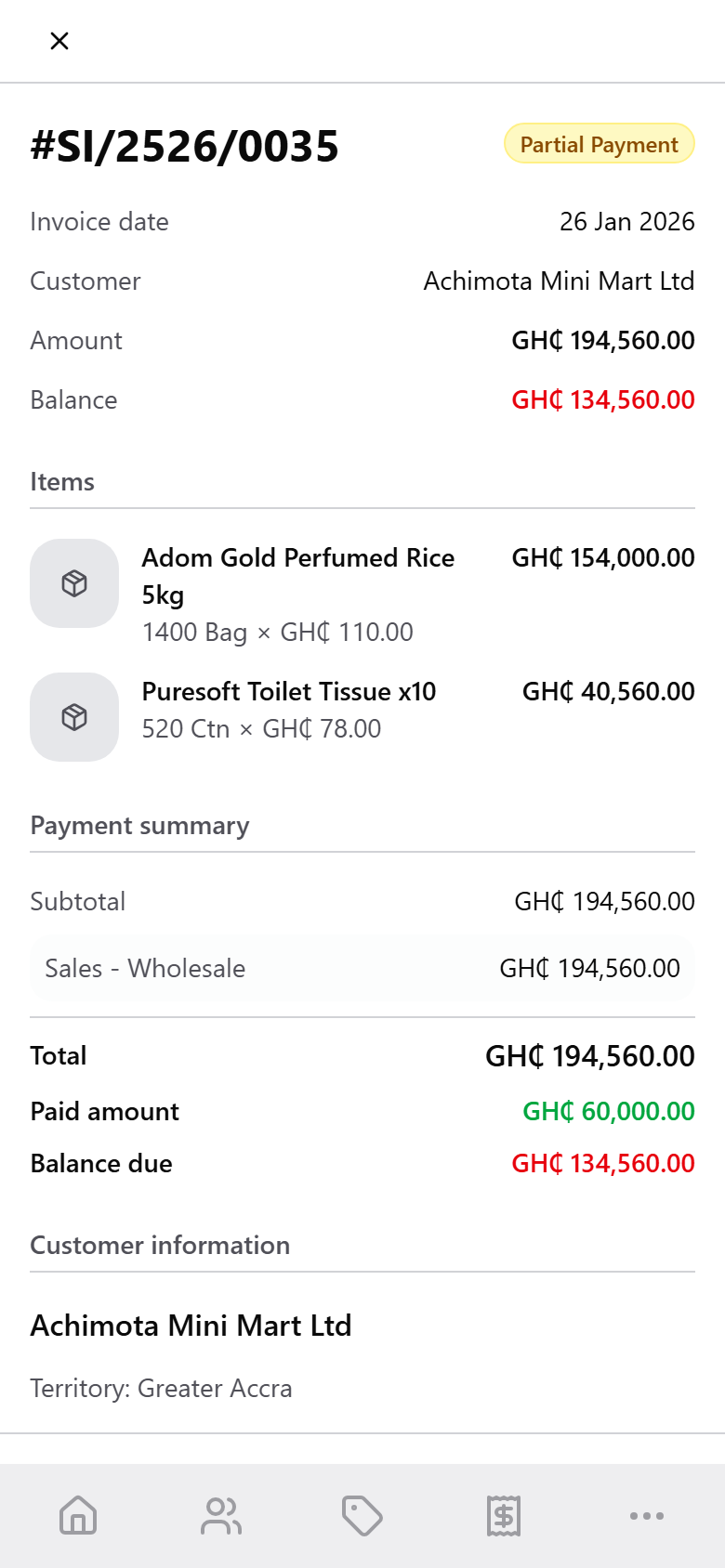
Your sales rep looks up an item and sees what is in each depot, with the selling price and the VAT rate the app will use. No call back to the office to find out whether the order can be filled.
Sell from the field, and have it land in the books
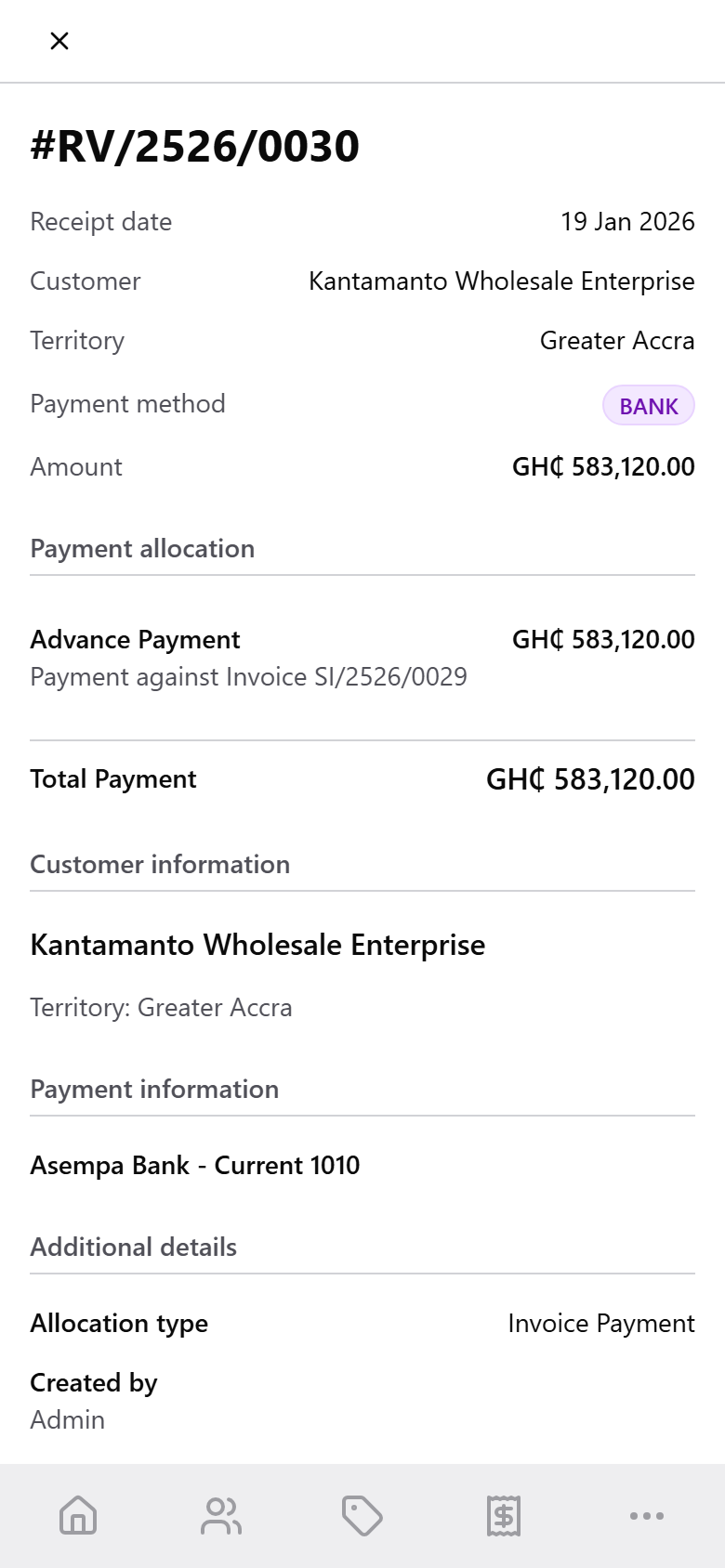
An invoice raised on the round opens the receivable and takes the stock off the depot it was sold from. A collection is applied to the bill it pays and lands in the bank account it went to. The rep needs a connection to save the document; there is no offline entry queue.
Built-in Ghana compliance
What Factura Financials does about Ghanaian tax today, and where it stops. Rows are here only if the product does the thing.
| Item | What it does |
|---|---|
| VAT, 15 % | The standard rate is configured as a tax-inclusive percentage class on the voucher, so VAT is allocated to your VAT ledger as the invoice is entered rather than worked out afterwards. |
| NHIL 2.5 %, GETFund Levy 2.5 % | The same tax-inclusive classes carry the two levies alongside VAT. Each is computed separately and posted to its own ledger, in the buckets the GRA’s E-VAT service expects, and you set which ledger each one lands in. |
| GRA E-VAT signed invoices | Invoices go to the GRA’s VSDC service and come back signed. The SDC identifier, receipt number and QR code print on the invoice — and on the 80 mm thermal receipt in Factura Mobile Sales. |
| Withholding tax | Captured on the payment voucher against a withholding-tax ledger, so the deduction is on the books and in the supplier’s balance. It does not produce a WHT certificate or file a WHT return — that part stays with you. |
| VAT return | A boxed return report off the ledger: VAT on sales and outputs, total purchases, VAT reclaimed on purchases, acquisitions and supplies. The NHIL and GETFund split is not on this return; it comes from the E-VAT records. |
Need the VAT and levies on a figure before you raise the invoice? Use the Ghana VAT & levies calculator →
What do VAT and the levies add to that invoice?
Type an amount and see VAT, NHIL and the GETFund Levy on their own lines. No signup.
Opens the full calculator with your figure, inclusive or exclusive. For what Factura Financials does with each levy, see sales and invoicing.
Multi-company, multi-currency, country-specific tax
Groups, foreign currency, projects — and the paperwork that comes with them.
Compliant in four countries today — Ghana, the UAE, Bahrain and Bangladesh — with VAT, statutory report formats and a local chart of accounts in each. The ledger, stock and production run wherever you trade.
Not on the list? Ask us. Most of these country packs exist because a customer asked for one. That is how the list grew, and it is how it grows next.
Desktop, web and mobile
Factura Financials runs on the web and on the desktop, with a mobile sales app. Start where your business is; move when you are ready.
- Factura Desktop.
- The original — installed on your own machines, for businesses that keep their books in-house. Hosting is your choice on every platform: on your own servers, or hosted by us.
- Factura Web.
- The same modules in the browser, and where most new customers start. Desktop customers have moved across when they were ready. Qualtek, our implementation partner, moved its clients this way.
- Factura Mobile Sales.
- For the field team: take orders, raise invoices, check stock, record collections and run point of sale from a phone — posting to the same books. See Mobile Sales →
Bring payroll totals into your accounts
If you also run Factura HRMS, month-end payroll arrives as a coded journal rather than a re-keying job.
The pay run closes in Factura HRMS, locked against recalculation, with the input changes behind it on the audit trail. It exports a journal: salaries, statutory liabilities and cost-centre splits, coded to your chart of accounts.
You import it, review it and post it, like any other batch. The journal lands against the right accounts and cost centres, and the payroll figure on your trial balance is the one the pay run closed with.
A planned move to Factura Financials
Three steps, in the same order every time. Nothing switches until the balances agree.
- Bring your balancesChart of accounts, customers, suppliers, opening balances and stock import from Excel. We map it with you.
- Set your structureCost centres, price levels, approval limits and document templates configured to your business.
- Agree the balances, then switchWe agree your opening trial balance against your current books before you move over. A period run in parallel is available where you want it.
Moving in from Tally? See what a Tally XML import actually brings across.
The same controls behind every module
Approvals, rights, record stamps and reporting are the foundation the seven modules sit on — not extras bolted onto one of them.
A document routes through the approvers you set, in the order you set them. Each approver sees what is waiting for them and what they have already cleared, and the daily view carries the count. Purchase orders and payments are the usual candidates.
Rights are set per window: create, alter, delete, print and display, per user. A report screen is its own window, so you can let someone read the trial balance without letting them post to it.
Every master and every voucher carries who created it and who last changed it, with the date and time. That is a stamp on the record, not a field-by-field change history, when you need to know what a figure was made of, the document behind it is the evidence.
Action, Position and Performance views, receivables and payables control towers, bank and general-ledger monitoring, and Ask Books. See the analytics →
There is no customer or supplier self-service portal here. Self-service is a payroll and HR idea, and it lives in the other product.
Everything included
Every module in Factura Financials, in one list.
General Ledger
Chart of accounts, journals, bank reconciliation, cost centres and project accounting.
Sales & Invoicing
Quotations through to receipt, with POS and price lists along the way.
Point of Sale
A web register that posts each sale into the ledger, with shifts, blind counts and mobile-money tenders.
Purchasing
Requisitions, purchase orders and multi-level approvals before money is committed.
Material Requests
One request for a purchase, a godown transfer, an issue or a manufacture, traced through ordering and receiving to what fulfils it.
Inventory
Multi-location stock, costed FIFO, LIFO, weighted average or standard.
Quality Control
Inspection at goods-in, production and dispatch, ending in a disposition that decides if stock is accepted.
Manufacturing
Bills of material through to finished goods and production planning.
Fixed Assets
Asset register, depreciation methods and disposal, each its own voucher.
Analytics & Reports
Trial balance, P&L, balance sheet and over 100 standard reports, exportable to Excel.
Bank Reconciliation
Reconcile bank statements against the ledger, not a separate spreadsheet.
Cost Centres
Nested as deep as you need, on every posting.
Project Accounting
Cost and revenue tracked per project as well as per account.
Multi-Currency
Transact and report in more than one currency, with forex gain and loss in the ledger.
Multi-Company & Group Consolidation
Separate books per entity, with group Balance Sheet, P&L and Cash Flow side by side.
Approval Workflow
Documents route through the approvers you set, in the order you set them.
Budgets & Variance
Budgets, budget vs actual and scenarios, read against the ledger.
From the people running it
We buy for specific jobs, and landed cost matters to us. Freight, duty, and handling go into the cost of the item when we receive it, so our margins on a job are real ones.
We’re consistently amazed by the flexibility and simplicity of Factura. It is now an integral part of the solutions we provide for our client businesses.
I can see what each job is costing while it is still running. Purchases and expenses are tagged to the job when they are entered, so I find out about an overrun in time to do something.
We are a factory, so I need to know what went into production and what came out. Factura ties the materials, the production, and the stock valuation to the same ledger, and the cost of what we produce is not a guess.
Before you ask us
Who is Factura Financials for?
Businesses that keep a full set of books and move stock or make something: trading and distribution, manufacturing, NGOs running donor projects, credit societies, oil & gas. One company or a group of them. If a spreadsheet still covers your accounts, this is more system than you need.
Is this accounting software or an ERP?
Both words fit part of it. The ledger, receivables, payables, fixed assets and reporting are accounting. Sales, purchasing, stock and production are the operations around them, and they post into that same ledger instead of into a second set of books. What it is not is a full ERP: there is no MRP and no CRM, and payroll and HR are a different application. Quality control is there for inspection at receipt, production and dispatch, licensed separately.
How do the modules post to one ledger?
There is one ledger, and every module writes to it through the same posting step. An invoice, a receipt note, a stock journal and a hand-typed journal all become entries the same way, and all use the same bill-by-bill allocation. That is why a figure on the trial balance opens the document that created it, whichever module raised it.
Can it replace Tally?
For the books, yes, and there is an import to get you there: a Tally XML export brings across your chart of accounts, ledgers with their opening balances and bill-wise breakup, cost centres, currencies, stock groups and items, voucher types, budgets and scenarios, and your vouchers. Five things you re-create in Factura instead — TDL customisations, Tally payroll, attachments, historical exchange-rate tables and Tally’s own audit trail. The import page lists all of it →
Can we run more than one company in it?
Yes, that is how most of our multi-company clients use it. Each company is its own database.
Does it handle foreign currency?
Yes — transact, revalue and report in more than one currency.
Desktop or web?
Both are Factura Financials, with the same modules. Most new customers start on Web; Desktop suits businesses that keep their books in-house.
Will it take our payroll?
If you run Factura HRMS, payroll arrives as a coded journal that you import, review and post — they are two separate applications, each with its own login. If your payroll is elsewhere, the same import takes a journal from it.
What about budget control and MRP?
Budgets and budget-vs-actual reporting are in the product. Budget control — blocking spend that breaks a budget — and MRP are on the roadmap, not in the product today. Quality control is shipped, licensed separately. Fixed assets is built and shipping.
How do we pay for it?
We quote in a short call after the demo.
See a month close, end to end
Thirty minutes. Post, reconcile, report, and you can stop us anywhere.