
One ledger, and every figure on it opens the document behind it.
The accounting core of Factura Financials: chart of accounts, journals, cost centres, periods and financial years, and the trial balance, profit & loss and balance sheet that come off them.
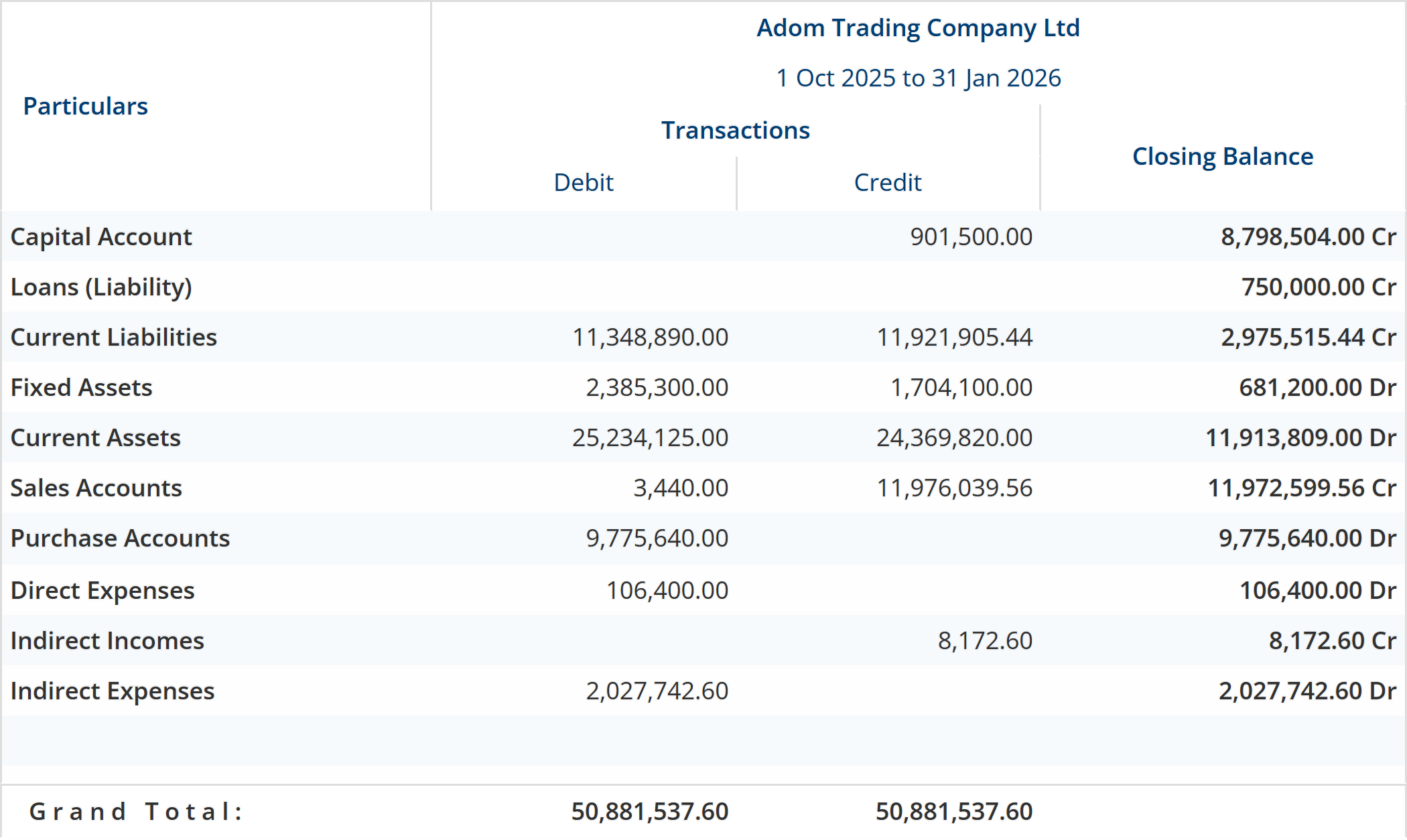
Chart of accounts, groups and cost centres
Your account structure is data, not a fixed template. Groups carry the nature that decides where a balance lands in the statements; each ledger carries the switches that decide how it behaves.
What it does
- Groups with a nature: assets, liabilities, income or expense, and whether the group takes part in gross profit.
- Opening balances per ledger, including in a currency other than your base one.
- Bill-by-bill tracking switched on per ledger, so a balance ages against named bills rather than as one figure.
- Cost centres applicable: a per-ledger switch, not a company-wide one.
- Stock-affecting ledgers flagged, so trading postings move inventory value with them.
- Cost centres nest without a depth limit: a cost centre carries a parent, and Factura checks only that you have not made a loop.
- Cost categories as a master alongside cost centres, and projects as their own master with a parent, a status, start, end and projected-end dates, and a project value.
- Customers and suppliers are ledgers filed under Sundry Debtors and Sundry Creditors; there is no separate party master to keep in step.
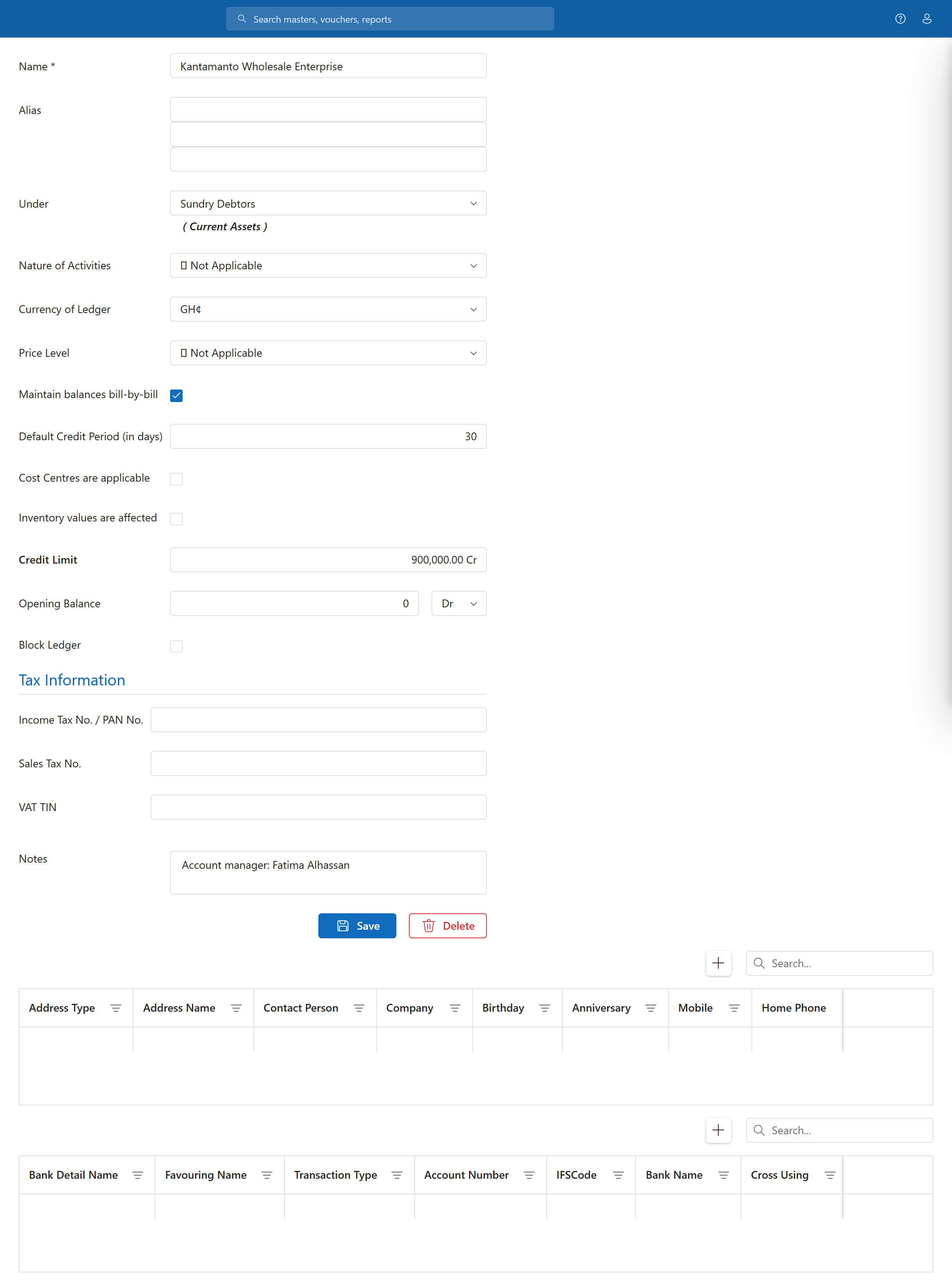
Journals, contra and the day book
There is no fixed list of Payment, Receipt, Journal and Contra to work around. Voucher types are rows you configure, each with its own numbering scheme, and a new company arrives with 35 of them already set up.
What it does
- Configurable voucher types: rename, add, or number them the way your auditor expects.
- One posting pipeline: a journal, a sales invoice and a manufacturing journal all save through the same voucher engine, which is why the registers behind them are the same report filtered differently.
- Day book as the running record of everything entered, by date.
- Ratio analysis and fund flow off the same postings, without a separate extract.
- Bill-wise allocation is generic — the same mechanism tracks a customer bill, a supplier bill and an advance.
Where the boundary is. The general ledger has no per-voucher approval step. The control at this layer is a books-level cut-off date: you close the period, and entries before it are locked for everyone rather than for one voucher at a time. Approvals on the buying side are a separate workflow, described on the Purchasing page.
Companies, currencies and financial years
Each company you keep books for is its own database, so one company’s postings can never be read into another’s trial balance by accident.
What it does
- One company per database: creating a company creates the database behind it, with its own settings row.
- Multi-currency: currencies are a master, a ledger can be kept in one, and the resulting exchange difference is computed into the balance sheet and the profit & loss rather than left for you to journal.
- Financial year start you set: it is a date held against the company, not a fixed 1 January or 1 April.
- Period cut-off at books level, so a closed period stays closed.
- Group totals across your companies — balance sheet, profit & loss and cash flow side by side with a combined column — come from Factura Desktop.
Trial balance, profit & loss and balance sheet
The three statements are read off the same postings in the same run, so they cannot disagree with each other. Over a hundred standard reports ship with the product, in nineteen categories — final accounts, account books, outstandings, inventory books, cost centres, cash and fund flow, VAT, audit and the rest.
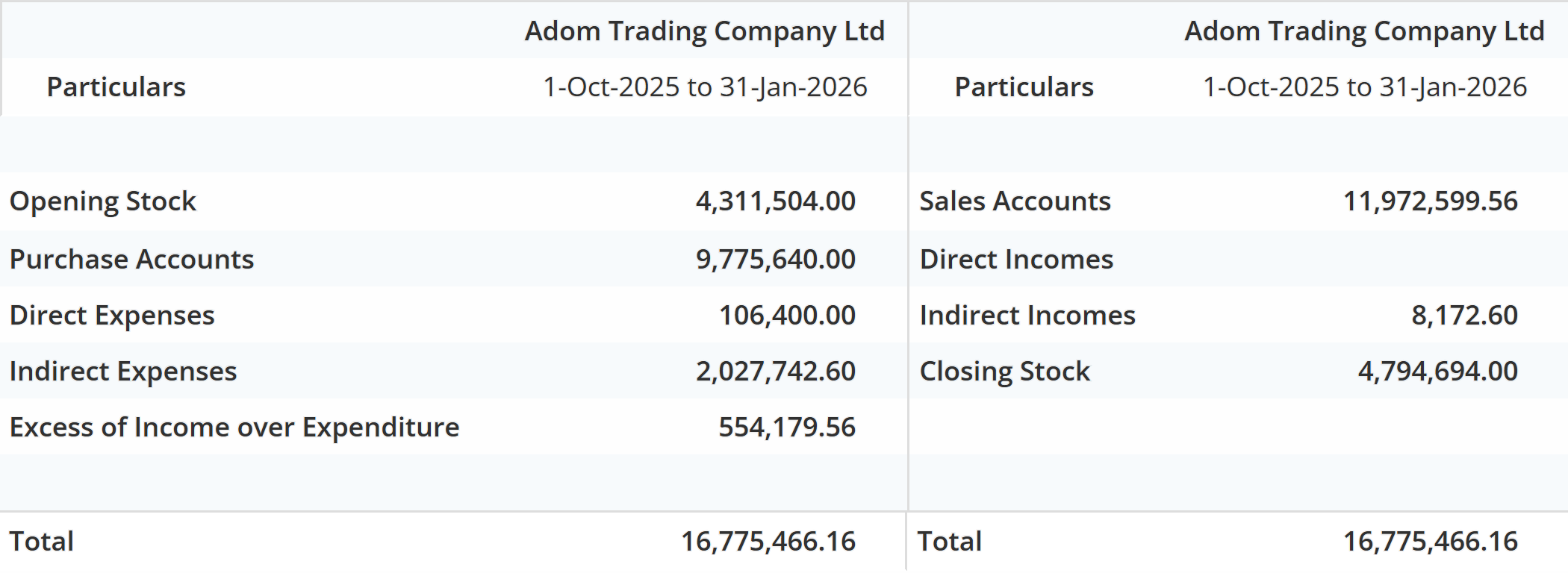
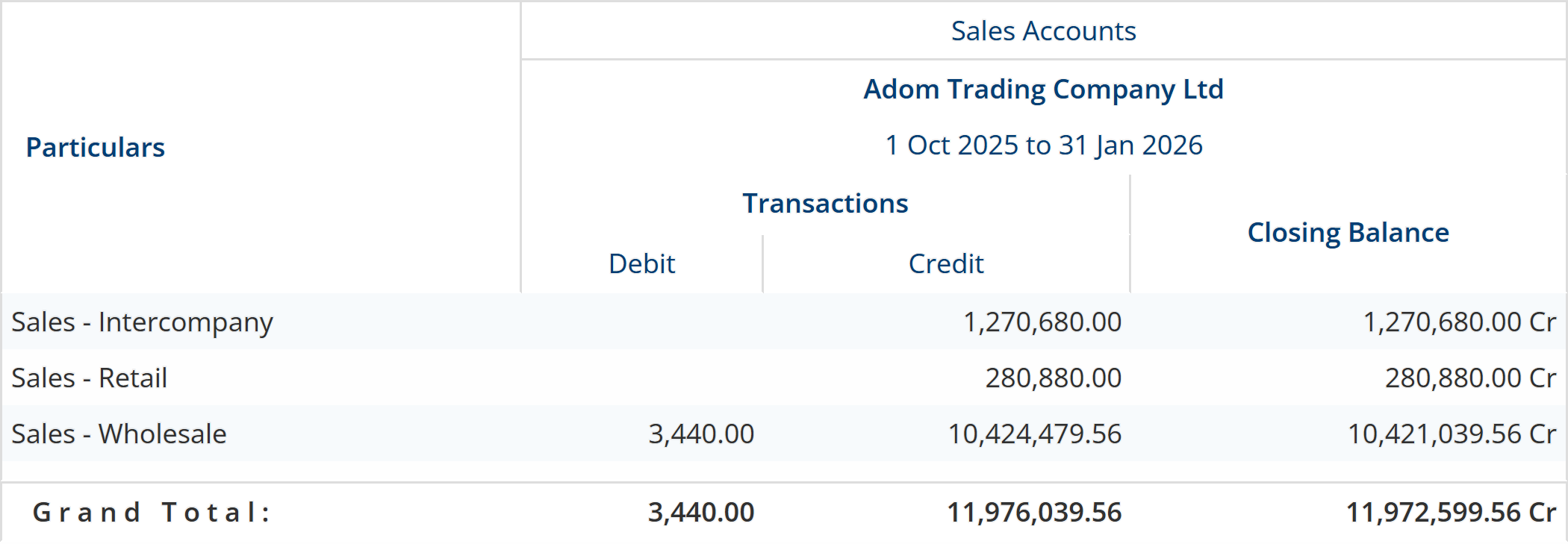
Any figure opens the document behind it
A line on the trial balance is not a picture of a number. Open it and you get the ledgers underneath, still adding to the figure you came from, and open one of those and you reach the voucher a person entered.
Controls: the GL audit monitor and bank reconciliation
Two screens a reviewer reaches for, read straight off the ledger rather than off a checklist someone has to remember to run.
The GL audit monitor
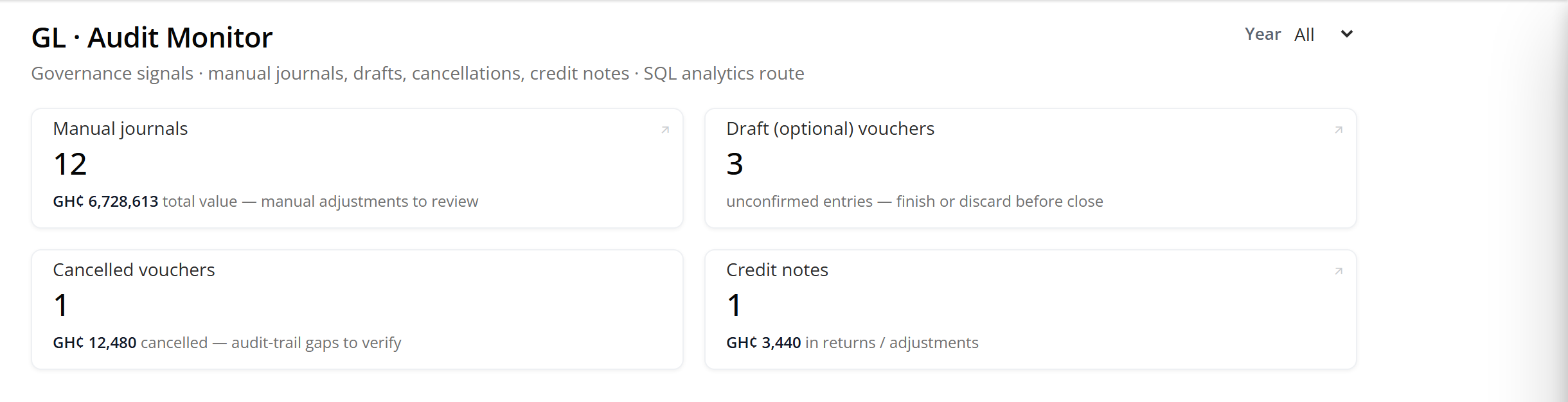
Manual journals, drafts that were never confirmed, cancellations and credit notes — the four kinds of entry a governance review looks for first, counted and valued for the year, each tile linking to the report behind it.
Bank reconciliation
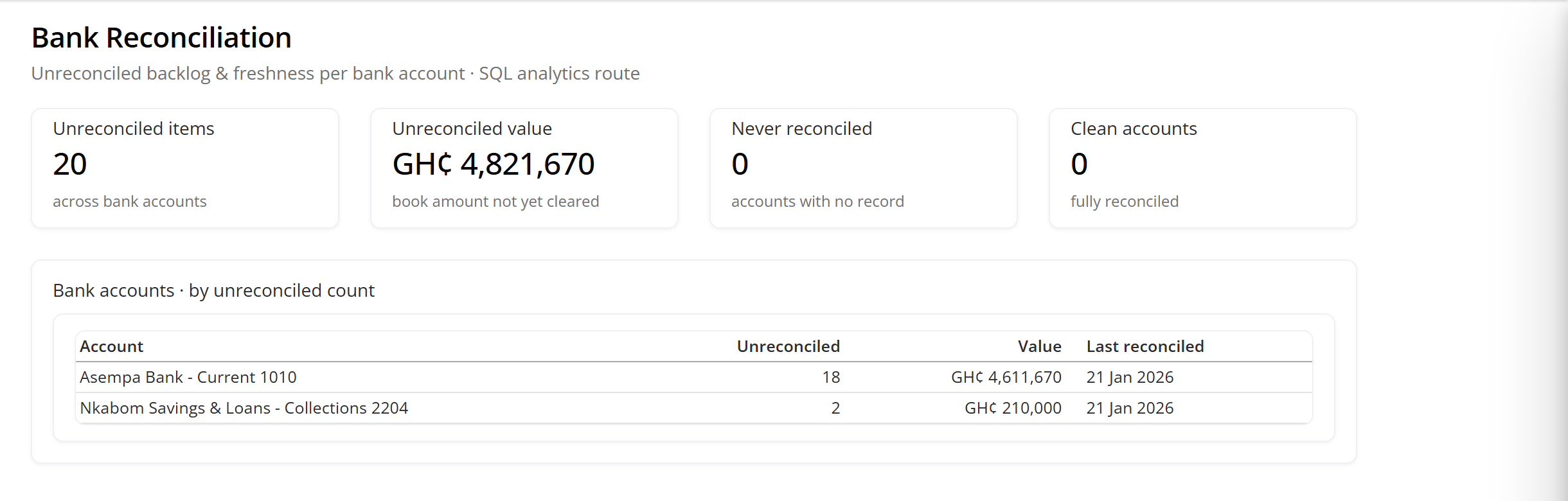
You match items against the ledger by hand, and Factura keeps the score: how many items are unreconciled per account, what they are worth, and how long it has been since that account was last reconciled. There is no statement import, no CSV, no MT940, no bank feed. Say so to your accountant before you plan around it.
Before you ask us
Can we keep more than one company in it?
Yes, and each one is a separate database. You switch between them inside the product. Totals across a group of companies — balance sheet, profit & loss and cash flow side by side with a combined column — come from Factura Desktop.
Can we import a bank statement to reconcile against?
No. Reconciliation is manual matching: you tick items off against the ledger. What Factura adds is the score — unreconciled count and value per account, and the date each account was last reconciled, so a stale account is visible rather than forgotten. If a statement importer matters to you, tell us at the demo and we will say where it sits.
What is the audit trail?
Records carry who created and modified them and when. That is stamping, not a field-by-field change history — Factura does not keep a before-and-after of every edit. The GL audit monitor above covers the entry types a review actually asks about: manual journals, unconfirmed drafts, cancellations and credit notes.
Do vouchers need approval before they post?
Not at the ledger layer. Postings are controlled by user rights — create, alter, delete, print and display, set per screen — and by the books-level period cut-off. There is a real multi-step approver workflow in the product; it is used on the buying side, on the Purchasing page.
The rest of the modules
Everything below posts into the ledger on this page.
- Sales and invoicing.
- Quotations, orders, delivery notes, invoices, receipts and the receivables tower. See Sales & Invoicing →
- Purchasing.
- Purchase orders, receipt notes, supplier invoices, payments and the payables tower. See Purchasing →
- Inventory.
- Stock groups, units, godowns, valuation methods and movement analysis. See Inventory →
- Manufacturing.
- Bills of materials, the manufacturing journal and consumption reporting. See Manufacturing →
- Analytics.
- Action, Position and Performance, the two control towers, and a question answered from your own ledgers. See Analytics →
- What you own.
- Assets depreciate into the ledgers their category names, and the register’s net book value is the Fixed Assets line on the trial balance. See Fixed Assets →
- All of it together.
- Back to Factura Financials →
See a month close, end to end
Thirty minutes. Post, reconcile, report — and you can stop us anywhere.