
You decide who may approve and who may see. The system keeps the record of what was saved.
Payroll is the most sensitive data most companies hold. This page sets out the four controls around it, approval chains, permissions, sign-in, and the record of what changed, including where each one stops. It is the detail behind the platform block on the Factura HRMS page.
How an approval chain resolves
A chain is configured per request type, per company, at one level or several. What makes it workable in a company that changes shape is that an approver need not be a named person: the chain resolves in a fixed order, and falls back cleanly when the first answer is empty.
- A named approverThe explicit answer, where a specific person owns the decision.
- A designationWhoever currently holds the role, so a promotion does not orphan a workflow.
- The person this employee reports toRead off the employee record.
- The department managerThe last fallback before the chain admits it has nobody.
- No approvers setIf none of the four resolves, the request says so instead of silently sitting somewhere. A workflow with nowhere to go is a configuration problem, and it should look like one.
The engine enforces that whoever presses approve is the assigned approver at the request’s current level. Approval is not an administrative power — a user with every right in the product still cannot approve at a level they are not on. What the engine does not do is compare requester against approver, so keeping a person out of their own chain is a property of the chain you configure rather than of the engine. We set that up with you rather than leave it to a default.
What travels with a request
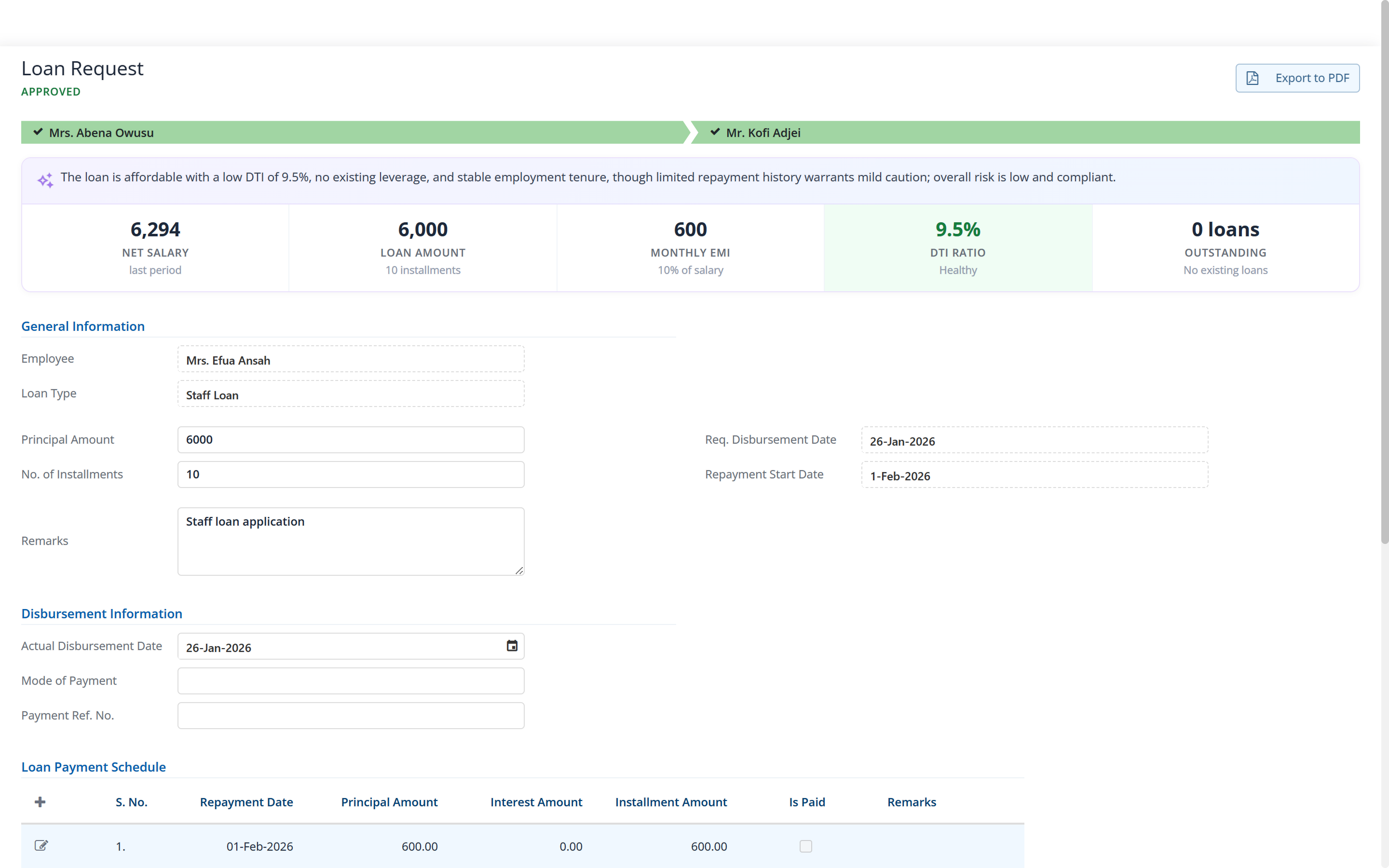
An approval that arrives without its context gets rubber-stamped or gets ignored. Both are failures. Each request carries the facts the decision needs.
- Leave.
- The requester’s balance in that leave type, and whether the request takes it negative.
- Loans.
- Net salary, the amount requested, the monthly instalment, the debt-to-income ratio and any existing loans, the affordability worked out rather than left to the approver’s arithmetic. An approved loan is not yet a disbursed one; disbursement is a separate act, and an approved-but-undisbursed loan is raised on the period’s attention list.
- Expenses.
- The claim lines and the receipts the employee attached.
- Attachments generally.
- Files uploaded against a request are carried through to the approver and stay with the request afterwards.
- Anything unusual.
- Where the assistant is switched on, a flagged result arrives with an explanation of why it deserves attention. Rules detect; the assistant explains; a person decides.
Permissions, sign-in, and separation of duties
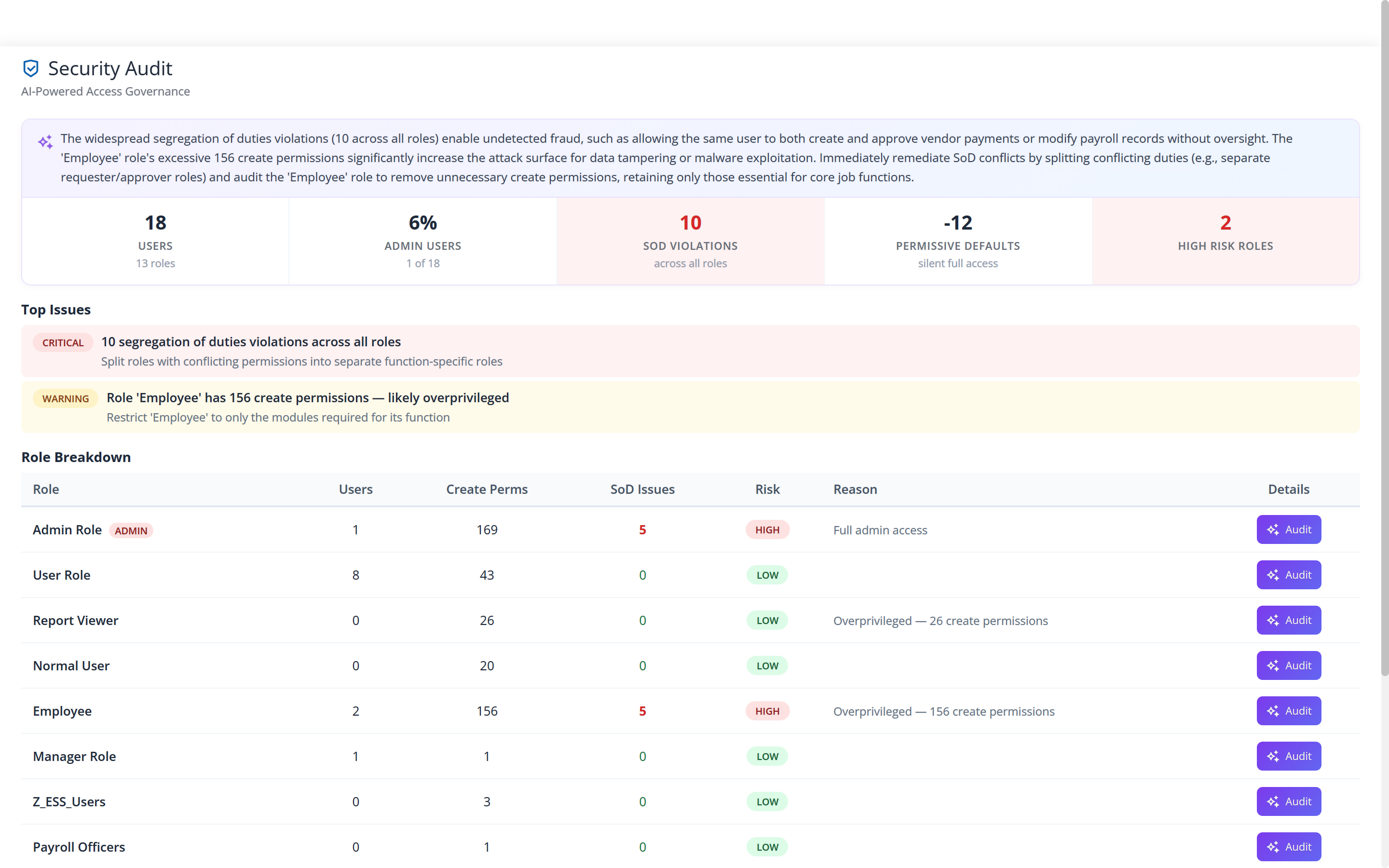
Rights are held per role and per user. The part worth looking at is not the permissions editor, every product has one, but the screen that tells you what your permissions have actually become after two years of people joining, moving and covering for each other.
The Security Audit screen lists who holds which rights, what share of your users carry administrative access, where duties that should be separated are not, and which roles carry the most risk — each with an explanation rather than a score on its own.
Sign-in, isolation and the record of change
Four things, stated with their limits.
- Two-factor sign-in, set per company.
- Off, available to users who want it, or required of everyone. Trusted devices, recovery codes and passkeys are part of it, so requiring it does not mean a code on every login from a known machine.
- One database per client.
- Not a shared table with a company column doing the separating. It is also why a restore, an upgrade or a migration concerns your data alone.
- Isolation is enforced in the database as well as in the application.
- Row-level security means a connection that has not identified its company reads nothing at all: it fails closed, which is the direction you want an isolation control to fail in. Every query in the application is filtered by company on top of that.
- Changes are kept, and reachable through the API.
- Saved changes to records are recorded — who changed them, when, and what the previous value was — and that history is available through the interface. Two boundaries: there is no record-level change viewer in the product today, so if you need the history of one field for an auditor we produce it for you rather than point at a button that does not exist; and because the record is written when a change is saved, an action that was refused leaves no entry.
Before you ask us
Can we see a full change history for one employee record?
Changes are kept and are reachable through the interface, but there is no screen in the product today that lets you browse them record by record. If an auditor asks for the history of a field, we produce it from the data. We would rather tell you that than let you discover the screen is missing during an audit.
Is the Security Audit screen the audit trail?
No, and they answer different questions. Security Audit is about rights: who holds what, where duties are not separated, which roles carry risk. The change record is about data: what a field used to be. The screen above is the first of those.
Is two-factor sign-in optional or compulsory?
Whichever you decide, set per company. It can be off, available to users who want it, or required of everyone. Trusted devices, recovery codes and passkeys are part of it.
Where does it run, and who can reach the data?
Hosted by us, or on your own servers where your policy needs the data to stay in your building. The application is the same either way. Your data sits in a database of its own, and the isolation is enforced by the database as well as by the application.
The rest of Factura HRMS
What these controls sit around.
- Payroll.
- The monthly cycle, the bank file and the statutory schedules. See Payroll →
- Self-service.
- Where a request is raised and where a manager approves it. See Self-service →
- Leave and attendance.
- Entitlement, accrual, balances, liability, work schedules and overtime. See Leave & attendance →
- Analytics.
- Executive summary, cost, variance, liability, workforce and statutory. See Analytics →
- People operations.
- Tasks, disciplinary, separation, training, policy and surveys. See People operations →
- Performance.
- New: review cycles, goals and check-ins, peer feedback, probation, calibration and improvement plans. See Performance →
- Recruitment.
- New: jobs, a careers page, a pipeline board, offers accepted online and a handoff to the employee record. See Recruitment →
- All of it together.
- Back to Factura HRMS →
See a real pay run, end to end
Thirty minutes. We walk a full month — prepare, review, close, and produce the statutory files — and you can stop us anywhere.