
Stock you can count and a valuation you can defend.
Items, units, groups and godowns in Factura Financials, valued by a method you choose and moved between depots on documents that post to the ledger in the same action.
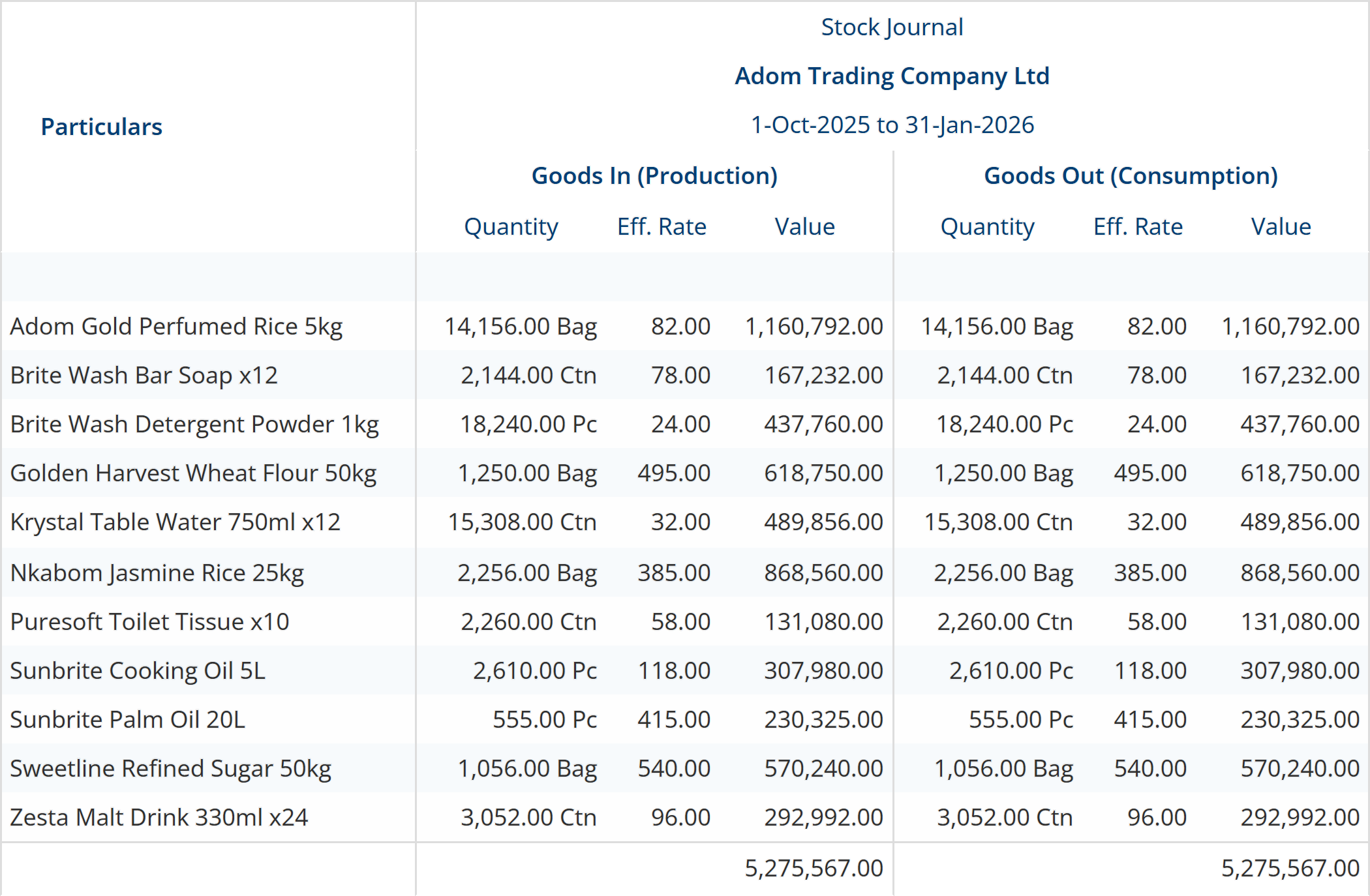
Count it, and value it the same way twice
A stock figure is only useful if the next person to run it gets the same answer. Valuation is a setting on the item, applied by the engine on every save, not a spreadsheet convention you agree to keep to.
What it does
- Costing method per item: FIFO, LIFO, weighted average and standard costing are the methods wired into the calculation engine.
- Recomputed on save: valuation is recalculated when an invoice or a point-of-sale line posts, so the value you read is the value the last document left behind.
- Opening balances per item, so a mid-year start does not begin at zero.
- Physical stock worksheet to run the count against, and a stock summary and stock query to read the result.
- Category and movement analysis: what moved, what did not, and what it earned.
Where the boundary is. Factura’s item master offers more costing methods in its list than the calculation engine implements. Two of them, LIFO-perpetual and monthly average cost, have no matching case in the engine, so we do not sell them. The four named above are the ones that compute.
Transfers between depots, analysed
Stock lives in named godowns, and godowns nest, a depot inside a region, a bay inside a depot. A transfer is a document, so what left Tema and what arrived in Kumasi are two sides of the same record, each carrying its own quantity, unit, effective rate and value. It is the screen at the top of this page.
What it does
- Multiple godowns, named and typed, with a parent godown above them.
- Godown on the transaction line: stock is located by the document that moved it, not by a separate item-to-location table someone has to maintain.
- Batch and serial tracking: batches with manufacture and expiry dates, serial numbers with automatic allocation.
- Both sides totalled, so an in-and-out analysis that does not balance is visible at a glance.
Check stock from the phone
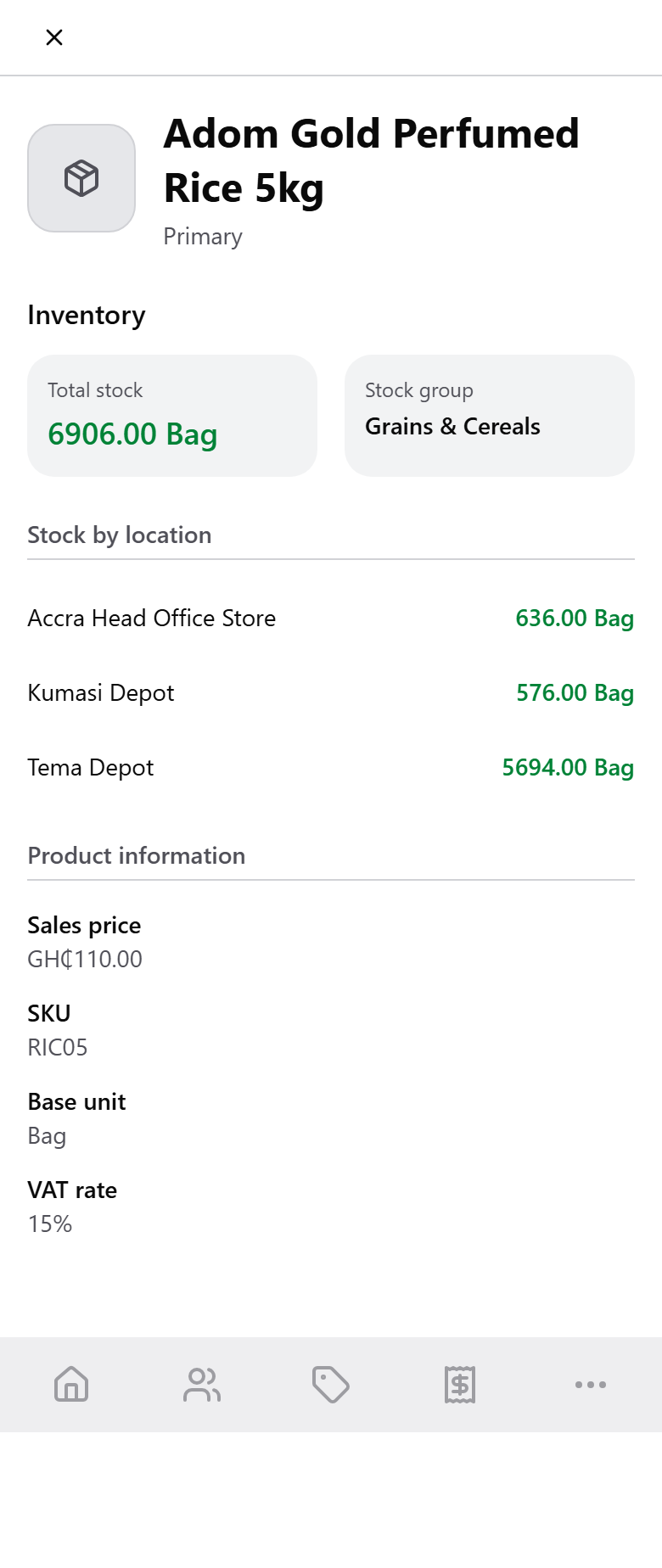
A rep standing in front of a customer needs the depot figure, not the company figure. Open any item in Factura Mobile Sales and the on-hand quantity is broken out per depot, alongside the sales price and VAT rate the app will use on the next line written.
There is no separate “check stock” destination in the app — per-depot stock lives on the item, where a rep is already looking. See Mobile Sales →
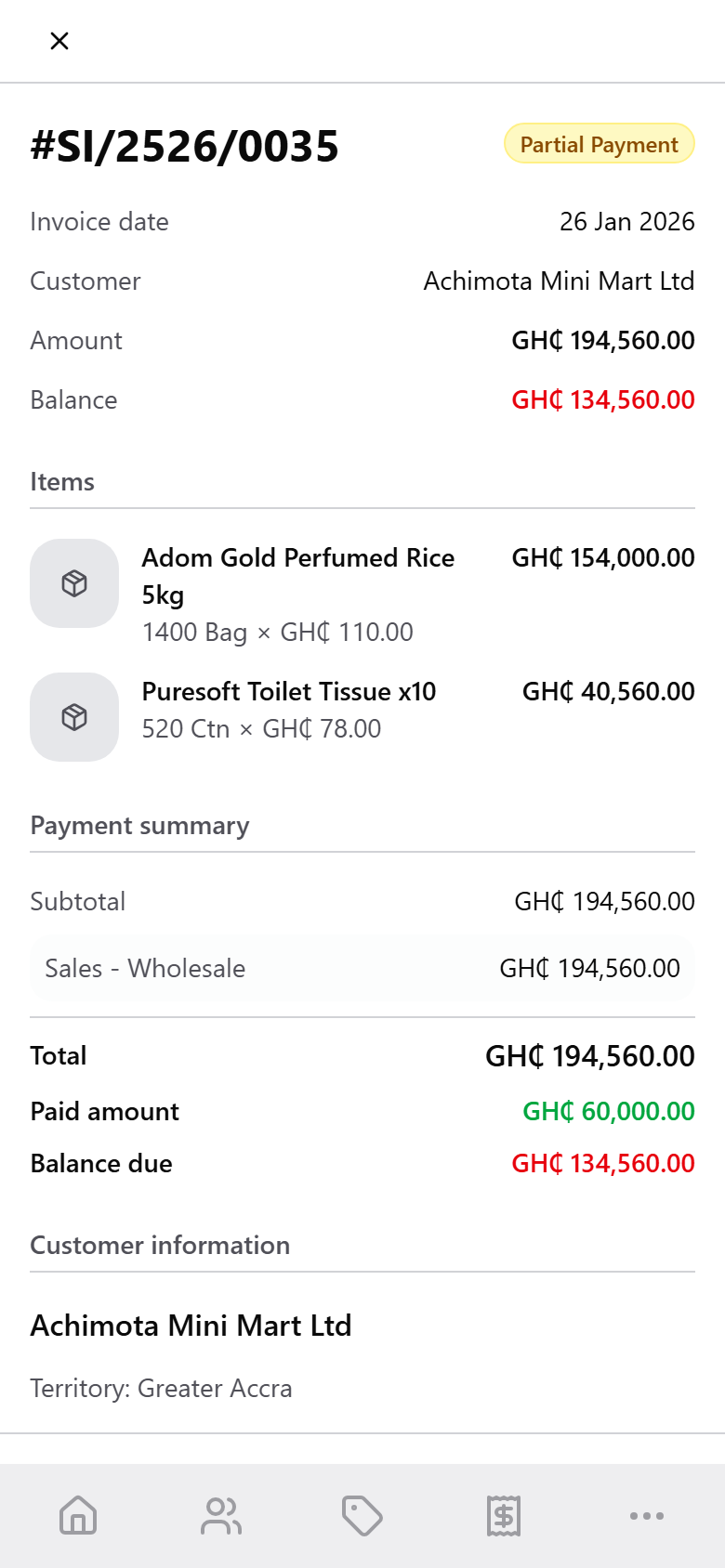
Sales from the field post to invoicing and stock
An invoice raised on a phone is a Factura Financials invoice. It opens the receivable, moves the stock and recomputes the valuation in the same save the office would have done, and the phone reads back the same bill-wise status the desktop tracks.
A sales order behaves differently on purpose: it posts as a document with no ledger and no stock effect until it is invoiced, so a commitment does not deplete stock the warehouse has not shipped.
Groups, units, price levels and reorder
The masters underneath the movement, set once and read everywhere — including by the phone.
What it does
- Stock groups and categories for reporting, and multiple units of measure per item: bags, cartons and pieces on the same analysis.
- Price levels and price lists, dated from a day you set and linked to a stock group, so a wholesale rate and a retail rate are not two spreadsheets.
- Reorder levels feeding requisitions on the buying side.
- Excel import for stock items, opening stock, price lists and bills of materials — column mapping is read from your header row rather than forced into a fixed template.
Quality control
Inspection at three stages (goods received, production and dispatch), each one raised straight off the receipt, the production run or the delivery it is checking.
What it does
- QC parameters: Pass/Fail, a numeric value with a unit, free text, or a choice list, held as reusable masters.
- Templates group the parameters that matter for a check, each with its mandatory checks, minimum, maximum or expected values, and instructions for the inspector.
- QC plans attach a template to a stock item or a stock group at a stage, with sampling set as all units, a percentage, or a fixed number.
- Inspections are raised from a pending receipt, production or dispatch line, record a result per sample, and carry supplier, godown and batch.
- A disposition closes every inspection — accept, reject, rework, return to vendor, or use as is — which decides whether the stock is accepted, with the inspector and the verifier recorded.
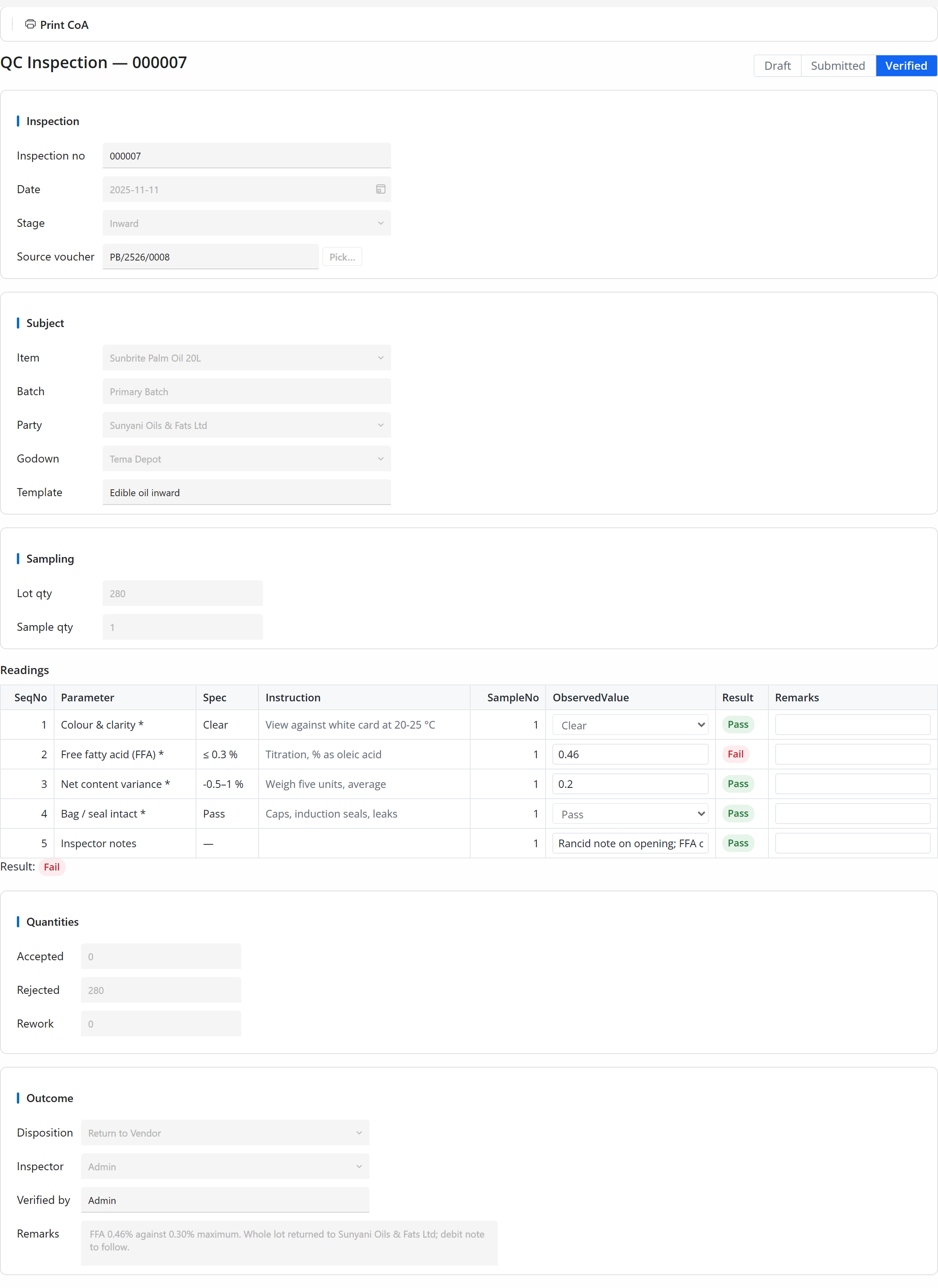
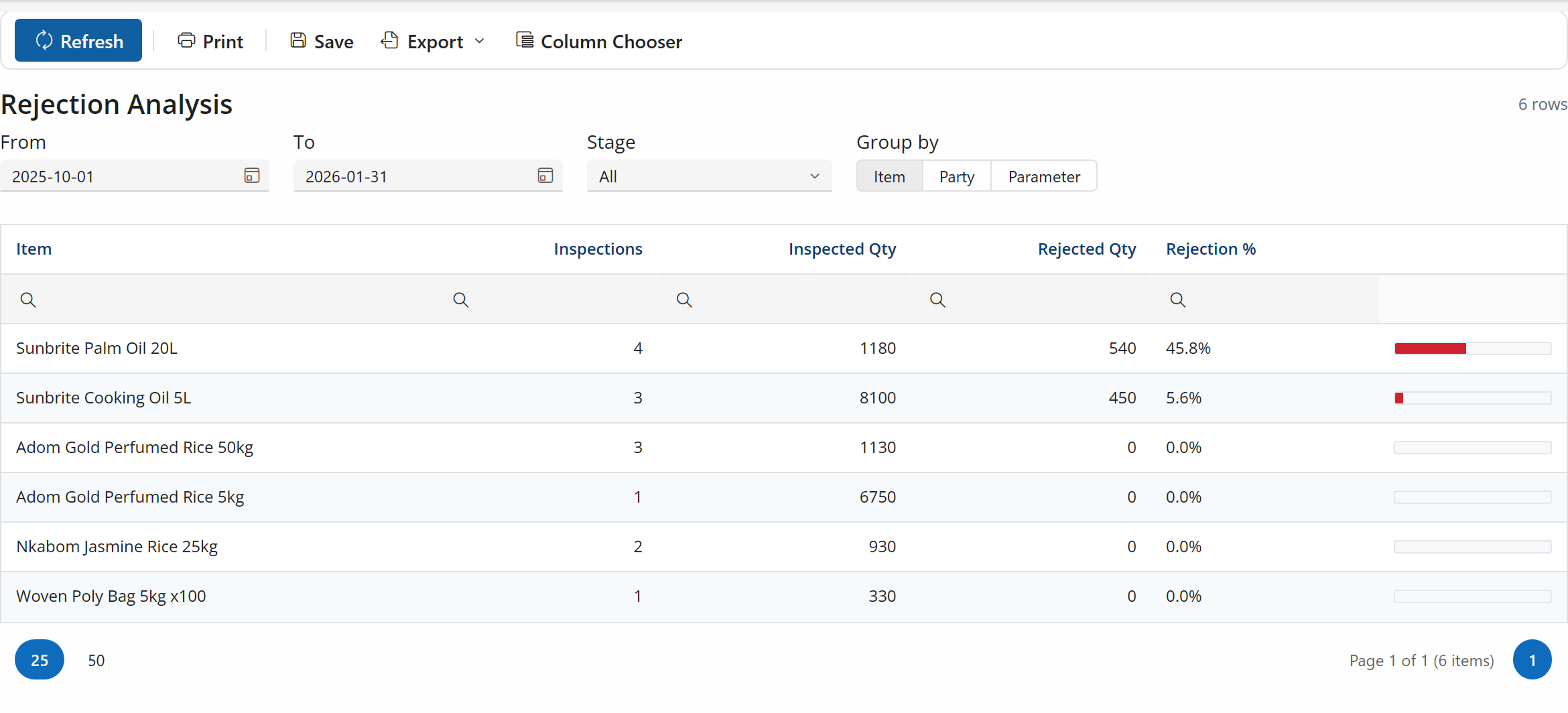
Reports. A QC register, a rejection analysis by item and supplier, and a printable certificate of analysis. There are no attachments on an inspection; photos and documents stay outside the record.
Where the boundary is. Quality control is licensed separately from the rest of Factura Financials. Ask for it at the demo if inspection is part of how you accept stock.
Where the stock figure lands
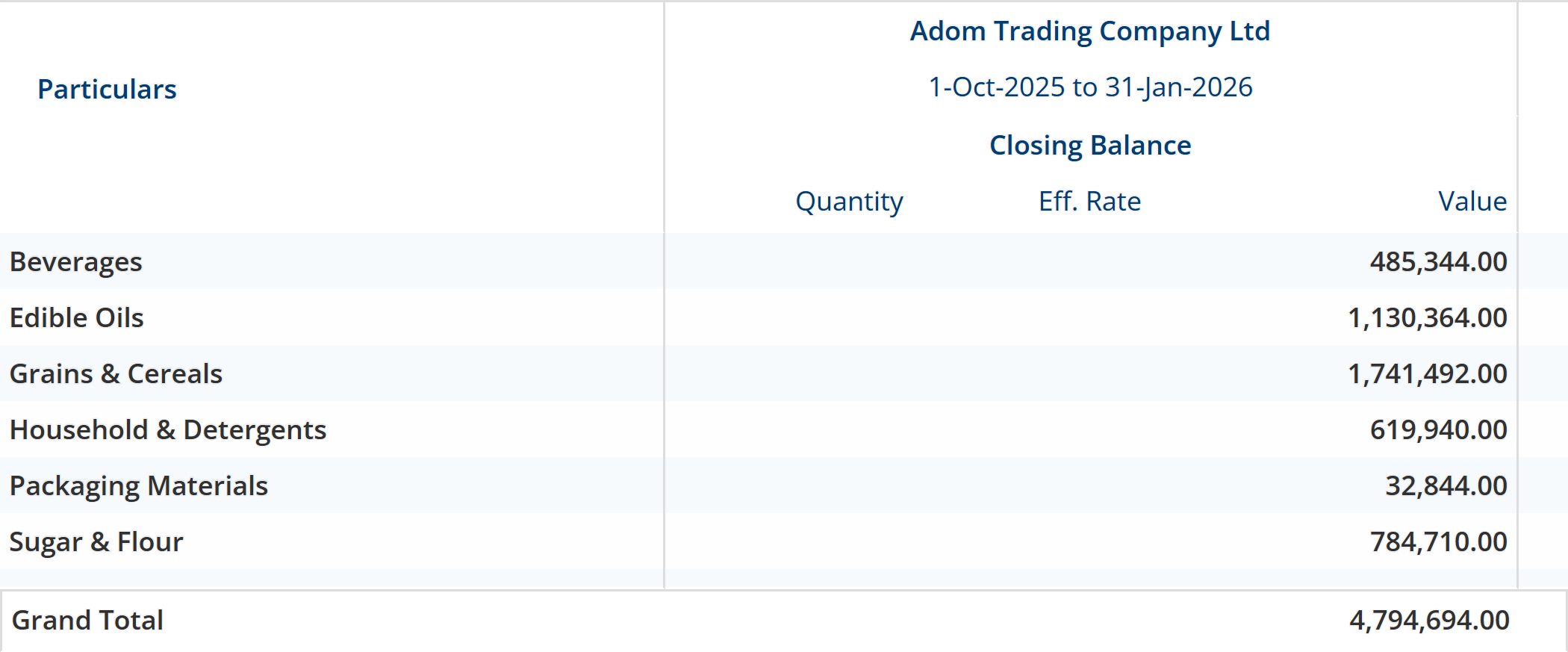
Inventory is not a side ledger. Closing stock sits on the profit & loss, stock value sits on the daily position view, and a bill of materials turns the same items into what you make.
- The statements.
- Opening and closing stock appear on the profit & loss for the period, off the same valuation. See the General Ledger →
- The daily view.
- Stock value is computed on demand on the Position screen rather than carried on every page load. See Analytics →
- What you make.
- A bill of materials names the components for a finished item, and the manufacturing journal explodes it against stock on hand. See Manufacturing →
- What you buy.
- Receipt notes bring stock in, with additional cost of purchase folded into the value. See Purchasing →
- What you sell.
- A delivery note releases stock and an invoice opens the receivable. See Sales & Invoicing →
- What you keep.
- Stock is what you sell; the forklift that moves it is an asset, with its own register, its own depreciation and its own ledgers. See Fixed Assets →
- All of it together.
- Back to Factura Financials →
Before you ask us
Which valuation methods actually work?
FIFO, LIFO, weighted average and standard costing. The item master lists more than that, but two of the extras are not implemented in the calculation engine, so we do not count them. Pick one of the four and it computes on every save.
Can we run more than one warehouse?
Yes. Godowns are a master, they nest under a parent, and the godown sits on the transaction line, so a transfer between depots is one document with a value on both sides. The demo book on this page runs three — Accra head office store, Kumasi depot and Tema depot.
Does the phone work without a connection?
No. Factura Mobile Sales is installable, but every order, invoice, receipt and point-of-sale line is written live to the server. There is no queue that holds entries and sends them later. Plan for data on the route.
Can we load our existing item list?
Yes, from Excel: stock items, opening stock, price lists and bills of materials each have an import. The columns are matched from your header row, so you do not have to reshape the file into a fixed template first. If your books are in Tally today, the Tally import covers the wider move.
See a month close, end to end
Thirty minutes. Post, reconcile, report — and you can stop us anywhere.