
How is the separation form laid out?
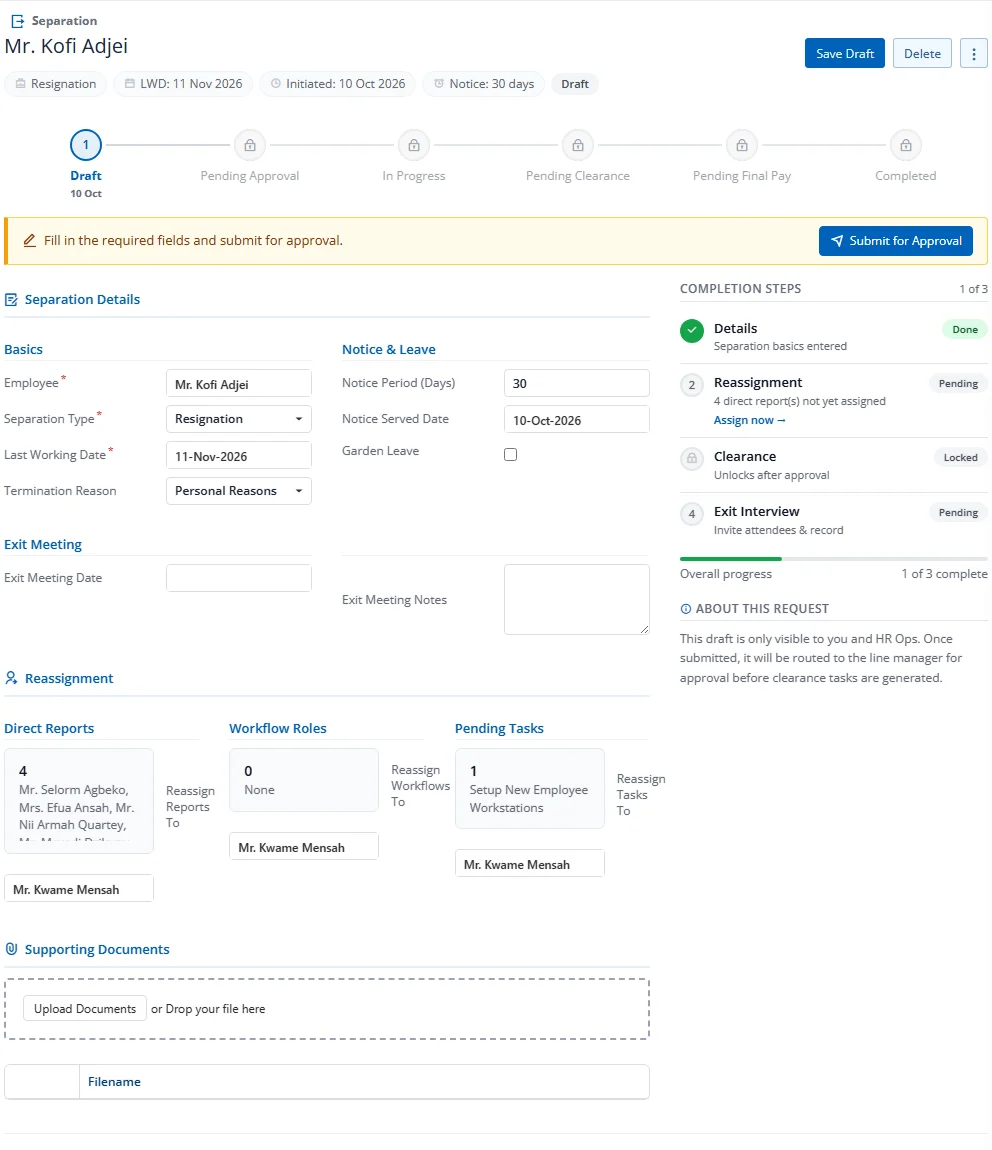
The v2 edit form replaces the old multi-tab pattern with a single workspace organised as:
- Header bar — page title (
Separation › <employee>) + action bar (Save Draft or Save, Delete, kebab) - Identity strip — chips for Type, LWD, Initiated date, Notice period, and the Status badge
- 6-step stepper — Draft → Pending Approval → In Progress → Pending Clearance → Pending Final Pay → Completed (each step with a date timestamp once entered)
- CTA strip — amber banner with the next required action (e.g., Submit for Approval)
- Workspace (8 cols) — section cards for the current stage
- Completion Steps sidebar (4 cols) — Details · Reassignment · Clearance · Exit Interview, each marked Done / Pending / Locked, with overall progress bar
Workspace Sections
The workspace card stack typically contains:
- SEPARATION — Core details (employee, type, LWD, termination reason)
- NOTICE & LEAVE — Notice period, served date and garden leave flag
- LEAVE & BENEFIT SETTLEMENT — At Pending Final Pay, choose Encash, Forfeit or Recover for each line, then Post to Final Pay
- EXIT INTERVIEW — Survey fields (hidden for Death-type separations)
- CLEARANCE — Department-task summary (visible from In Progress onward)
- FULL ACTIVITY TIMELINE — Chronological audit trail (replaces the old History tab)
A View full details link in the workspace opens the case in a wide drawer for editing in a focused panel.
Required Fields Reference
| Field | Description |
|---|---|
| Employee | The departing employee (locked after first save) |
| Separation Type | Resignation, Termination, Retirement, End of Contract, Redundancy, or Death |
| Last Working Date | The employee's final day |
| Termination Reason | Categorized reason for departure |
| Notice Period (Days) | Contractual notice period |
| Notice Served Date | When notice was formally served |
| Garden Leave | Whether the employee is on garden leave during notice |