
How do I create a training program?
Click Add Training Program at the top right of the Training Programs page.
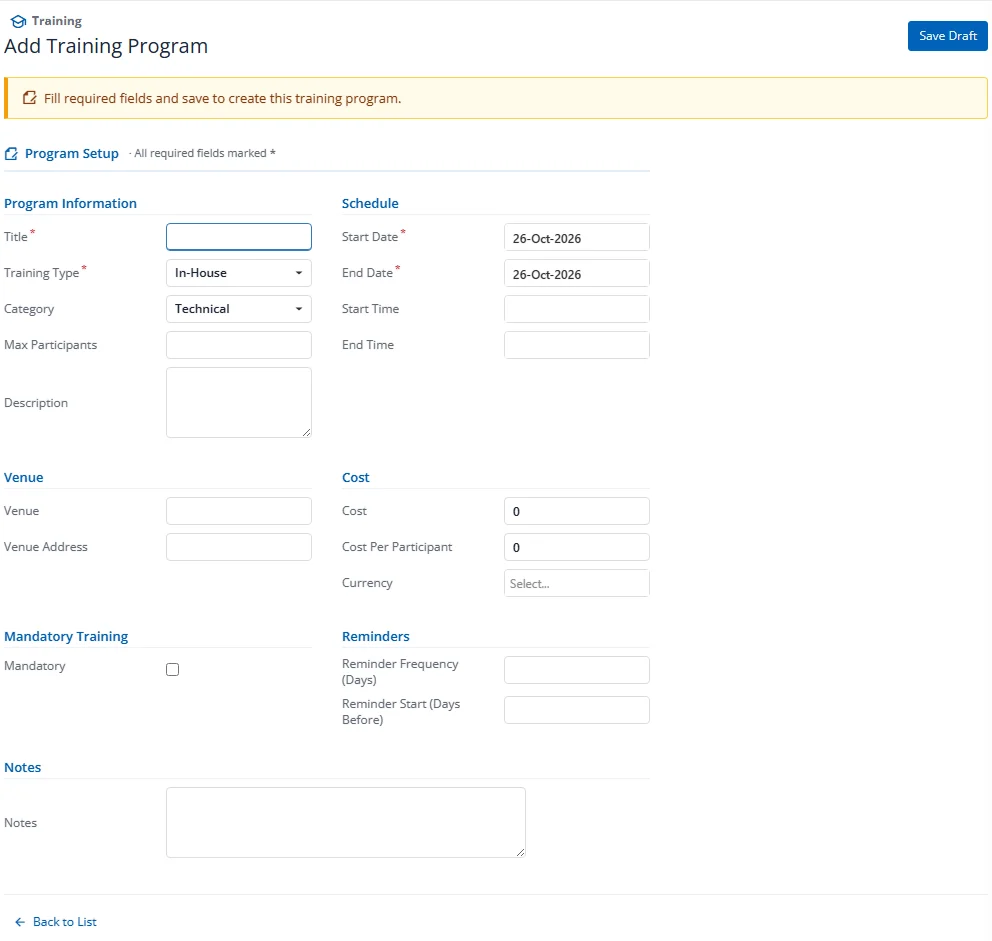
Required Fields
| Field | Description |
|---|---|
| Title | Name of the training program |
| Training Type | In-House or External |
| Start Date | First day of the program |
| End Date | Last day of the program |
Optional Fields
| Field | Description |
|---|---|
| Category | Technical, Soft Skills, Compliance, Safety, Leadership, etc. (picklist) |
| Description | Detailed program description |
| Start Time / End Time | Daily time range |
| Venue | Location name |
| Venue Address | Full address |
| Max Participants | Capacity limit (0 = unlimited) |
| Cost / Cost Per Participant | Budget tracking |
| Currency | Cost currency |
| Is Mandatory | Marks program as mandatory compliance training |
| Mandatory Due Date | Deadline for mandatory training completion |
| Notes | Additional notes |
After saving, additional tabs become available: Skills, Participants, Materials & Resources.