
How do I read the Executive Summary?
Where does the whole workforce stand right now — one headline per area (cost, headcount, statutory, leave, loans, diversity, overtime) plus a prioritised list of what needs action.
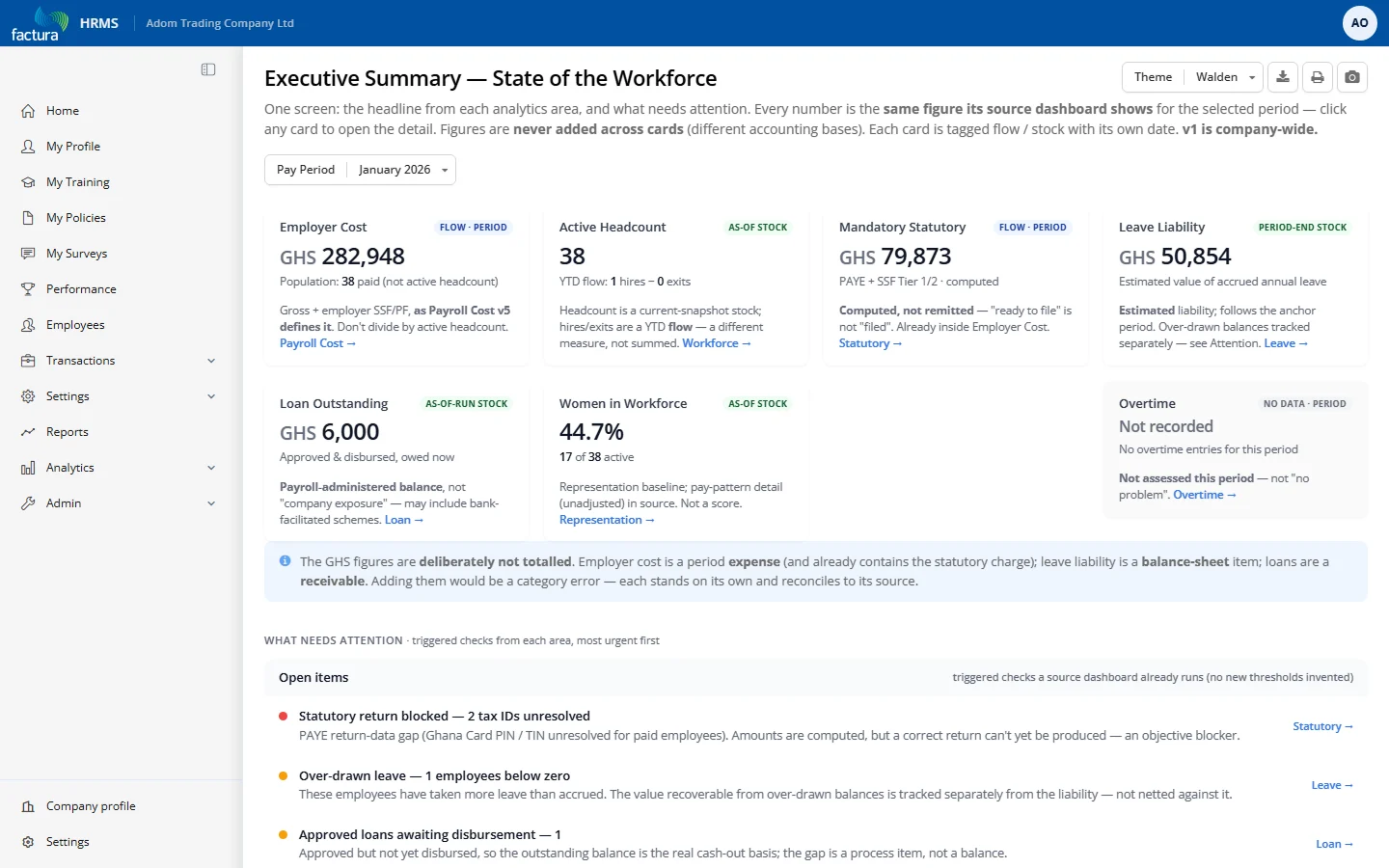
Who it's for: HR/payroll managers and leadership wanting a single-screen check-in before drilling into a specific dashboard.
KPI tiles
- Employer Cost — total cost to employ people this period (gross + employer SSF/PF); the meta line shows paid headcount.
- Active Headcount — currently active employees, with YTD hires minus exits alongside (a different, flow measure — don't add it to the stock).
- Mandatory Statutory — PAYE + SSF Tier 1/2 for the period; "ready to file," already inside Employer Cost.
- Leave Liability — estimated cash value of accrued unused annual leave at period end.
- Loan Outstanding — approved-and-disbursed staff-loan balance still owed.
- Women in Workforce — female share of active headcount, with the raw count.
- Overtime — total OT hours and people involved; switches to a "not assessed" state when nothing was recorded.
Panels
- What needs attention (Open items) — triggered checks, most urgent first: statutory return blocked (unresolved TINs), over-drawn leave, approved loans awaiting disbursement, overtime not assessed.
- Context — not triggered alerts — trends to watch (e.g. net YTD headcount change) rather than active alerts.
- About (info icon) — explains why figures are never summed, plus scope/freshness caveats.
Filters & controls
- Period picker drives every tile and check. Company-wide only in v1 (no department filter yet).
- Every KPI tile is a link to its source dashboard for full detail.
How to read it
- Never add the GHS figures across cards — cost is an expense, leave liability a balance-sheet item, loan outstanding a receivable.
- "Paid population" (cost) ≠ active headcount — don't divide one by the other for a per-head cost.
- An empty Open Items list means those specific checks found nothing — not that everything everywhere is fine.