
How do I see task reports?
The Reports tab provides a dashboard of task analytics.
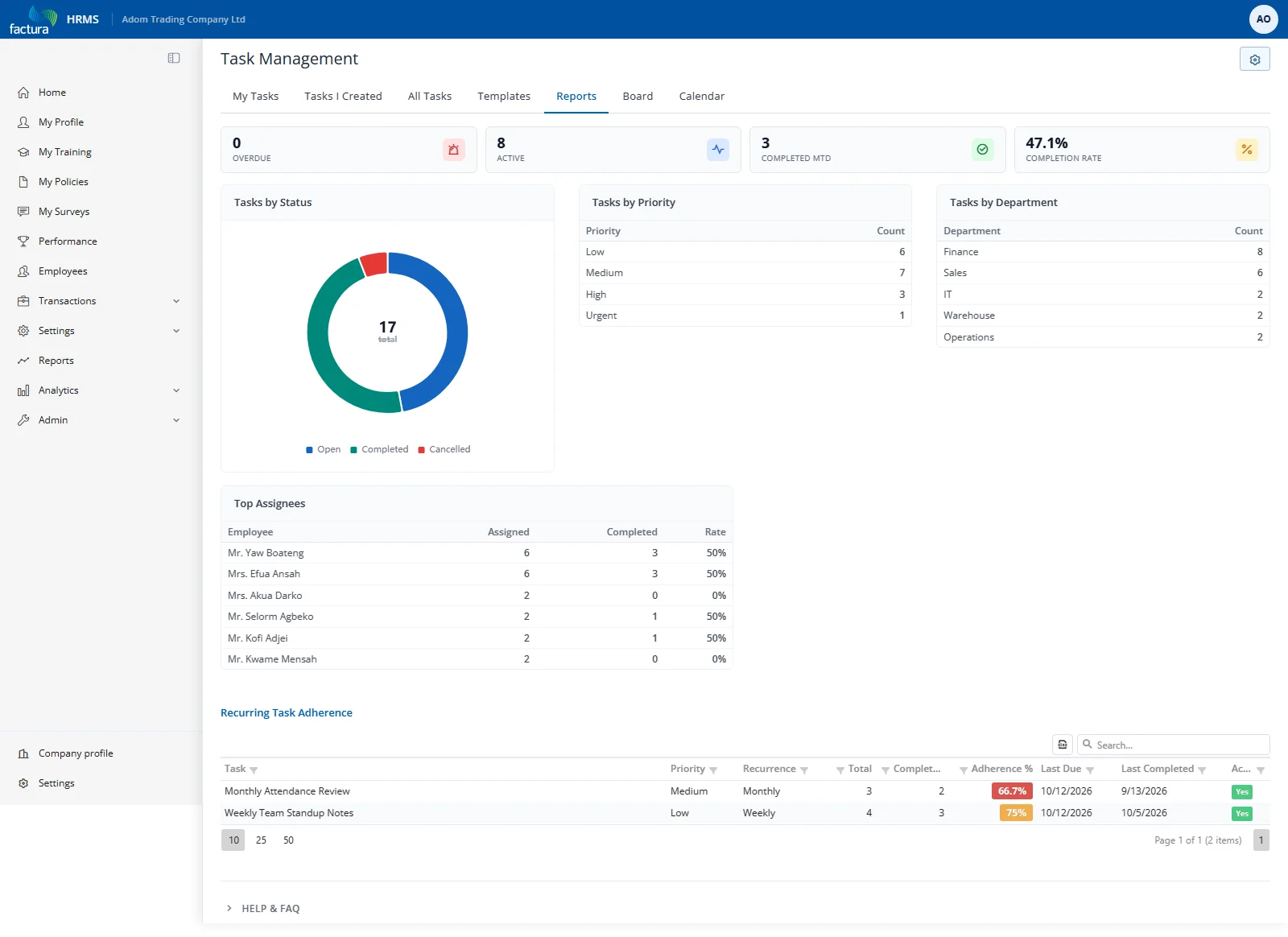
KPI Cards
Five summary cards across the top:
- Total Tasks — Total count
- Open Tasks — Not yet started
- Overdue — Past due and incomplete
- Completed This Month — Finished this month
- Completion Rate — Percentage of completed tasks
Charts
- Tasks by Status — Doughnut chart showing distribution
- Tasks by Priority — List with counts per priority level
- Tasks by Department — List with counts per department
Top Assignees
Table showing employees with the most assignments, their completion count, and rate.
Recurring Task Adherence
Grid at the bottom showing recurring task compliance:
| Column | Description |
|---|---|
| Task | Recurring parent task subject |
| Recurrence | Daily, Weekly, Monthly, etc. |
| Total | Number of generated instances |
| Completed | Instances completed |
| Adherence % | Completion rate (color-coded: green ≥90%, yellow 70-89%, red <70%) |
| Active | Whether recurrence is still active |