
What is in the case details drawer?
For stages 2-4, the case details form moves into a right-side drawer to free vertical space for the action/hearing stack.
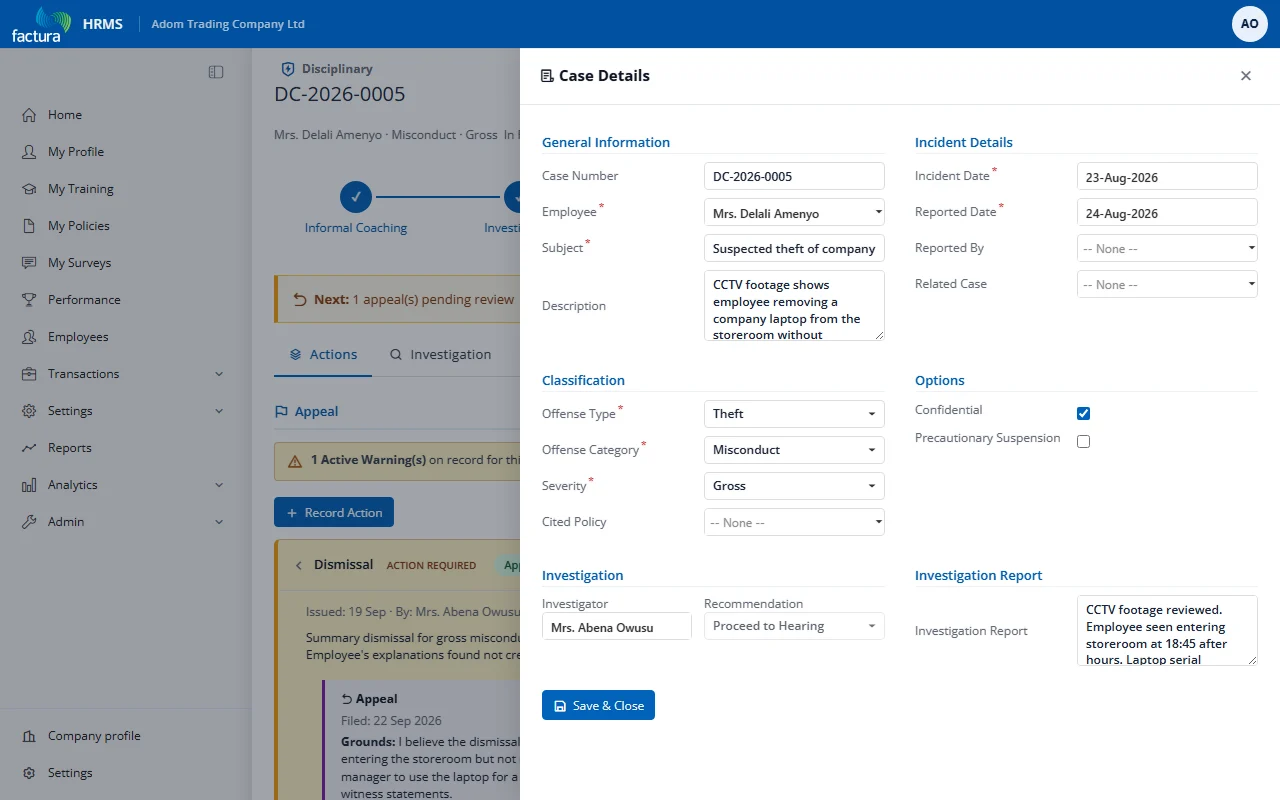
Opening the Drawer
Click View Details in the case header bar. A 760px wide panel slides in from the right with a semi-transparent backdrop.
Drawer Contents
The same form fields as the inline details card:
- General Information (employee, subject, description)
- Incident Details (dates, reported by, related case)
- Classification (offense type, category, severity)
- Options (confidential, precautionary suspension)
- Investigation (investigator, recommendation, report)
Closing the Drawer
- Click the X button in the drawer header
- Click the dark backdrop behind the drawer
- Press the Esc key
Saving
Click Save & Close at the bottom of the drawer to save changes and close in one action.
Note
For stages 0-1 and new cases, the details form appears inline in the workspace (no drawer needed since there's no action stack competing for space).