
How do employees see their training?
Employees can view their training through the Employee Self-Service portal.
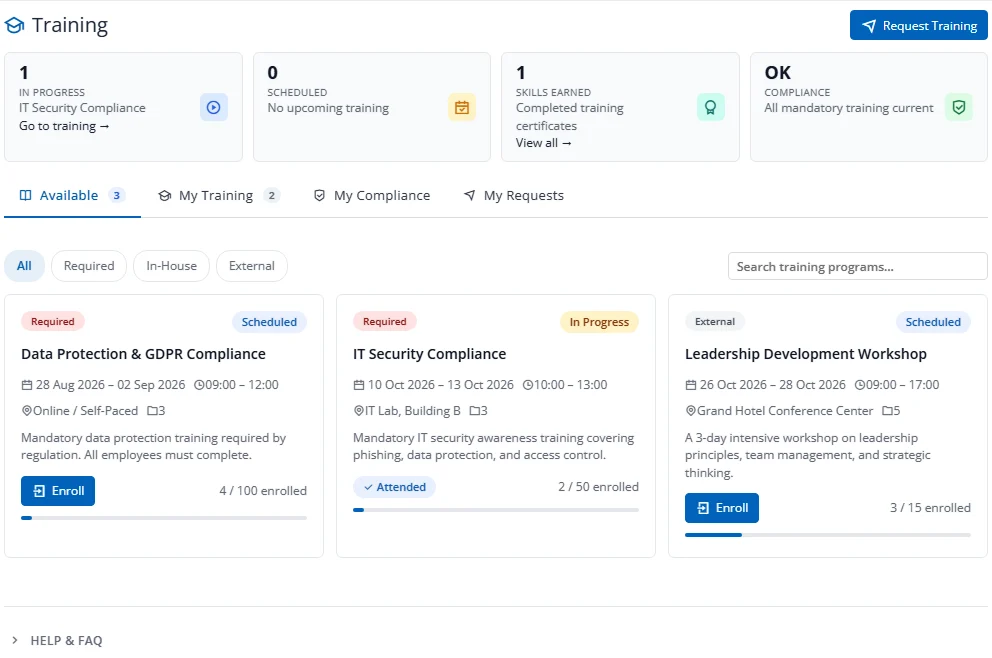
The page opens with summary cards (In Progress, Scheduled, Skills Earned, Compliance) and a Request Training button.
Four Tabs
| Tab | What It Shows |
|---|---|
| Available | Programs the employee can enroll in, filterable by All, Required, In-House or External |
| My Training | Programs the employee is enrolled in or has completed |
| My Compliance | The employee's mandatory training status |
| My Requests | Training the employee has requested |
Self-Enrollment
From the Available tab, employees can click Enroll to enroll directly. The system checks the licence, the module switch, the program status, capacity and duplicate enrollments.