
How do I set up peer reviews?
Peer reviews add written comments from colleagues. Peers give no ratings, peer comments carry no weight in the score, and a review can be shared even when peers have not answered.
Switch peers on for a cycle
- In the cycle setup, step Basics, tick Peer reviews.
- In Rating scale & policy, set the minimum and maximum number of peers an employee picks (3 and 6 by default) and the anonymity threshold: the number of answers a question needs before its comments are shown to the employee (4 by default, never below 3).
- Leave Names for managers off if managers should see comments without names. HR always sees who wrote what.
Approve picks and follow up
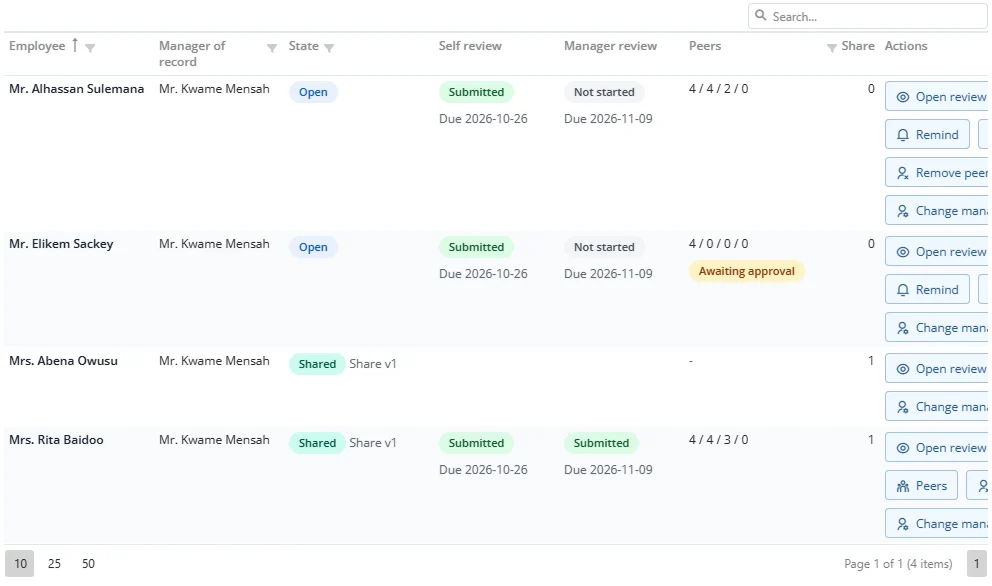
In the console the Peers column shows four numbers: picked / approved / submitted / declined, with Awaiting approval when picks are waiting. Peers opens the same approval window the manager uses (see 3.4), so you can decide on the manager's behalf. Remove peer takes an approved peer off a review with a reason.
To protect anonymity, once a review has been shared, a peer who already answered cannot be removed. If you re-share a review after the set of peers changed, Factura warns you, because the change could reveal who wrote what.