
How do I set up standard components?
Standard components are permanent — once checked, they apply to every payroll run until you manually uncheck them.
Layout
- Earnings and Deductions are displayed side-by-side
- Accumulators are displayed below in full width
- Each table shows a checkbox, component name, and amount field
How to Set Up Standard Components
- Open the employee record and navigate to the Payroll Components tab
- Under STANDARD COMPONENTS, you will see three tables: Earnings, Deductions, and Accumulators
- Check the box next to each component that applies to the employee
- Enter the Amount for each checked component
- Click Save
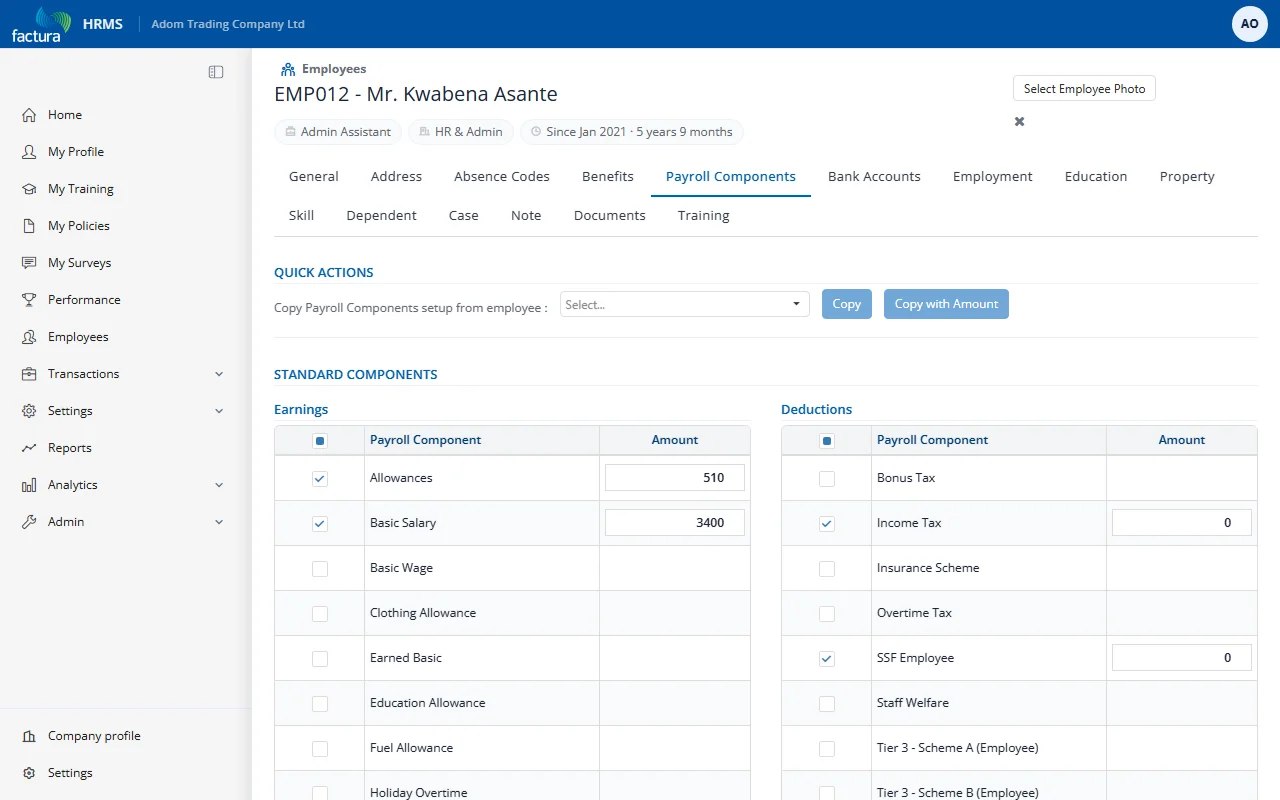
Quick Actions
| Action | Description |
|---|---|
| Select All checkbox | Check/uncheck all components in a table (Earnings, Deductions, or Accumulators) |
| Copy | Copy component selection from another employee (without amounts) |
| Copy with Amount | Copy component selection AND amounts from another employee |
Example: New Employee Basic Setup
Scenario: A new employee joins with a monthly salary of 5,000, housing allowance of 1,500, and transport allowance of 500. They also have a GOSI deduction of 475.
Steps:
- Under Earnings, check:
- Basic Salary → enter 5000
- Housing Allowance → enter 1500
- Transport Allowance → enter 500
- Under Deductions, check:
- GOSI Employee → enter 475
- Click Save
Result: These components will appear on every payslip going forward.