How do I set up expense types?
Last reviewed · Part of Expense requests
Before employees can submit expenses, an administrator must configure the Expense Types (expense categories) available in the system.
Navigating to Expense Types
- Open Settings in the left sidebar.
- Select Expense Type from the settings hub.
Understanding the Expense Type List
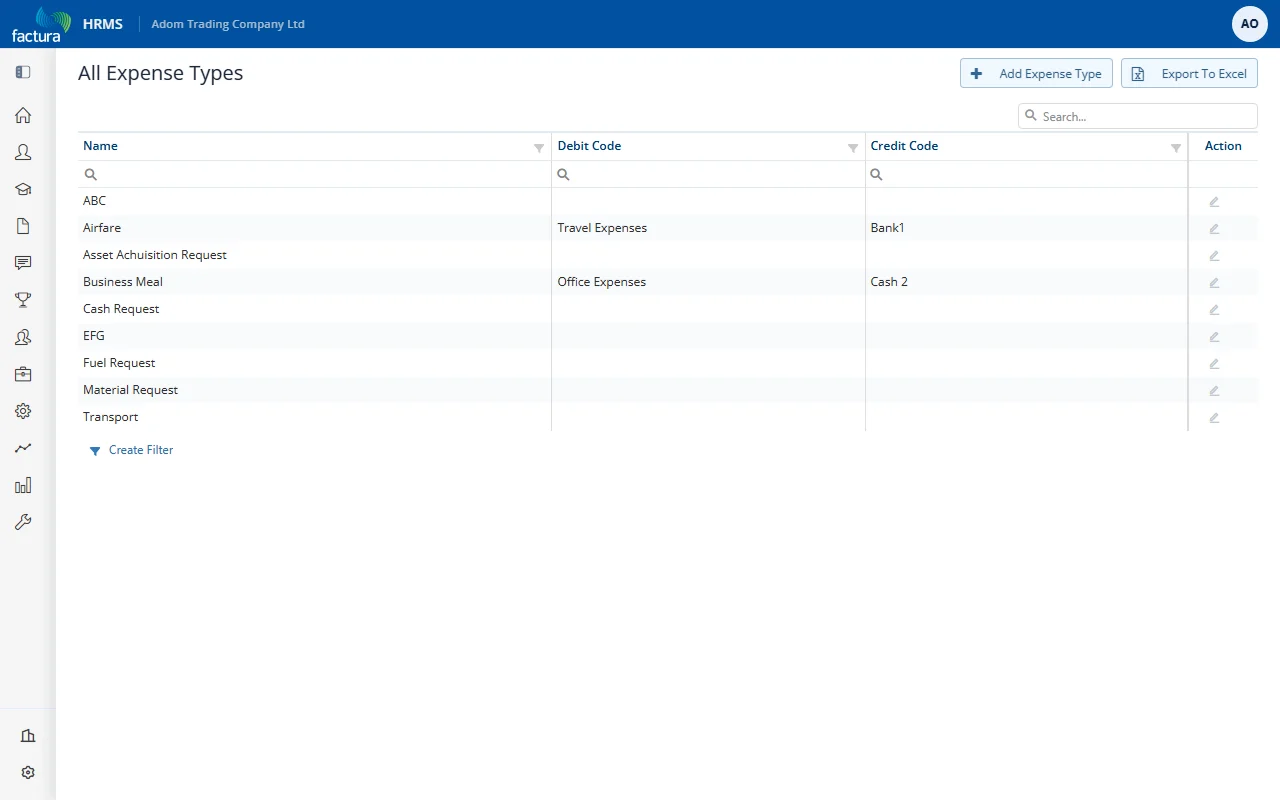
The list shows all configured expense types with their properties:
| Column |
Description |
| Name |
The expense category name (e.g., Airfare, Business Meal, Transport) |
| Debit Code |
The accounting debit code for this expense type (e.g., Travel Expenses, Office Expenses) |
| Credit Code |
The accounting credit code for this expense type (e.g., Bank1, Cash 2) |
Common Expense Types
| Type |
Typical Use |
| Airfare |
Flight tickets for business travel |
| Business Meal |
Meals during business activities or client meetings |
| Transport |
Local transportation (taxi, ride-share, fuel) |
| Fuel Request |
Fuel costs for company or personal vehicle used for business |
| Cash Request |
General cash advance or petty cash request |
| Asset Acquisition Request |
Purchase of equipment or assets |
| Material Request |
Purchase of supplies or materials |
Managing Expense Types
| Action |
Description |
| + Add Expense Type |
Create a new expense category |
| Pencil icon (Action column) |
Edit an existing expense type's name or accounting codes |
| Export To Excel |
Download the list of expense types |
