
How do I find and filter disciplinary cases?
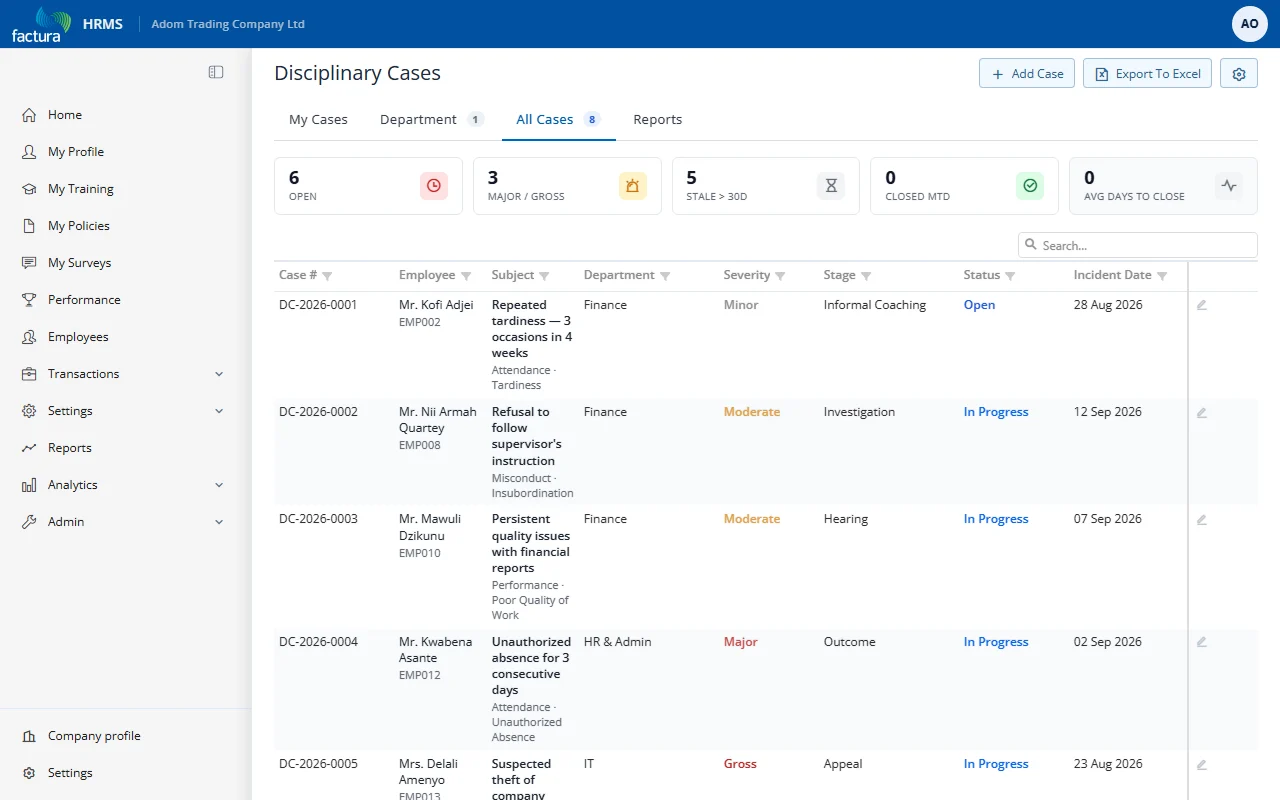
The case list is the entry point to the module. It displays all disciplinary cases in a searchable, sortable grid.
Tabs
The list page (titled Disciplinary Cases) has four tabs. A tab shows a count pill when it contains cases:
| Tab | What It Shows |
|---|---|
| My Cases | Cases where you are the employee the case is about |
| Department | Cases for employees in your department(s) |
| All Cases | Every case (subject to role permissions) |
| Reports | KPI summary cards plus charts (stage funnel, severity mix, by department) |
KPI Pills
Each grid tab shows a row of one-click filter pills above the grid:
| Pill | Meaning | Click to filter |
|---|---|---|
| Open | Cases not yet closed | Show open only |
| Major / Gross | Cases at the two highest severities | Show severe only |
| Stale > 30d | Open cases with no activity for >30 days | Show stale only |
| Closed MTD | Cases closed this calendar month | (clickable on All Cases) |
| Avg Days to Close | Average closure duration (read-only, All Cases only) | n/a |
When a pill is active, the grid filters live and a "Clear filter" affordance appears.
Grid Columns
The grid uses the cellStack layout — one bold column per row:
- Case # — bold (e.g.,
DC-2026-0001) - Employee — name + employee code subtitle (plain weight)
- Subject — narrative + subtitle line showing offense type / category
- Department — primary work location
- Severity — colored chip (Minor / Moderate / Major / Gross)
- Stage — current stage (Informal Coaching, Investigation, Hearing, Outcome, Appeal, Closed)
- Status — colored badge (Open / In Progress / Suspended / Closed / Cancelled)
- Incident Date — when the incident occurred
- Initiated By — who created the case
- Lock icon — appears for confidential cases
- Action — pencil (edit) icon
A free-text Search box sits above the grid; column header filters and the filter row are also available.
Actions
- + Add Case (top right): Creates a new disciplinary case
- Export To Excel: Exports the current tab's filtered grid
- Settings (gear icon): Module settings (admin only)