How do I set the performance notification policy?
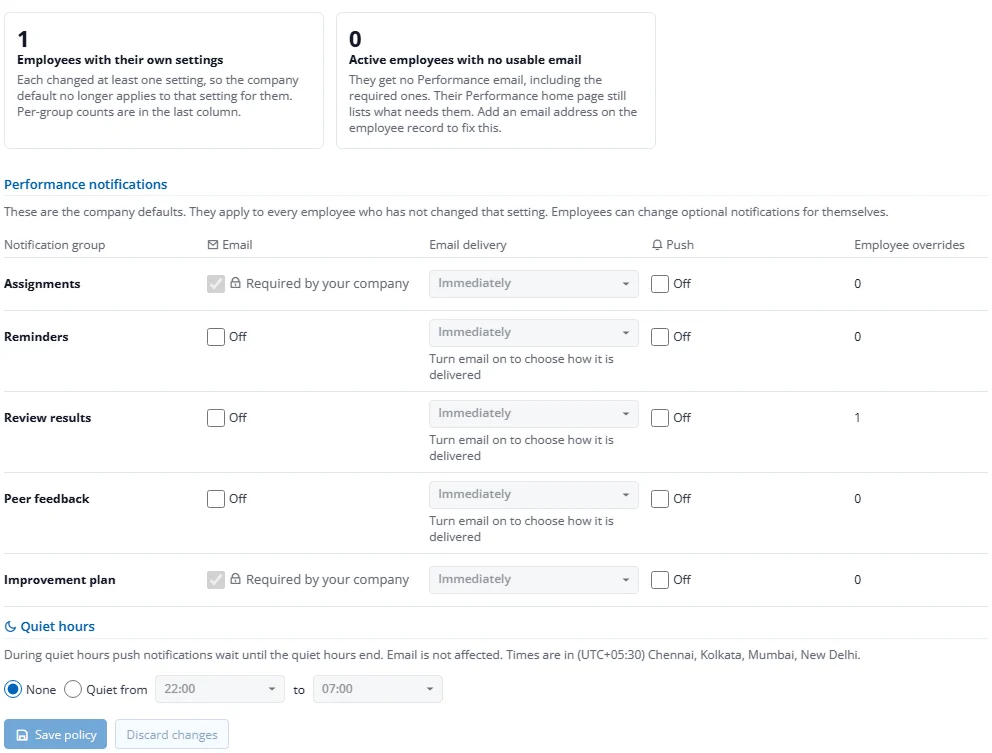
Performance sends e-mail and phone (push) notifications. You set the company defaults; each employee can then change their own (see 4.8).
- On Review Cycles, press Notification policy.
- For each group (Assignments, Reminders, Review results, Peer feedback, Improvement plan) switch Email and Push on or off and choose how e-mail arrives: Immediately, Daily digest or Weekly digest.
- Optionally set company Quiet hours for push.
- Press Save policy.
Digest and quiet-hours times follow the Factura server's clock, shown on the page as "Times are in …". They do not adjust to each person's own time zone.
Some e-mails cannot be switched off: the cycle launch, a reopened review, and an improvement plan starting and closing. The panel also shows how many employees have their own settings and how many have no usable e-mail address; those people get no e-mail at all, so add an address to their employee record.