
How do I use My documents?
Open My documents in the side menu (or in My work). You see your own documents of types HR has made visible to you. Confidential types are never shown.
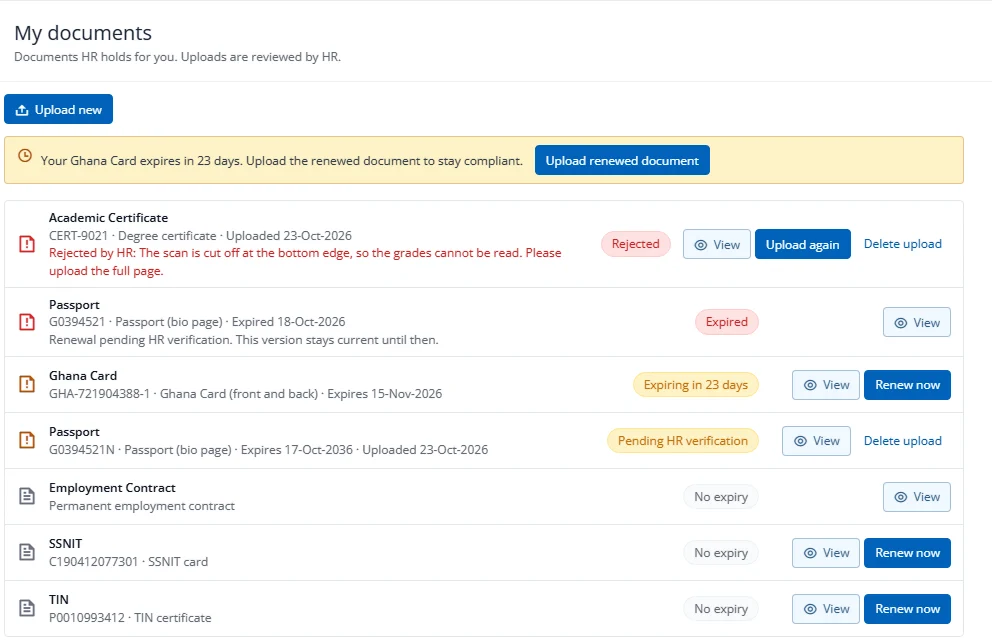
Each document shows its type, number, expiry date and a status in words, for example Pending HR verification, Rejected by HR:
If the company has turned on Allow employees to upload documents, and the type allows it:
- Upload new adds a document. It stays Pending HR verification until HR checks it.
- Renew now (or Upload renewed document) uploads a replacement. Your old document stays current until HR verifies the new one, and the page says Renewal pending HR verification.
- Upload again appears after HR rejects a document. Read the reason first. The new upload is linked to the rejected one.
- Delete upload removes your own upload within 24 hours while it is unverified.
If ESS upload is off, or the type does not allow it, the page tells you to contact HR. Uploads are always reviewed by HR. You will receive an email when HR verifies or rejects (the rejection email includes the reason).
You will also receive expiry reminder emails with a link to My documents.