
How do document expiry reminders work?
What is sent
A daily job (06:00) looks at current documents with an expiry date. For each type the reminder days come from the type (for example 60, 30, 7). A reminder is also sent on the day a document has expired.
- The employee gets an email with a link to My documents.
- HR gets one digest email per day listing everything due, sent to users who can verify the type and see the employee.
- The employee's manager gets an email only if the company turned that on. Note that managers are only found when the employee's Reports to field is filled in.
Rules:
- Only one reminder is sent per document per day: the smallest threshold reached. A missed day does not send several emails at once.
- Each threshold is sent once.
- Documents with no expiry date, archived documents, and employees who have left are skipped.
- A document with a renewal waiting for verification is skipped.
An email may be sent again in rare cases where a job run stopped part-way.
A weekly digest (Mondays) lists required documents that are missing, when reminders are on.
Settings
Open System Settings in Setup and choose Documents in the list on the left (under Data & Import).
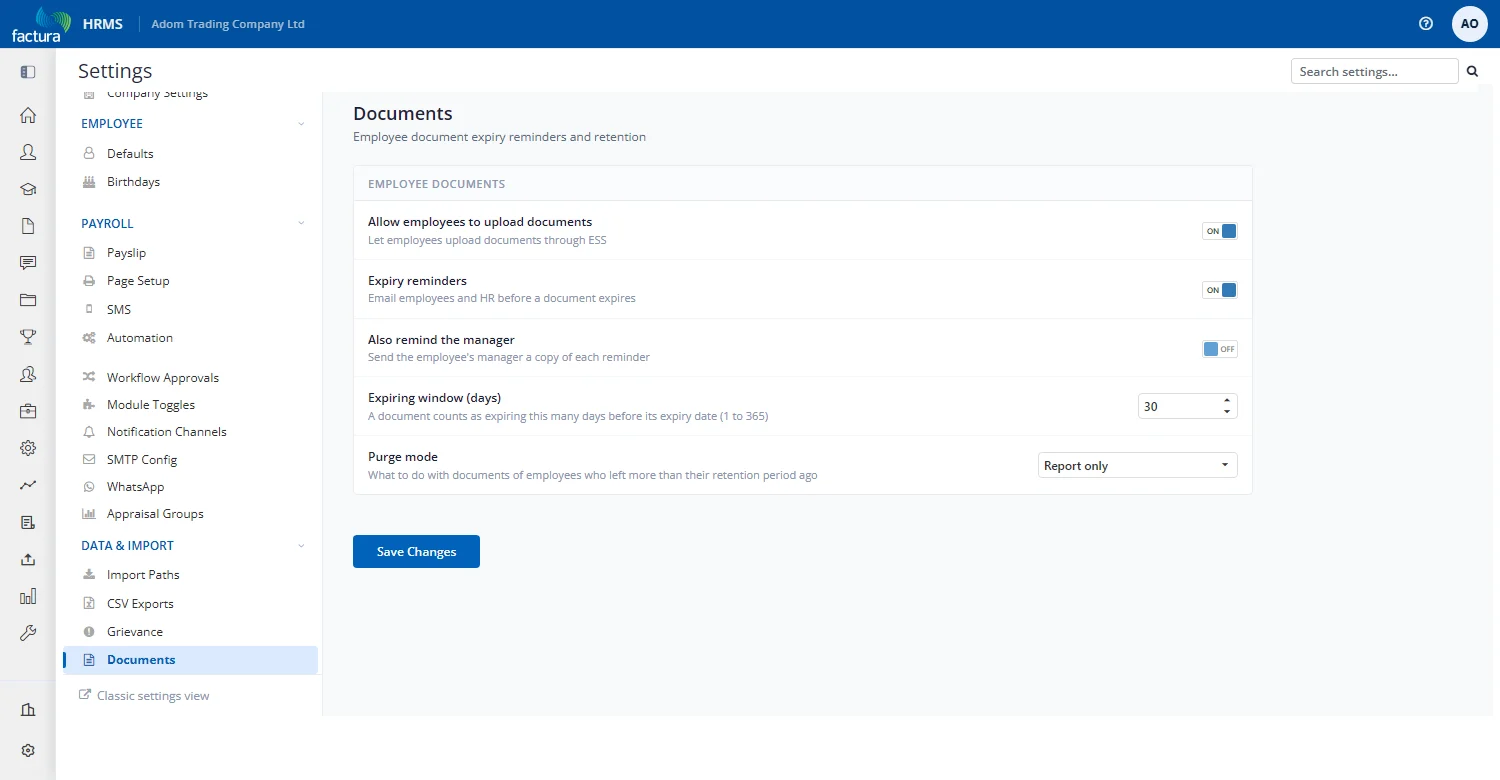
| Setting | Meaning | Default |
|---|---|---|
| Allow employees to upload documents | Employees can upload documents in ESS | Off |
| Expiry reminders | Switch for the expiry and missing-document emails | On |
| Also remind the manager | Also email the manager | Off |
| Expiring window (days) | How many days before expiry a document counts as Expiring (1 to 365) | 30 |
| Purge mode | Off, Report only, or Purge (section 11) | Report only |
Reminders only go out for types that have reminder days. Migrated documents are Uncategorised and have none, so nothing is sent until you assign types and set reminder days.
If HR roles have not yet been given access to the types, HR digests have nobody to go to. Set the access first, or switch reminders off until you have.